EasyManua.ls Logo

Singer 620 - Bight-Amplitude and Pattern Selector; Bight-Amplitude and Pattern Selector Removal and Replacement

Singer 620
26 pages
Print Icon
To Next Page IconTo Next Page
To Previous Page IconTo Previous Page
Loading...
NOTE:
The
following
instructions
apply
goneraily'to
Class
620,
625,
626
and
628
Machines.
As
indicated
on
page
13,
however.
Class
628
Machines
must
use
the
Sight-Amplitude
Selector
in
lieu
of
a
Release
Mechanism
in
order
to
neu¬
tralize
the
particular
zig-zag
stitch
pattern
provided
by
the
replaceable
Fashion
Disc
utilized.
Accordingly,
the
section
on
page
20
dealing
with
Bight-Amplitude
Adjust¬
ments
will
be
particularly
applicable
to
users
of
Class
628
Machines.
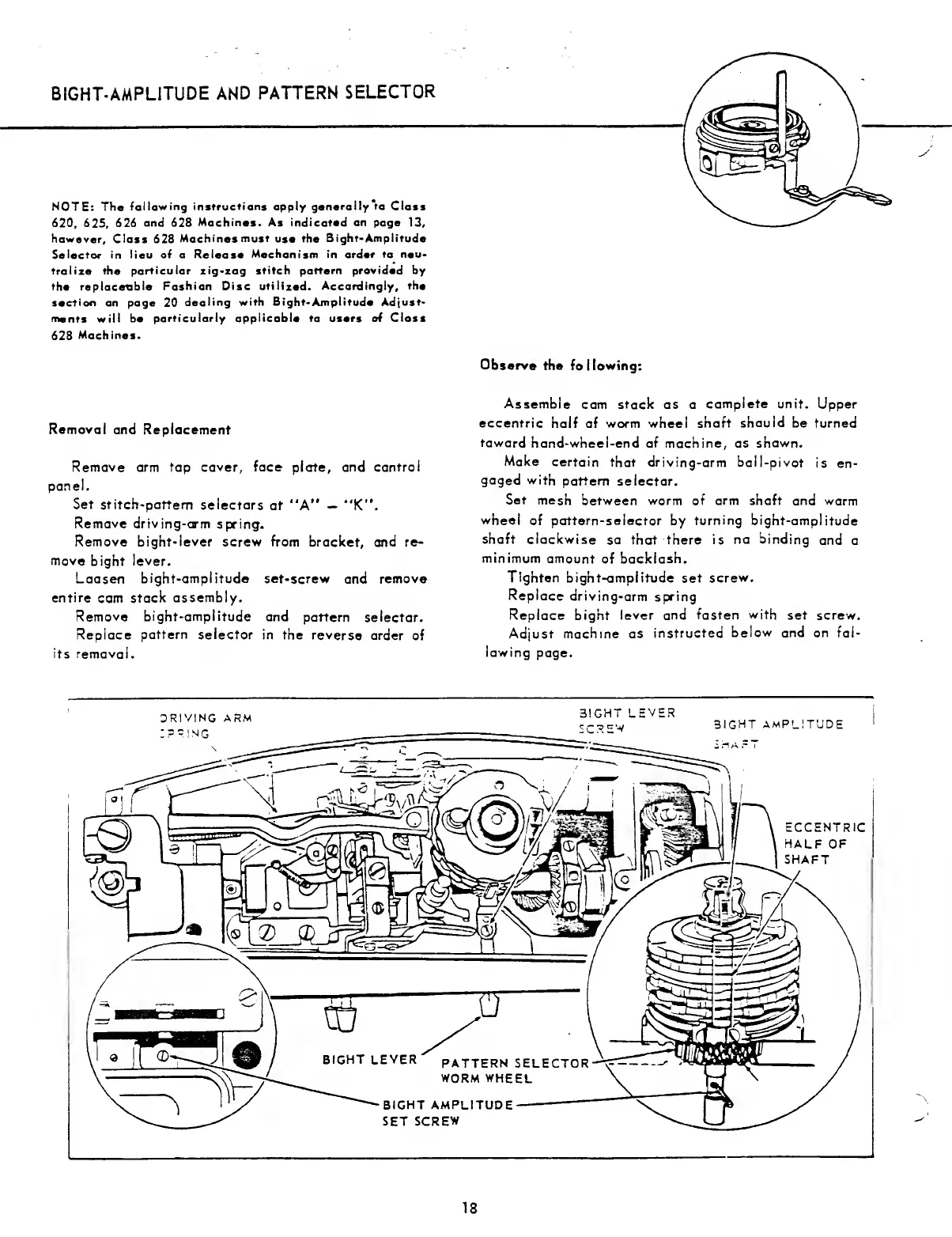
Removal
and
Replacement
Remove
arm
top
cover,
face
plate,
and
control
panel.
Set
stitch-pattern
selectors
at
“A”
“K”.
Remove
driving-arm
spring.
Remove
bight-lever
screw
from
bracket,
and
re¬
move
bight
lever.
Loosen
bight-amplitude
set-screw
and
remove
entire
cam
stack
assembly.
Remove
bight-amplitude
and
pattern
selector.
Replace
pattern
selector
in
the
reverse
order
of
its
removal.
Observe
the
following:
Assemble
cam
stack
as
a
complete
unit.
Upper
eccentric
half
of
worm
wheel
shaft
should
be
turned
toward
hand-wheel-end
of
machine,
as
shown.
Make
certain
that
driving-arm
ball-pivot
is
en¬
gaged
with
pattern
selector.
Set
mesh
between
worm
of
arm
shaft
and
worm
wheel
of
pattern-selector
by
turning
bight-amplitude
shaft
clockwise
so
that
there
is
no
binding
and
a
minimum
amount
of
backlash.
Tighten
bight-amplitude
set
screw.
Replace
driving-arm
spring
Replace
bight
lever
and
fasten
with
set
screw.
Adjust
machine
as
instructed
below
and
on
fol¬
lowing
page.
18

Related product manuals