EasyManua.ls Logo

Singer 620 - Setting the Bight-Amplitude Stop-Plates

Singer 620
26 pages
Print Icon
To Next Page IconTo Next Page
To Previous Page IconTo Previous Page
Loading...
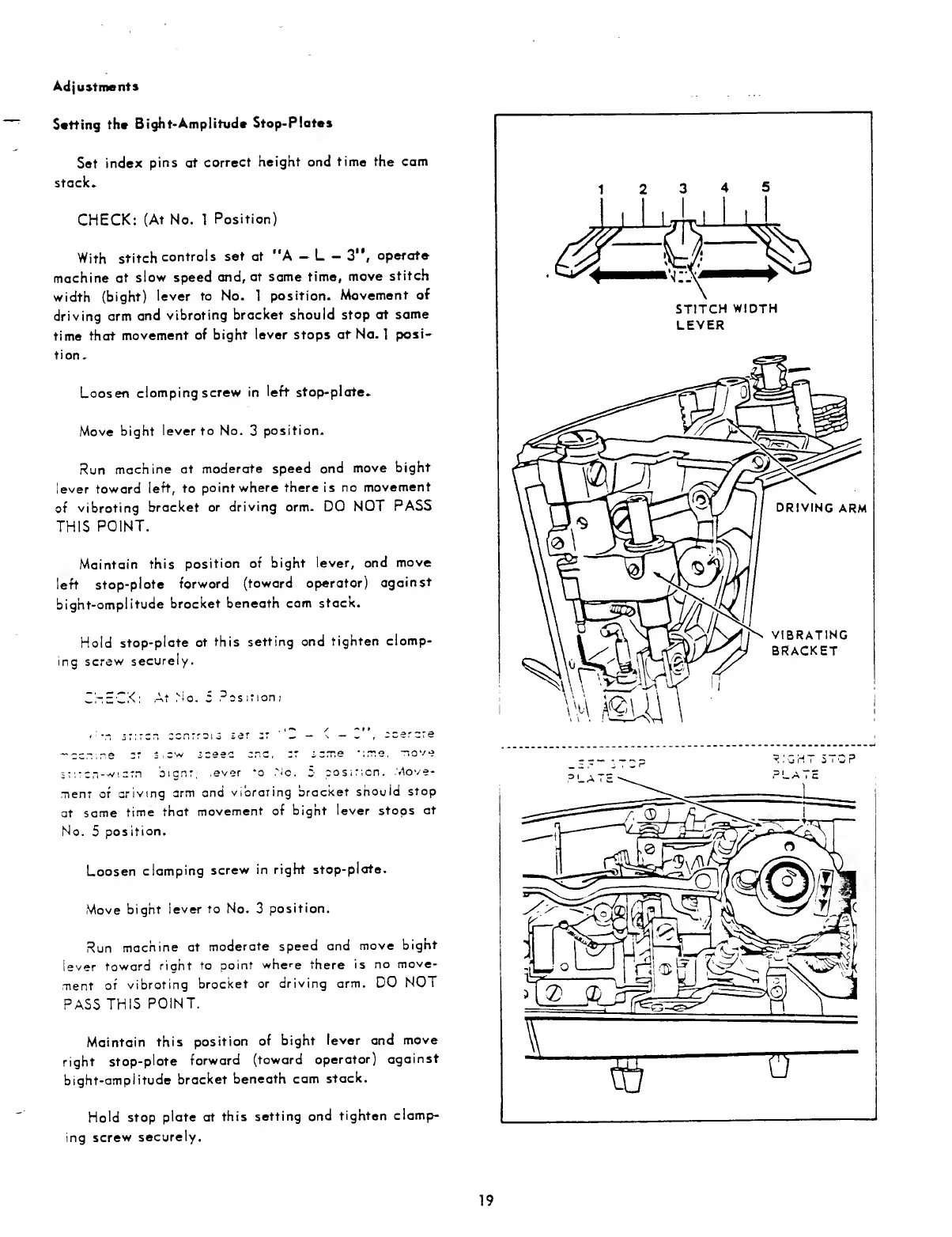
Adjustments
Setting
the
Bight-Amplitude
Stop-Plates
Set
index
pins
at
correct
height
and
time
the
cam
stack.
CHECK:
(At
No.
1
Position)
With
stitch
controls
set
at
"A
L
3”,
operate
machine
at
slow
speed
and,
at
same
time,
move
stitch
width
(bight)
lever
to
No.
1
position.
Movement
of
driving
arm
and
vibrating
bracket
should
stop
at
same
time
that
movement
of
bight
lever
stops
at
No.
1
posi¬
tion.
Loosen
clamping
screw
in
left
stop-plate.
Move
bight
lever
to
No.
3
position.
Run
machine
at
moderate
speed
and
move
bight
lever
toward
left,
to
point
where
there
is
no
movement
of
vibrating
bracket
or
driving
arm.
DO
NOT
PASS
THIS
POINT.
Maintain
this
position
of
bight
lever,
and
move
left
stop-plate
forward
(toward
operator)
against
bight-amplitude
bracket
beneath
cam
stack.
Hold
stop-plate
at
this
setting
and
tighten
clamp¬
ing
screw
securely.
CHECK:
At
Mo.
5
Position:
sf.tcn-widtn
bignt.
.ever
to
.No.
5
position.
Move¬
ment
of
arivmg
arm
and
vibrating
bracket
should
stop
at
same
time
that
movement
of
bight
lever
stops
at
No.
5
position.
Loosen
clamping
screw
in
right
stop-plate.
Move
bight
lever
to
No.
3
position.
Run
machine
at
moderate
speed
and
move
bignt
lever
toward
right
to
point
where
there
is
no
move¬
ment
of
vibrating
bracket
or
driving
arm.
DO
NOT
PASS
THIS
POINT.
Maintain
this
position
of
bight
lever
and
move
right
stop-plate
forward
(toward
operator)
against
bight-amplitude
bracket
beneath
cam
stack.
Hold
stop
plate
at
this
setting
and
tighten
clamp¬
ing
screw
securely.
19

Related product manuals