EasyManua.ls Logo

Singer 650 - Selecting Stitch Patterns; How to Select Stitch Patterns

Singer 650
89 pages
Print Icon
To Next Page IconTo Next Page
To Previous Page IconTo Previous Page
Loading...
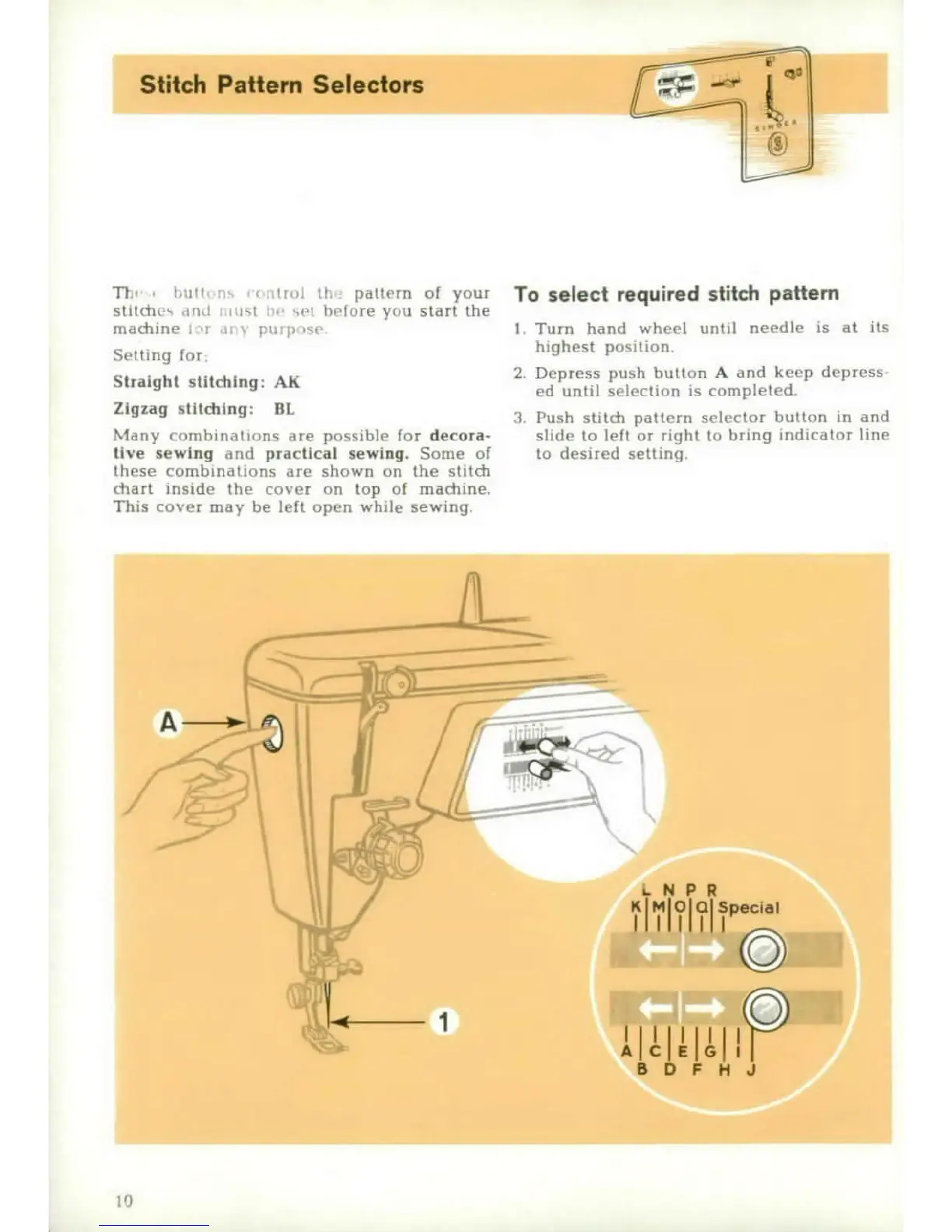
Stitch
Plaftiw
Selectors
TI
, , ý i.
pattern
of
your
To
select
required
stitch
pattern
stilh
, " , i
1
w ý I
I , lw
re
you
start
the
macline
.dt pýh,
I.
Turn
hand
wheel
until
needle
is
at
its
Setting
for
highest
position.
Straight
stltdng:
AK
I2.
Depress
push
button
A
and
keep
depress
Aed
unlil
selection
is
compleled.
Zigzag
stltching:
HIL
I
Push
stitch
pettern selector
button
in
and
Many
(omb
nbai
ons
are
possible
for
decora-
slide to
left
or
right
to
bring
indicator
line
live
sewing
and
practical
sewing.
Some
of
to
desired
setting
hese
combinalions
are
shown
on the
stitch
chart
inside
the
cover
on
top
of
machine.
This
cover
may
be
left
open
while
sewing.
A
•00

Other manuals for Singer 650

Related product manuals