EasyManua.ls Logo

Singer 650 - Plain Zig-Zag Stitch Settings; Stitch Pattern Selector Settings for Zig-Zag; Stitch Width Selector for Zig-Zag

Singer 650
89 pages
Print Icon
To Next Page IconTo Next Page
To Previous Page IconTo Previous Page
Loading...
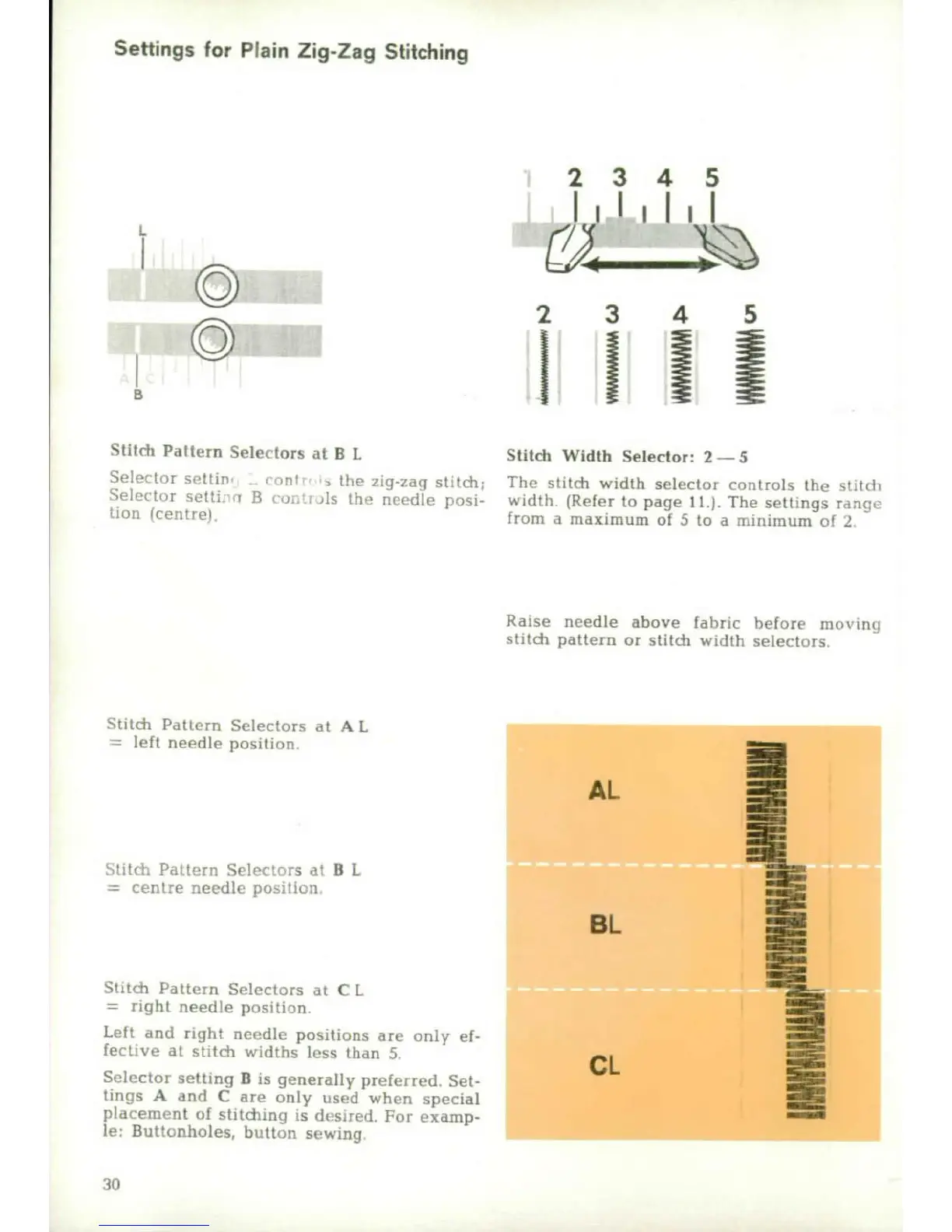
Settings
for
Plain
Zig-Zag
Stitching
2
3
4
5
©
Stitch
Pattern
Selectors
at
B
L
Stitch
Width
Selector:
2-5
S•
t
1,r
tir,
....
.nt
.
the
zig-zag
stitch;
The
stitch
width
selector
controls
the
st,tdc
Sclettir
sett;
B
,
s
fh
nte
edle
posh
a
idth
(Refer
to
page
It.).
The
settings
iraaf
lto)1
(coiltreo
from
a
maximum
of
5
to
a
minuimum
of
2.
Raise
needle
above
fabric
before
morving
stitdc
pattern
or
stitch
width
selectors
Stitch
Pattern
Selectors
at
AL
left
needle
positionM
i
AL.
Uýtý
Palt-rn
Selectors
al
B
L
centre
needle
po-iticon
BL
S;~t~n
th
ttern
Selectors
at
C
L
right
needle
position.
Left
and
right
neaedle
positions
are
oniy
ef-
fective
at
stitch
widths
loss
than
5.
Selector
setting
B
is
generally
preferred.
Set-
tings
A
and
C
are
only
used
when
special
placement
of
stitidnng
is
detsired.
For
examp-
le,
Buttonholes,
button
sewing
30

Other manuals for Singer 650

Related product manuals