EasyManua.ls Logo

Singer 650 - Using the Button Sewing Foot

Singer 650
89 pages
Print Icon
To Next Page IconTo Next Page
To Previous Page IconTo Previous Page
Loading...
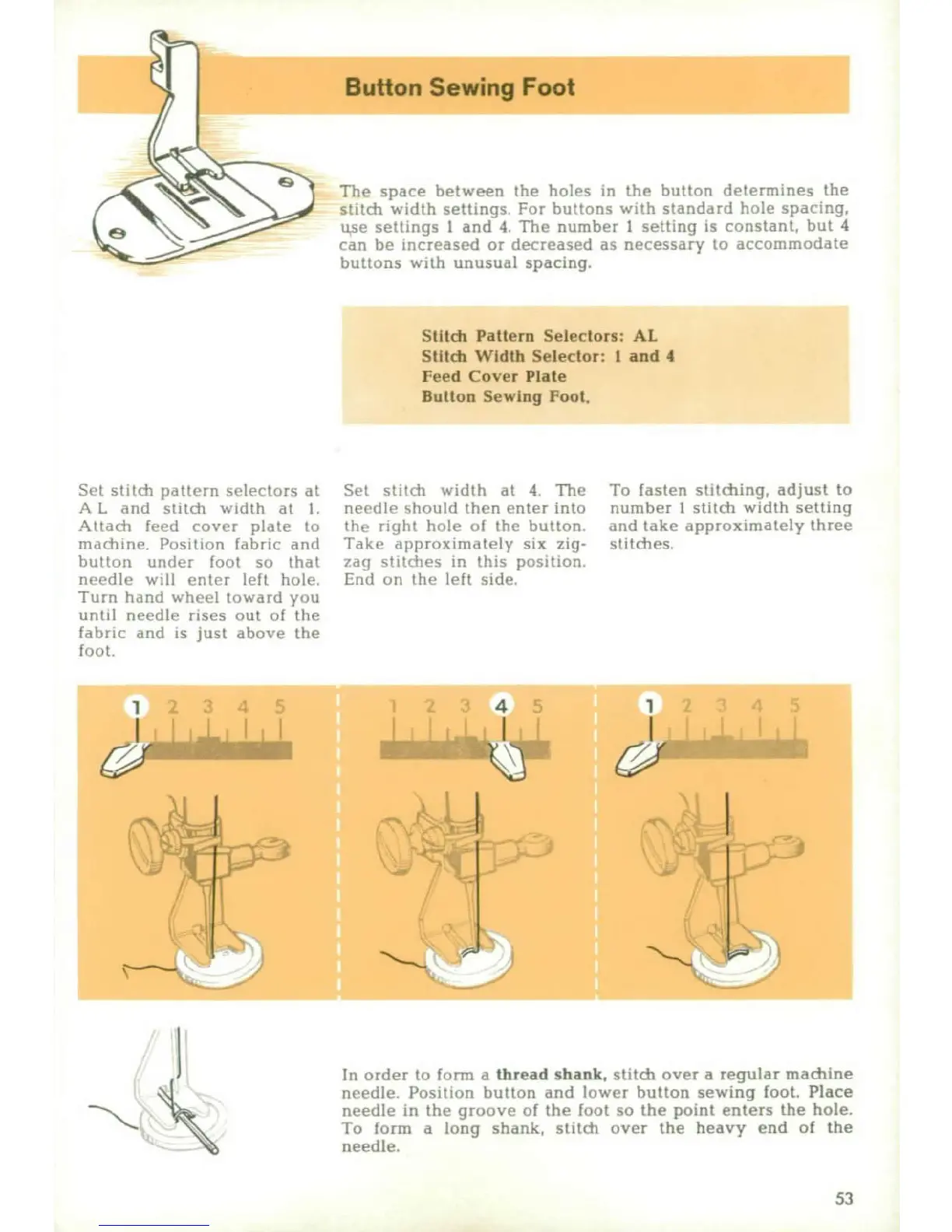
The
space
between
the holes
in
the
button
determies
the
stitch
width
settings
For
buttons
with
standard
hole
spacing,
ruse
settings
I
and
4.
The
number
I
setting
is
constant,
but
4
can
be
increased
or
decreased
as
necessary
to
accommodate
buttons
with
unusual
spacing.
Stitch
Pattern
Selectors: AL
Stitch
Width
Selector: I
and
4
Feed
Cover
Plate
Button Sewing
Foot.
Set
stitch
pattern
selectors
at
Set
stitch
width
at
4
The
To
fasten
stitching,
adjust
to
A
L
and
stitch
width
at
I
ne•dtle
should
then
enter
into
number
I
stithd
width
setting
Atachi
fee(d
cover
plate
to
th,,
right
hole
o
I
the
button
and
take
approximately
three
OiOdi
he.
Position
fab
ric
and Take
aipprox
imnately
six
zig-
si
tdies,
button
under
loot
so
that
zai}
stitbhes
in
this
position.
needle
will
ent(r
left
hoe,
End
on
the
lelt
side.
Turn
hand
wheel
towdad
vou
until
needle
rises
out
ol
the
fabric
and
is
just
above
the
foot.
2 3
4
5 2
3 4
5
12
3
4
5
In
order
to
frorin
a
thread shank,
stitch
over
a
regular
machine
ncedle.
Position
button
and
lower
button
sewing
foot, Place
needle
in
the
groove
of
the
foot
so
the
point
enters
the
hole.
Knelloorm
a
long
shank,
stitch
over
the
heavy
end
of
the
53

Other manuals for Singer 650

Related product manuals