EasyManua.ls Logo

Singer 670 - Combination Patterns

Singer 670
89 pages
Print Icon
To Next Page IconTo Next Page
To Previous Page IconTo Previous Page
Loading...
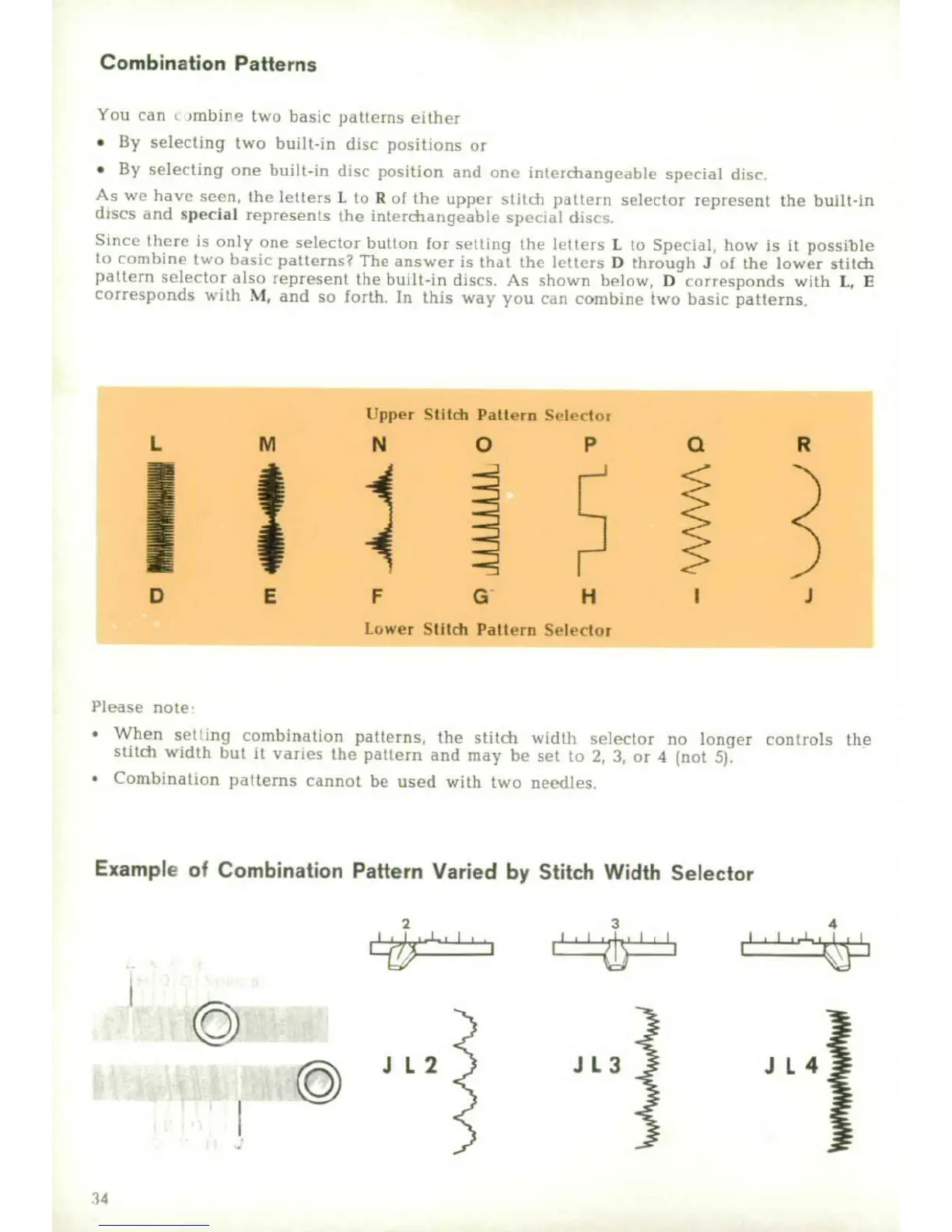
Combination
Patterns
You
can
nmbier,
tvo
basic
patterns
either
*
By
selecting
two
buit-in
disc
positions
or
"
By
selecting
one
built-in
disc
position
and
<one
irtletharyiealen
sprcial
disc,
As
we
have
seen,
lth
letters
L
to
R
of
the,
upper
sWiIch
patteri
selector
represent
the
built-in
dhscs
arid
spec-at
represen
s
the
inl
rdchaigecbe
spta
,t
disc:>
Since
there
is
only
one
selector
bulton
for
setllng
ihe
letliets
L
to
Speoial,
how
is
it
possible
to
conmbine
two
bhasif
patt[(nYs?
The
arnswer
is
that
tho
etters
D
through
J
of
the
lower
stitch
pattern
selector
also
represent
the
boilt-in
discs.
As
shown
below,
D
corresponds
with
L,
E
corresponds
with
M,
and
so
forth.
In
this
way
you
cati
conmbitne
two
basic
patterns
Upper
Stild
Pattern
Slector
L
M
N
0
P
Q
R
D
E
F
H
I
J
Lower
Stitd
Paftern
Selector
IPlease
note
"
When
set
out
combination
patterns,
the
stitch
woidth
seleclor
no
longer
controls
the
stitch
width
but
it
vaies
the
pattern
and
may
he
set
t>
2,
3,
or
4
(not
5).
*
Combination
patterns
cannot
be
used
with
two
nee~dles
Example
of
Combination
Pattern
Varied
by
Stitch
Width
Selector
23
4
0
JL2
JL
3
JL4j
'4-i

Other manuals for Singer 670

Related product manuals