
 Need help?
Do you have a question about the SINJI SMART FLOODLIGHT CAMERA and is the answer not in the manual?
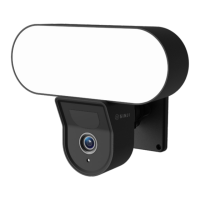
Details the Smart Floodlight Camera's features for home security and convenience.
Lists all included components for the Smart Floodlight Camera setup.
Provides detailed technical data including resolution, power, and connectivity.
Step-by-step guide to download and set up the required Smart Life mobile application.
Instructions for connecting the Smart Floodlight Camera to your Wi-Fi and the app.
View back recorded events, requires SD card or cloud subscription.
Access saved screenshots and video recordings from the camera.
Option to switch the app interface between white and black themes.
Disable camera recording to ensure privacy.
Control the IR night vision camera functionality (on, off, or auto).
Receive mobile notifications when motion is detected by the camera.
Automatically turn on the floodlight when motion is detected in darkness.
Activate a loud alarm directly from the Smart Floodlight Camera.
Manually control the floodlight or set automatic lighting schedules.
Recommendations for optimal placement and signal strength for the camera.
Guidelines for safely cleaning the Smart Floodlight Camera.
Solutions for common connection and functionality problems.
 General
| Brand | SINJI |
|---|---|
| Model | SMART FLOODLIGHT CAMERA |
| Category | Digital Camera |
| Language | English |

 To Next Page