Sinocan International Technologies Co., Ltd. P06-U/S/L User’s Manual
8
3. Printer Interface and Connection
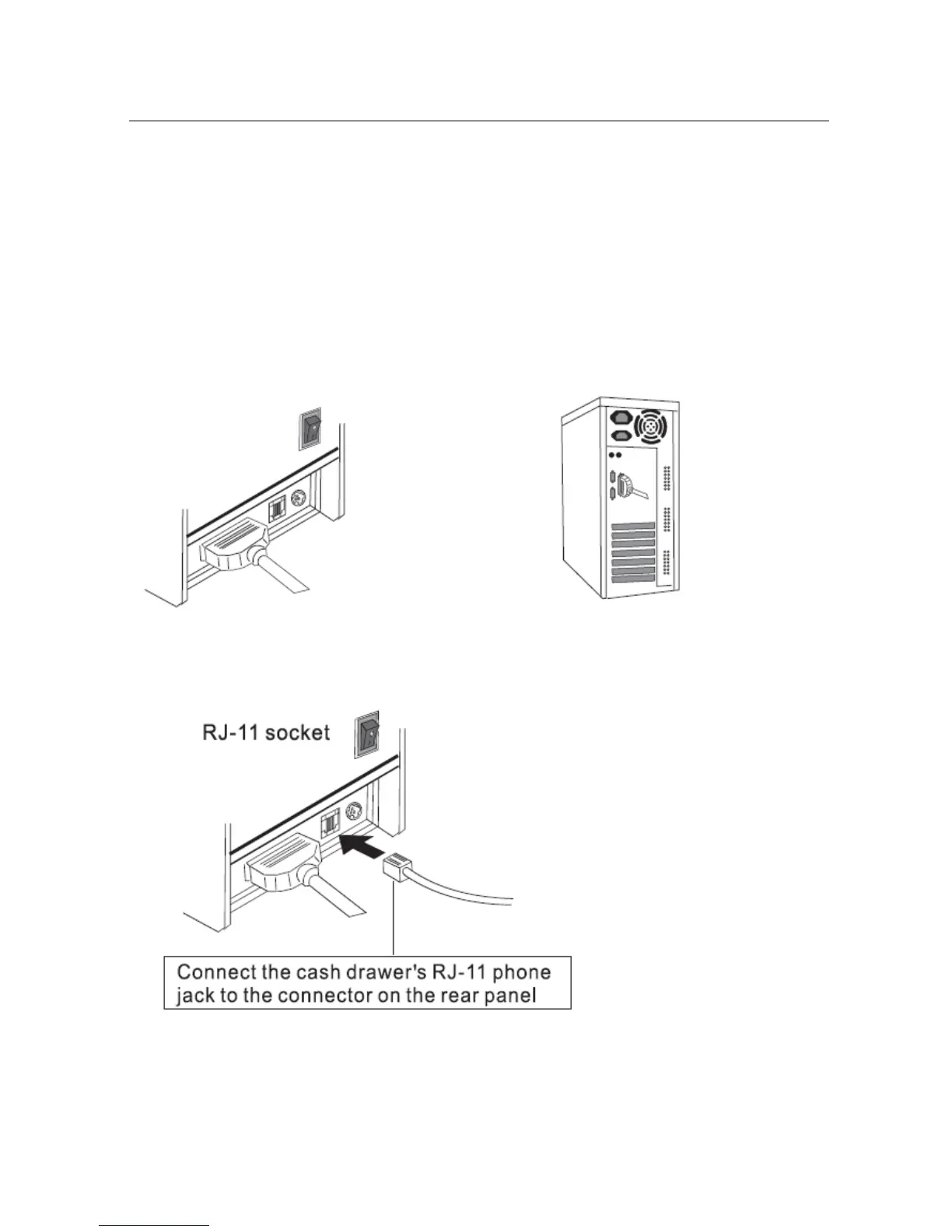
3.1) Connecting the Interface Cable
a. Before connecting/disconnecting the interface cable, make sure that power to the
printer and all the devices connected to the printer is turned on
b. Connect the interface cable to the connector on the rear panel of the printer
c. In the case of a serial interface, tighten the connector screws. In the case of a parallel
interface, fasten the connector clasps
3.2) Connecting to a Cash Drawer
Important: ake sure that the printer is turned off and unplugged from the AC outlet and hat the
computer is turned off before making connections. o not connect a telephone line into the peripheral
drive connectors. Failure to bserve this may result in damage to the printer.
Plug the cable connector securely
into the printer’s interface connector
Attach the other end of the cable to
the computer


 To Next Page