EasyManua.ls Logo

Sinope TH1123WF - User Manual

Sinope TH1123WF
2 pages
Print Icon
To Next Page IconTo Next Page
Loading...
Out
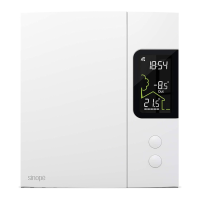
TH1123WF
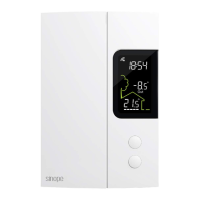
TH1124WF
Installation Guide
Smart Thermostat for
Electric Heating
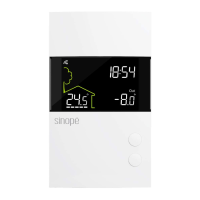
Wi-Fi connection status
Time
Secondary display:
Setpoint [Set) or outside
temperature [Out]
Ambient temperature
Heating indicator
Make sure that the
breakers for your
heating system are
off at the main
electrical panel.
Use the connectors provided to connect the thermostat wires
to the wires in the electrical box.
Note: The wires of this thermostat are non-polarized.
Replace the cover
and lock
Power up the thermostat.
Unlock and lift the
thermostat cover.
INSTALL YOUR THERMOSTAT
1
2
3
4
5
Out
YOUR TH1123WF / TH1124WF THERMOSTAT
Operatlng voltage: 120 / 208 / 240 Vac, 60 Hz
• TH1123WF Thermostat
Maximum load:
12.5 A / 3000 W @ 240 Vac
Resistive load only.
Minimum load:
1.25 A / 300 W @ 240 Vac
• TH1124WF Thermostat
Maximum load:
16.7 A / 4000 w @ 240 Vac
Resistive load only.
Minimum load:
1.25 A / 300 W @ 240 Vac
Setpoint range: 5 ˚C to 30 ˚C (41 ˚F to 86 ˚F)
Display range: 0 ˚C to 50 ˚C (32 ˚F to 99 ˚F)
Resolution: ± 0.5 ˚C (± 1 ˚F)
Storage: -20 ˚C to 50 ˚C (-4 ˚F to 122 ˚F)
Operation: 0 ˚C to 50 ˚C (32 ˚F to 122 ˚F)
Protocole : Wi-Fi
Standard: IEEE 802.11 b/g/n
Frequency: 2.4 GHz
Compatible with an electric heating system such as:
• Baseboard heater [short cycle]
• Convector [short cycle]
• Fan-forced convector [long cycle)
• Radiant ceiling heating
Controlling this HomeKit-enabled accessory automatically and
away from home requires a HomePod, Apple TV, or iPad set up
as a home hub. It is recommended that you update to the latest
software and operating system.
TECHNICAL SPECIFICATIONS
Make sure to firmly tighten the wire
connectors for a secure connection.
A loose connection can be a tire hazard.
Special CO/ ALR solderless connectors
must be used when connecting with
aluminum conductors.
Four-wire installation
Two-wire installation
The installation of this thermostat should be made by a certified electrician and must be installed in
conformity with the national and local Electrical Codes.
Warnings
Question and Answer IconNeed help?

Do you have a question about the Sinope TH1123WF and is the answer not in the manual?

Summary

Technical Specifications

Thermostat Electrical and Operational Data

Details operating voltage, load capacities, temperature ranges, and communication protocols for TH1123WF/TH1124WF.

Heating System Compatibility

Lists compatible electric heating systems such as baseboard, convector, and radiant ceiling heating.

Installation Guide

Installation Steps Summary

Overview of the installation process including power off, cover access, wiring, and power restoration.

Add Thermostat to Neviweb App

App Download and Account Creation

Instructions for downloading the Neviweb app and creating an account to add the thermostat.

Device Pairing Process

Steps to add the thermostat device through the Neviweb app's 'Add Device' function.

User Settings and Thermostat Configuration

Neviweb App Configuration

Details on setting thermostat parameters like temperature format and control cycle via the Neviweb app.

Direct Thermostat Settings Access

Method to access and modify temperature format and control cycle directly on the thermostat.

Disconnect Thermostat

Wi-Fi Disconnection

Procedure to disconnect the thermostat from the Wi-Fi router by pressing specific buttons.

Neviweb App Removal

Instructions to remove the thermostat from the Neviweb app via the thermostat's settings.

Sinope TH1123WF Specifications

General IconGeneral
TypeSmart Thermostat
ConnectivityWi-Fi
Temperature DisplayYes
Control TypeTouchscreen
DisplayBacklit LCD
Voltage120V
Operating Temperature0 °C to 40 °C
Temperature Range5 °C to 30 °C (41 °F to 86 °F)
ControlMobile App
SchedulingYes, 7-day programmable
CertificationFCC

Related product manuals