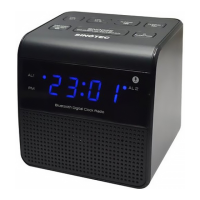
2. Press MEMORY and hold to activate the storage mode.
3. Press TUNING - / + to select the preset number.
[P 01 ~ P 20] is preset station numbers.
Press MEMORY button again to confirm the station number.
If this position is occupied, the previous stored frequency will be
displayed.
To remove a pre-stored FM radio station, store another station in its
place.
LISTEN TO A PRESET FM RADIO STATION
Press MEMORY to select a preset number.
Note
The digital display returns to clock display if no buttons is pressed for 5
seconds.
LISTEN TO BLUETOOTH WIRELESS MUSIC STREAMING
1.Press / FUNCTION to Bluetooth mode.
2. [bt] displays on the screen.
3. Bluetooth indicator flash quickly to wait for Bluetooth enabled device / smart
phone to pair with it.
4. Turn on Bluetooth function at Bluetooth enable device / smart phone.
5. Scan CRB-3368 as device name.
6. Select CRB-3368 on device name list.
7. Bluetooth indicator flash slowly after pairing and connecting.
8. Playback music or multi-media audio source on the device/ smart phone.
9. Press Volume + / - or adjust volume level on the device/ smart phone to
desired level.
10. Press skip to select previous song.
11. Press skip to select next song.
12. Press to play or pause the song that is being played back.
Note
The digit display returns to clock display if no button is pressed for 10 seconds.
SET ALARM TIMER
Make sure that you have set the clock correctly.
You can set two separate alarm timers. For the alarm sound, you can select
the FM radio or the buzzer.


 To Next Page
 Loading...