4
19
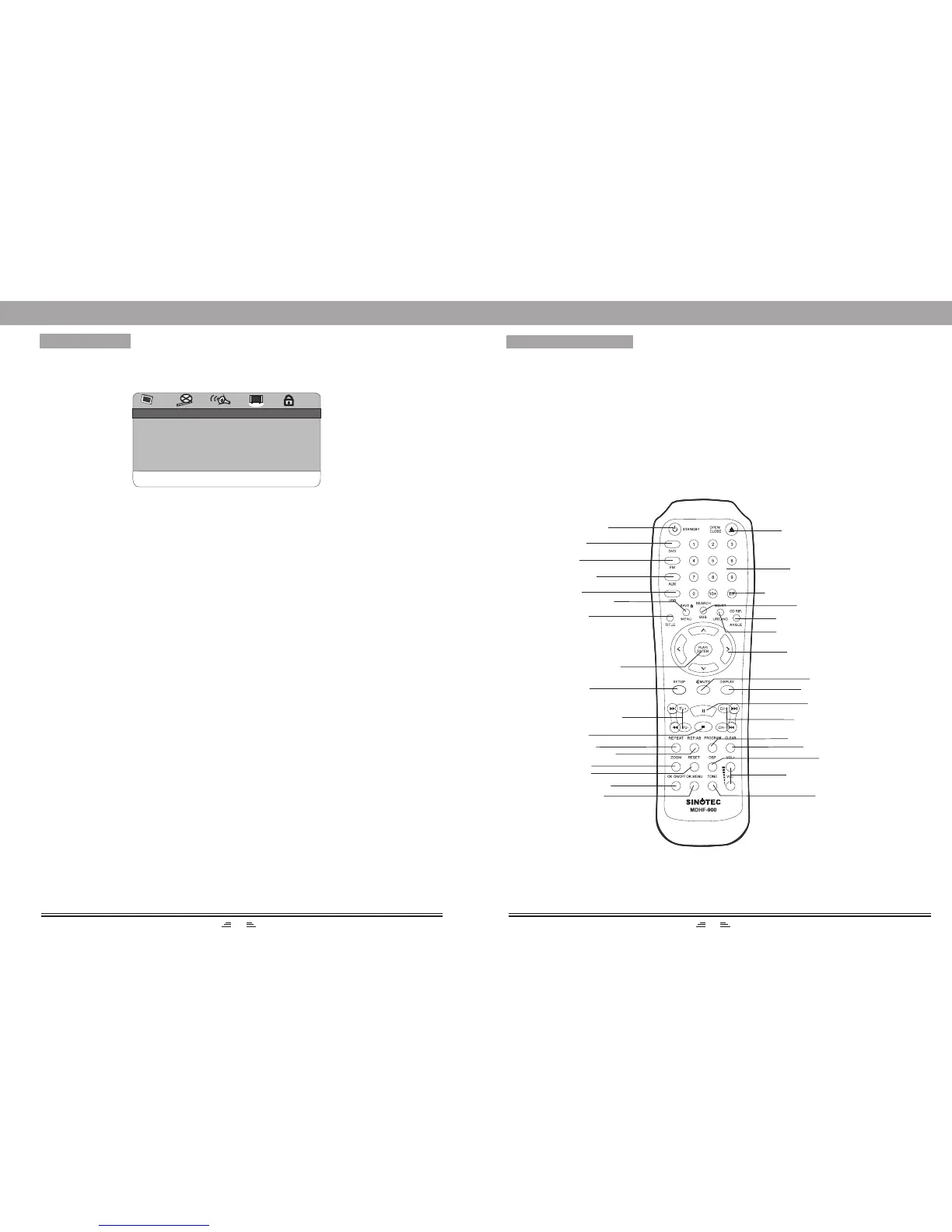
REMOTE CONTROL
NOTE:
1. Turn on the player and install batteries in the remote control. Put the emitter against the
sensor of player for remote control.
2. The distance of remote control should not exceed 7 meters, or else, it will not work.
3. If the sensor or remote controller emitter is stuck with foreign matters, it may result in the mal-
function in signal reception or not at all.
4. The remote control function may be affected under the strong interference signals, such as power
supply and other strong high-frequency signals.
STANDBY
TIME/FREQUENCY
DISPLAY
TITLE
DIRECTION
SETUP
F.FWD/TUNE+
F.RWD/TUNE-
SEARCH/
SUBTITLE
PROGRAM
OK ON/OFF
DSP
TONE
OK MENU
OPEN/CLOSE
NUMBER
BUTTONS
CD RIP. /ANGLE
PLAY/ENTER
MUTE
PAUSE
/LANGUAGE
MONO/STEREO
VOLUME+/-
ZOOM
STOP
A-B REPEAT
USB
SAVE/MENU
NEXT/CH+
PREV./CH-
MENU SETUP
Angle Mark
When the disc has multi-angle pictures, setting the Angle Mark displays a multi-angle mark on
the screen. This option has two settings:
ON: Display multi-angle mark
OFF: Multi-angle mark is not displayed
Close Caption
When playing DVD discs, set this option OFF to close caption, choose the ON option to open
the caption.
Screen Saver
To set screen saver on or off.
Last Memory
When the option is set to ON, the system remember the played disc content.
The disc content is not remembered when the OFF option is selected.
Version
This option is used to display the model of this system and its factory name.
Default
In the status of Eject or no disc, choose this option to resume to the DVD player’s original setup.
DVD
FM
CLEAR
REPEAT
AUX IN
General Setup Page
ANGLE MARK ON
CLOSE CAPTION OFF
SCREEN SAVER OFF
LAST MEMORY OFF
VERSION
DEFAULT
GENERAL SETUP
RESET
GOTO GENERAL SETUP PAGE


 To Next Page