7
16
SYSTEM CONNECTION
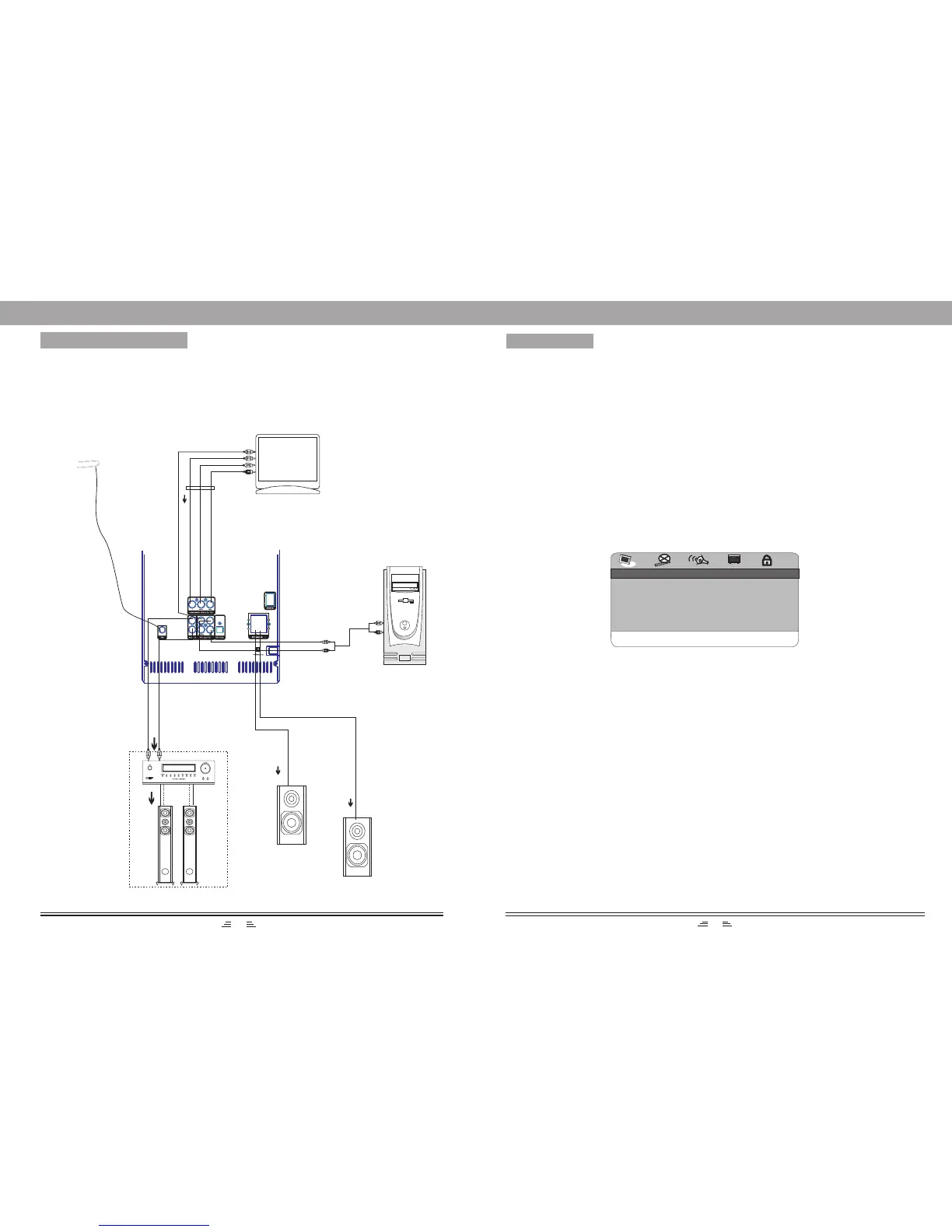
Please refer to the following figure to connect your acoustic equipment.
To keep all the connection correctly and firmly.
Power supply should be connected finally.
MENU SETUP
Left Speaker
Right Speaker
L channel R channel
TV
Audio Output
PC
Audio Output
DVD Menu Setup
To access the DVD menu :
1. Press the SETUP button .
2. Press the direction buttons to switch between the different setup pages .
3. Press the direction button to move the cursor to the position you want, then press the PLAY/ENTER
button again to enter the subdirectory.
4. Press the PLAY/ENTER buttons again to enter the next subdirectory.
Note: In any menu, you can press the up and down direction buttons to move the cursor and press the
PLAY/ENTER button to enter the selected items. Press the SETUP button to exit the system
setup page.
Language Setup Page
OSD Language
This option is used to select the language of all the screen displays and setup menus.
You can set OSD language to English.
Audio Language
When playing DVD discs, the player will automatically play the built-in language of the disc.
This unit could play such languages as: English, French, German, Spanish, Chinese, Japanese, Korean,
Thai and Others.
Subtitle Language
When playing DVD discs, the player will automatically play the built-in subtitle language of the disc.
This unit could play such built-in languages as: English, French, German, Spanish, Chinese, Japanese,
Korean, Thai and Others. You can select any one as the built-in subtitle or close the subtitle.
Disc Menu Language
This unit has the following menu language available: English, French, German, Spanish, Chinese,
Japanese, Korean, Thai and Others.
OSD LANGUAGE ENG
AUDIO ENG
SUBTITLE ENG
DISC MENU ENG
LANGUAGE SETUP
GOTO LANGUAGE PAGE
FM Antenna


 To Next Page