G
G
e
e
t
t
t
t
i
i
n
n
g
g
S
S
t
t
a
a
r
r
t
t
e
e
d
d
I
I
n
n
t
t
r
r
o
o
d
d
u
u
c
c
t
t
i
i
o
o
n
n
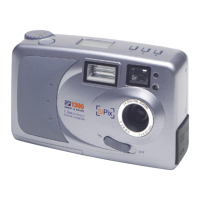
Congratulations on your purchase of the SP-1300 Shoot & Share digital camera! Your SP-1300
camera has been ergonomically designed to allow you to quickly and easily take high-quality
digital pictures without the trouble of buying and developing film.
With a 1.3 Mega Pixel CCD image sensor you are assured of clear, high-resolution pictures that
can be printed, displayed on your web site, or sent to others through e-mail.
The supplied software and drivers enable you to easily download your pictures to your PC.
With the application software you can edit your pictures with tools such as sharpen, smooth, red
eye correction, and brightness and contrast adjustment. Other tools include special effects,
which will allow you to flip images, shear them, and turn them into cylinders. The USB cable
allows you to easily download your pictures to your computer where you can use the enclosed
software to perform image-processing tasks.
Unpacking the SP-1300 camera
Upon receiving your SP-1300 camera, open the carton and carefully remove the contents. If
anything is missing or damaged, please contact your reseller immediately. Your package should
contain the following items:
• SP-1300 Shoot & Share digital camera
• Camera hand strap
• USB cable
• Four AA alkaline batteries
• 8MB CompactFlash™ card
• Quick Start Guide
• CD-ROMs containing:
• MGI PhotoSuite III SE
• SP-1300 Camera Driver
• SP-1300 Owner’s Manual (PDF)
• Adobe Acrobat Reader
Do not throw the packaging box away. You may need it later if you ever have to ship the SP-
1300 camera.
1


 To Next Page