WIFI
NETWORK NAME SCAN
PASSWORD
NETWORK NAME
PASSWORD123
IP ADDRESS
xxx.xxx.xxx.200
APPLY
DEFAULT
CONNECTED:
SISER 111.222.3.444
GENERAL SETTINGS
LED ALERT SLEEP UNIT LANGUAGE
GENERAL SETTINGS
1. 2. 3. 4. 5.
1.
2.
3.
4.
5.
WIFI
1.
2.
3.
4.
5.
1.
2.
3.
8
4.
5.
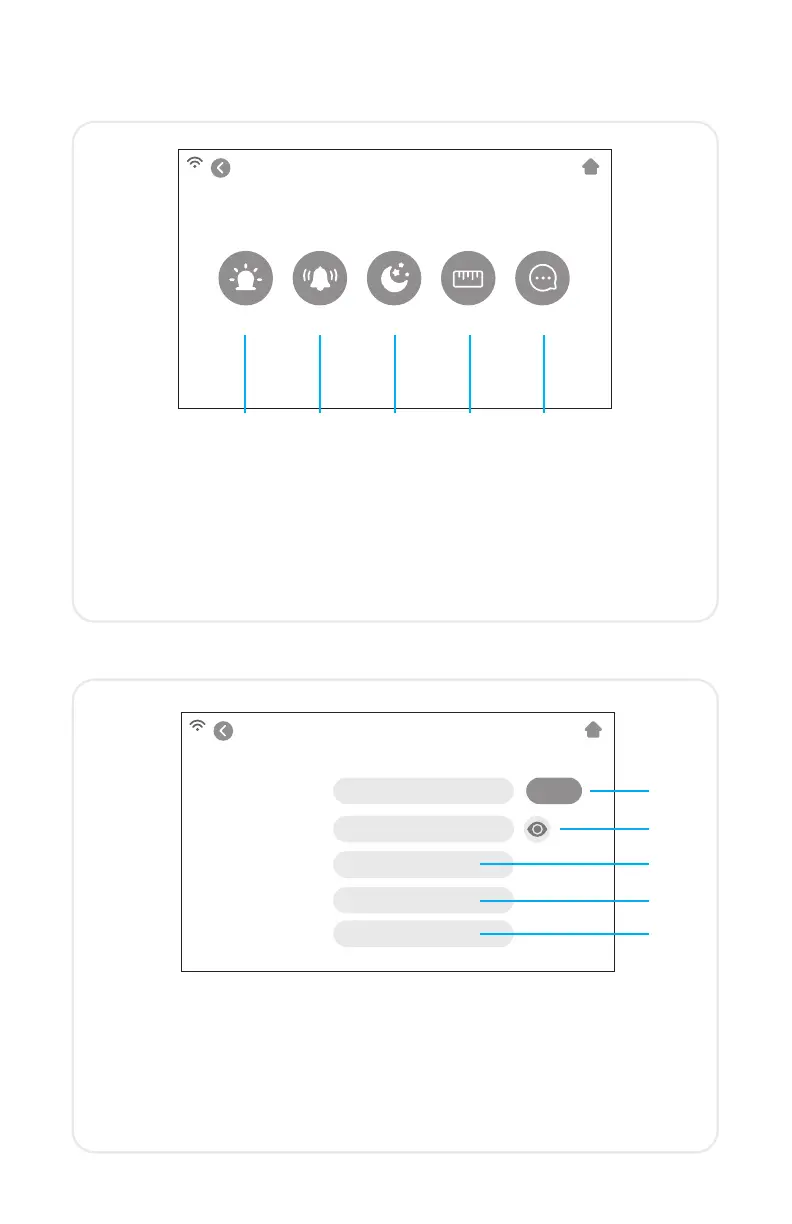
Make general adjustments to your cutter
LED — Turn the LED ON/OFF and adjust the brightness
Alert — Turn the chime and/or LED ON/OFF that indicates a
completed job
Sleep — Set how much time of inactivity will put the cutter to sleep
Unit — Choose between metric and imperial measurements
Language — Select desired language
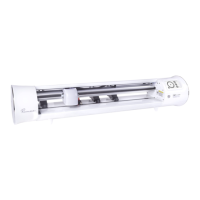
Set up the cutter’s wireless connection
Scan — Searches for available WiFi networks that the cutter can
connect to
Eye Button — Shows or hides the password entered
IP Address — Manually enter an IP Address
Apply — Uses the manually entered IP Address to connect
Default — Switch WiFi to Hotspot mode


 To Next Page