TOUCH SCREEN
6
SETTINGS
CUT SETTINGS
TEST CUT
HOME SCREEN
SETTINGS
CUT SETTINGS
TEST CUT
Navigate by tapping the touch screen to select an option or slide along a
bar to adjust values.
1.
2.
3.
4.
5.
6.
7.
1.
2.
3.
4.
5.
6.
7.
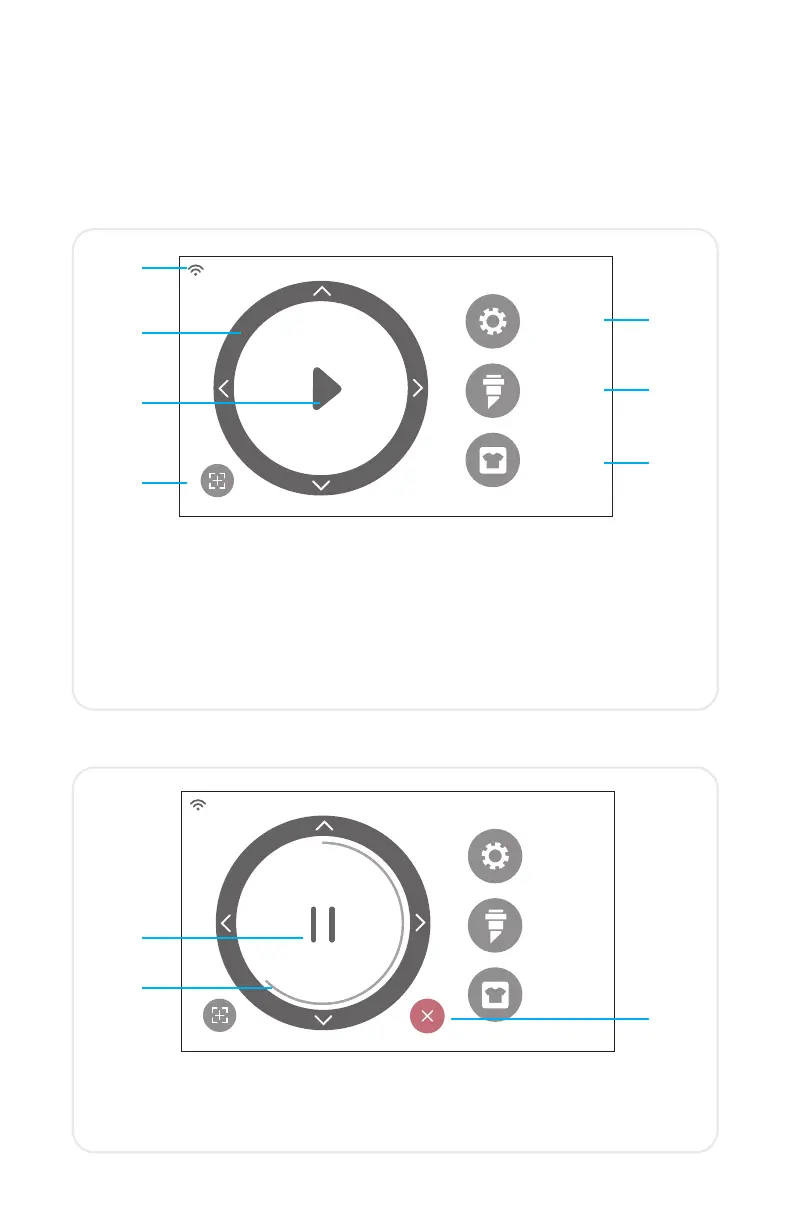
HOME SCREEN JOB IN PROGRESS
1.
1.
2.
3.
2.
3.
WiFi Indicator — Displays WiFi connection status
Directional Arrows — Moves material and machine head
Play Button — Resumes cut or recuts the last known design
Tool Reorientation — Moves tool holder back to starting position
Settings — Opens cutter settings menu
Cut Settings — Opens presets menu with adjustable cut settings
Test Cut — Performs a test cut at the tool holder’s current position
Pause Button — Pauses job at current position
Job Progress Bar — Displays progress of current job based on how
far the circle is completed
Cancel Button — Cancels current job


 To Next Page