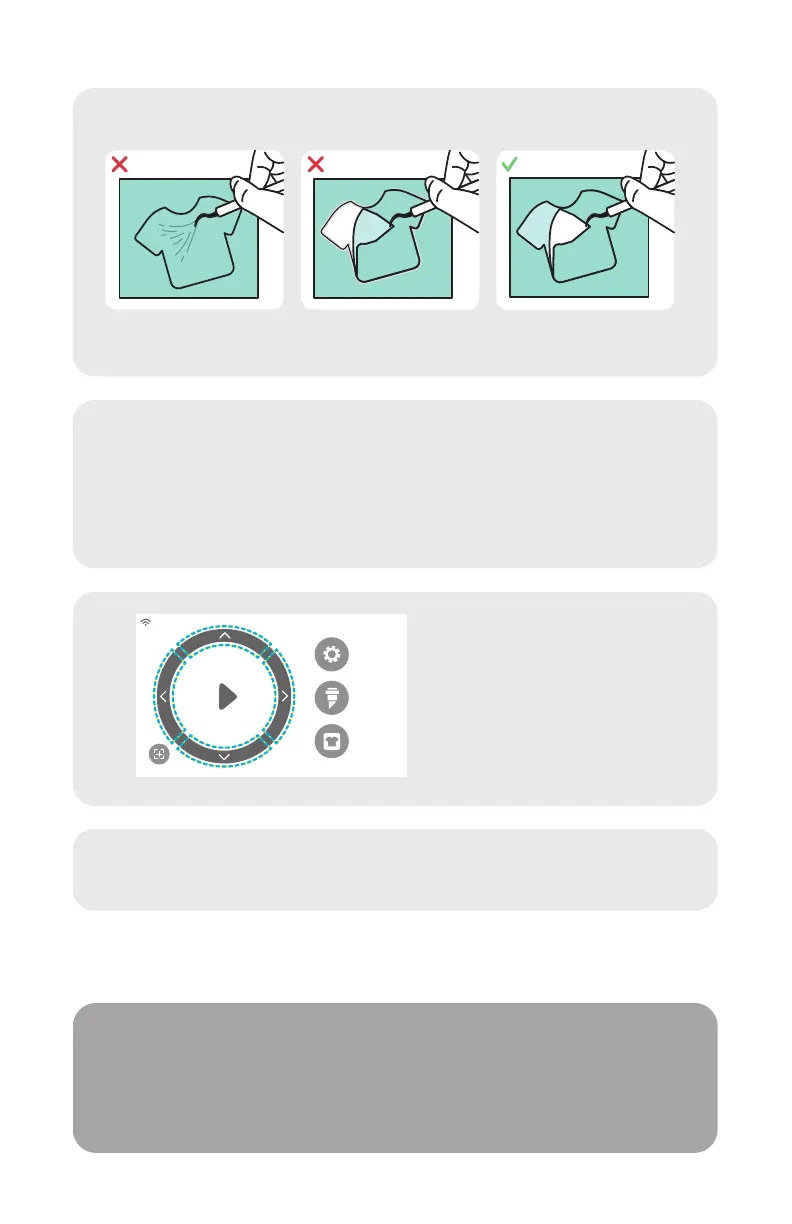
Identifying a Good Test Cut
9
Once you’re ready to cut, plug in the USB flash drive
via the USB-A port on the rear of the cutter. Tap the
‘Settings’ button, then ‘USB’. Select your cut file*
from the drop down.
*Visit siserna.com for info on accepted file types
5
10
Move the position of the
blade by using the
on-screen arrow buttons.
Once the blade is in
position, tap the play
button to begin cutting.
Congratulations— you’ve cut your first design! To learn
how to apply your design, visit www.siserna.com.
Ready to use your cutter to its full potential?
Access advanced designer tools, inspirational projects,
tutorials, and more by downloading
Leonardo
TM
Design Studio.
SETTINGS
CUT SETTINGS
TEST CUT
Cut not deep enough
and can’t be weeded
Material and carrier
cut through
Material cut and
carrier not cut through


 To Next Page