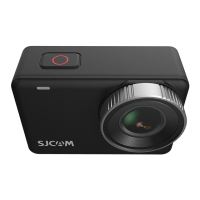
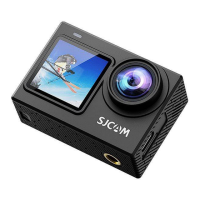
The SJCAM SJ7 STAR is a high-precision 4K action camera designed for capturing high-quality videos and photos, allowing users to express their vision and share their experiences. It features an aluminum body and a 2-inch LCD touchscreen for intuitive control and viewing.
Function Description:
The SJ7 STAR serves as a versatile action camera capable of recording videos in various resolutions, including true 4K at 30 frames per second (FPS), and capturing still images at 16 megapixels. It supports a wide range of video resolutions, from 720P up to 4K, with different framerate options to suit various recording needs, including slow motion and time-lapse video. The camera utilizes an Ambarella A12S75 chipset and a Sony IMX117 12MP sensor to deliver crisp and detailed imagery.
Key functionalities include:
- Video Recording: Capture dynamic footage with options for different resolutions, framerates, and field of view (FOV) settings (Wide, Medium, Narrow). It supports advanced features like Gyro Anti-Shake for stabilized video, Loop Record for continuous recording, and Car DV mode for use as a dashcam.
- Photo Capture: Take high-resolution still photos with various modes such as Single Shot, Self Timer, Photo Burst (up to 10 consecutive shots), and Photo Lapse for creating time-lapse sequences.
- Audio Recording: Equipped with a built-in microphone and speaker, the camera records audio in AAC format. Microphone volume can be adjusted to control sensitivity.
- Connectivity: Features built-in Wi-Fi for wireless connection to the SJCAM ZONE app, allowing for remote control, firmware updates, and file transfer. It also includes HDMI and Mini-USB ports for wired connections and data transfer.
- Storage: Supports MicroSD cards up to 128GB (UHS-3 High Speed recommended) for storing recorded media.
- User Interface: A 2-inch LCD touchscreen provides a visual interface for navigating menus, previewing shots, and playing back content. The camera also has physical buttons for power, shutter, and settings/Wi-Fi.
Usage Features:
The SJ7 STAR is designed for ease of use, with a touchscreen interface and an optional smart remote for convenient operation.
- Powering On/Off: Press and hold the Power/Mode button to turn the camera on. A chime will sound, indicator LEDs will light up, and the SJCAM logo will appear on the screen. Press the Power button once to turn it off.
- Navigation: The main screen displays current mode, resolution, aspect ratio, framerate, image quality, FOV, status indicator lights, date and time, battery level, microphone status, and available storage. Swiping down from the top accesses the Toggles Screen for quick access to photo/video galleries, remote control toggle, and Wi-Fi toggle. Swiping up from the bottom accesses the Modes Screen to switch between video, still, video lapse, slow record, photo lapse, and burst mode. Tapping the settings icon or pressing the Settings button on the front of the camera leads to the Settings Screen.
- Mode Selection: The Modes Screen allows users to choose between different capture modes for videos and photos.
- Settings Customization: The Settings Screen offers extensive options to customize camera behavior. These settings are mode-specific, meaning adjustments made in one mode (e.g., Photo Mode) will only apply to that mode. General settings, accessible via a dedicated button, apply across all modes.
- Photo Mode Settings: Adjust photo size, quality, long exposure, photo stamp (date/time overlay), self-timer delay, photo burst count, time-lapse interval, sharpness, AWB (Auto White Balance), EV (Exposure Value), ISO, and metering modes (Center, Multi, Spot).
- Video Record Settings: Configure video resolutions, quality, FOV, slow motion, Gyro Sensor (anti-shake), detection (motion detection), dual files (saves two versions of recorded video), video stamp, time-lapse video, loop record length, Car DV mode, microphone volume, sharpness, AWB, EV, ISO, and metering modes.
- General Settings: Includes options for Quick Capture (automatic recording on power-up), Delay Off (dashcam power-down delay), TV Mode (NTSC/PAL), Light Frequency (50Hz/60Hz), Auto Shutdown, Screen Off timeout, Status LED and WiFi LED toggles, TV Out (HDMI output), Beep sounds, Date Setup, Time Setup, Date Format, Language, WiFi settings (SSID, password), and formatting the MicroSD card.
- Remote Control (Optional): The SJ Smart Remote can be paired with the camera for wireless control. Once paired, it allows users to turn the camera off, start/stop recording, and take burst shots from a distance of up to 10 meters (30 feet) line-of-sight.
- File Management: Files can be transferred using four methods:
- USB Cable: Connect the camera to a computer via MiniUSB, select "Mass Storage Device," and access files as a drive.
- SJCAM ZONE App (WiFi): Connect the camera to a smartphone via Wi-Fi, use the app's gallery to download desired files.
- MicroSD Card Adaptor: Remove the MicroSD card, insert it into an adaptor, and plug it into a computer to transfer files.
- Smartphone with Removable Storage: Insert the MicroSD card directly into a smartphone with a card slot to transfer files.
- Waterproof Case: The camera comes with a waterproof case, allowing it to be submerged for underwater recording. Instructions are provided for safely removing the camera from the case.
Maintenance Features:
Proper care and maintenance ensure the longevity and optimal performance of the SJ7 STAR.
- Firmware Updates: It is crucial to keep the camera's firmware up to date. This can be done automatically by connecting the camera via Wi-Fi to the SJCAM ZONE app or by visiting www.sjcamhd.com/firmware.
- Battery Management: The camera uses a removable 1000mAh battery. It can be charged via MiniUSB using an AC adapter, car charger, or PC. For dashcam use, it's recommended to remove the internal battery and use a car charger cable to prevent overcharging/overheating. An external dual charger accessory (sold separately) can be used for charging spare batteries.
- MicroSD Card Handling: Always ensure the camera is turned off before inserting or removing the MicroSD card to prevent data loss. The card should be inserted with the label facing the front until it clicks into place. To remove, gently push it in until it ejects. Formatting the MicroSD card on the camera can help manage files and prepare it for new recordings.
- Environmental Care:
- Avoid dropping the camera as it is a high-precision product.
- Do not expose the unit to strong magnetic fields from magnets, electrical motors, or machinery using strong radio waves.
- Never leave the unit in high-temperature areas, as prolonged heat exposure can damage electronics and optics.
- Always use the included waterproof case when submerging the camera in water.
- Charging Safety: Avoid extended periods of battery charging and keep the camera away from children and pets while charging to prevent accidents.

 Need help?
 General

 To Next Page