The SJCAM SJ10 PRO is a high-precision action camera designed to capture high-quality video and photos, empowering users to record and share their experiences. It is built to be versatile and responsive, suitable for various demanding environments.
Function Description:
The SJ10 PRO is an action camera capable of recording videos and taking still photographs. It features a touch screen for easy navigation and control, and can be operated via a power/shutter button on top. An optional SJ Smart Remote allows for wireless control, including starting/stopping video recording, taking burst shots, and turning the camera off. The camera supports various video and photo modes, including standard video, video lapse, slow motion, still photograph, photo lapse, burst mode, and a car mode that automatically starts recording when the engine is started. It also includes advanced features like Gyro Stabilization for smoother footage, Distortion Correction to counteract fisheye effects, and various metering options to optimize image brightness. File management can be done via USB-C, the SJCAM Zone app over WiFi, or by directly accessing the microSD card.
Important Technical Specifications:
- Chipset: Ambarella H22 S85
- Sensor: SONY IMX377
- Sensor Resolution: 12 MegaPixels
- LCD Screen: 2.33" IPS Touch Screen
- Lens: 7G (2 Aspheric Lens included)
- Angle: 170°
- Aperture: F 2.8
- Focal Length: 2.8mm
- Video Resolution:
- 4K: (3840×2160) 25/30/50/60fps
- 1440P: (1920×1440) 25/30/50/60fps
- 1080P: (1920×1080) 24/25/30/50/60/120fps
- 720P: (1280×720) 240fps
- Photo Resolutions:
- 12M (4000×3000 4:3)
- 10M (3648×2736 4:3)
- 8M 16:9 (3840×2160 16:9)
- 8M 4:3 (3264x2448 4:3)
- 5M (2595×1944 4:3)
- 3M (2048×1536 4:3)
- 2MHD (1920X1080 16:9)
- Battery Capacity: 1300mAh Detachable Battery
- Battery Duration (Approx.): 100 Minutes for 4K@30fps
- Weight: 85 G
- Dimensions: 62.5 MM × 41 MM × 28.8 MM
- System Compatibility: WINDOWS 7, 8X or higher / OS X® 10.8 or higher
- Storage Supported: MicroSD, UP TO 128GB (Class-10 U3 recommended, FAT32 or ExFAT filing system)
- Video Format: MP4 (H264/H265), MOV
- Decode Format: H.264/H.265
- Image Format: JPG
- WiFi: 2.4G/5G (802.11 A/B/G/N)
- Gyro Stabilization: 6-Axis Gyroscope
Usage Features:
- Powering On/Off: Press and hold the Power/Shutter Button on the top right side. A blue LED status indicator lights up when on standby, and blinks blue when recording.
- Battery Replacement: The battery compartment is accessed by sliding a lock button and opening the door. Batteries are inserted in one direction, indicated by an arrow.
- MicroSD Card Insertion: The MicroSD card slot is located on the left side, under a covered door. Push the button, slide the door down, and swing it outwards. Insert the card gently until it clicks, ensuring correct orientation.
- USB-C Cable Insertion: The USB Type-C port is also under the covered door on the left. It's used for file transfers, battery charging (RED status indicator), or connecting a microphone (PURPLE status indicator when connected to a computer).
- Main Screen Interface: Displays elapsed time, time left on card, WiFi status, microphone status, battery level, gyro stabilization status, current mode icon, date & time, resolution/options, ISO details, shutter speed details, zoom controls, and settings access.
- Toggles Screen: Swipe down from the top of the main screen to access quick toggles for Lock Screen, WiFi, FPV, and Remote Control.
- Playback Screen: Tap the playback icon on the main screen to view recorded videos and photos. Navigate through files, check battery status, and see file names.
- Mode Selection: Swipe up from the bottom of the main screen to access various recording modes: Video, VideoLapse, Slow Motion, Photo, PhotoLapse, Burst Mode, Photo+Video, and Car Mode.
- Mode Settings: Access specific settings for each mode, such as EV, White Balance, Color Profile, Metering Mode, Gyro Sensor, Encoding (H.264/H.265), Volume, Sharpness, Distortion Correction, Loop Recording, File Size, Video Quality, Photo Quality, ISO, Audio, Time Stamp, Shutter Speed, RAW, VideoLapse, Slow Motion, and Photolapse Interval.
- General Settings: Access system-wide settings including Language, WiFi, WiFi Frequency, Format, Auto Power Off, LCD Off Time, Front Display, Indicator Light, Keypad Tone, Rotate, Brightness, Color Temperature, External Microphone, Date/Time, Gimbal Control, Frequency, Default Setting, Display ISO, User Interface, and Firmware Version.
- Digital Zoom: Zoom in and out by tapping magnifying glass icons on the main screen (digital zoom, crops the image).
- SJ Smart Remote (Optional): A wearable remote with buttons for WIFI On/Off, Camera-Off, Burst Shot, Record Video Start/Stop, and Shutter. Pairs via the camera's Remote Control settings.
Maintenance Features:
- Firmware Updates: Keep the camera's firmware up to date by connecting via WiFi to the SJCAM ZONE app or visiting www.sjcam.com/firmware.
- Battery Care: Avoid extended periods of battery charging. Store extra batteries away from sharp metals and moisture.
- Waterproof Integrity: Although waterproof without additional housing, always check that all seals are intact and all doors are properly closed before submerging. For dives deeper than 5 meters, a dedicated waterproof housing is required.
- Cleaning: After diving, wash the camera housing with clean freshwater to rinse off salts or contaminants. Wipe off excess water with a clean cloth and air-dry before opening doors.
- MicroSD Card Formatting: Format the microSD card regularly (preferably to ExFAT on a desktop) to ensure optimal performance and prevent data corruption.
- Troubleshooting: The manual provides guidance for common issues such as distorted sound, incorrect file order, "no file found" errors, slow startup, slow card warnings, short video recordings, camera reboots, and power-on issues.
- Power Management: Tips for maximizing battery life include setting Auto Power Off and LCD Off Time to shorter durations, planning recordings, and using indicator lights instead of constantly checking the LCD. Using a charger and spare battery is recommended for continuous use.

 Need help?
 General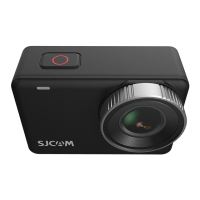

 To Next Page








