1. Software download and installation
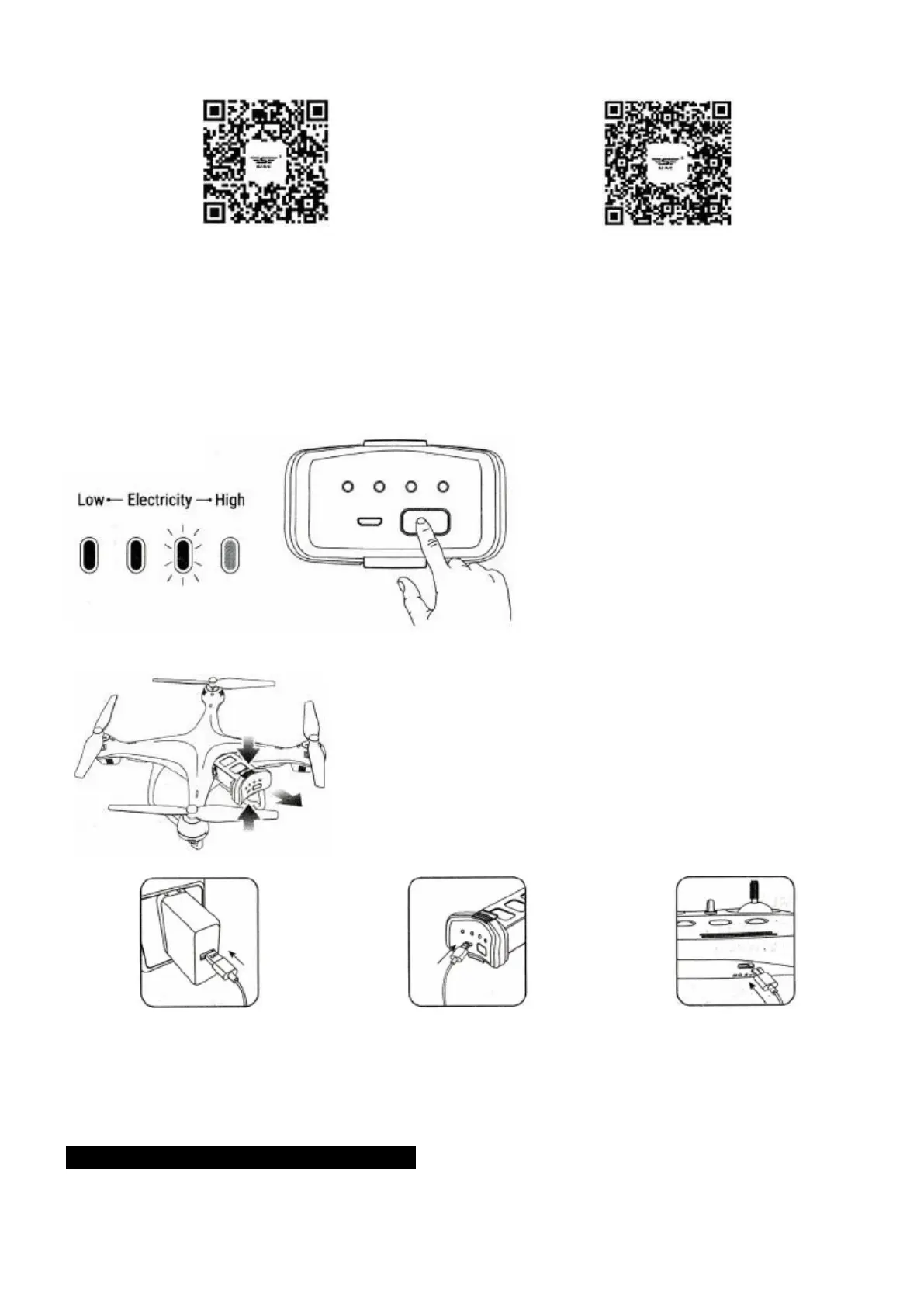
QR code of "SJ-GPS" software for Apple IOS
system (Please scan this QR code to install this
software).
QR code of "SJ-GPS" software for Android system
(Please scan this QR code to install this software).
- Connect the power of this model, and then access into "SETTING" in the mobile phone, open the "WiFi"
and find the "SJ-GPS_XXXX". When the link is successfully connected, please exit the "Setting" option.
- Open "SJ-GPS" software in the mobile to access into the control interface.
2. Check the Battery Level
3. Charging the Battery and Transmitter
Press the buckle and Pull
out the Battery from the
drone.
Phone adapter: 5V— 2A (Not
included)
Charging time: About 60 minutes
(Depending on Charging Power)
Charging time of the transmitter:
About 50 minutes
Tip: When the transmitter is in low power, the power indicator light on the transmitter will keep flash, you
need to charging the transmitter this time.
LITHIUM BATTERY CHARGING INSTRUCTIONS
1. Balanced charging: if the power switch of the quad-copter is on the state ON / OFF, The Quad-copter
can be charged. Insert the USB cable into the USB port of a computer, and then connect with the charging



 To Next Page