14
How to operate
How can I use this?
※ WPU-A700D models are models without IoT function.
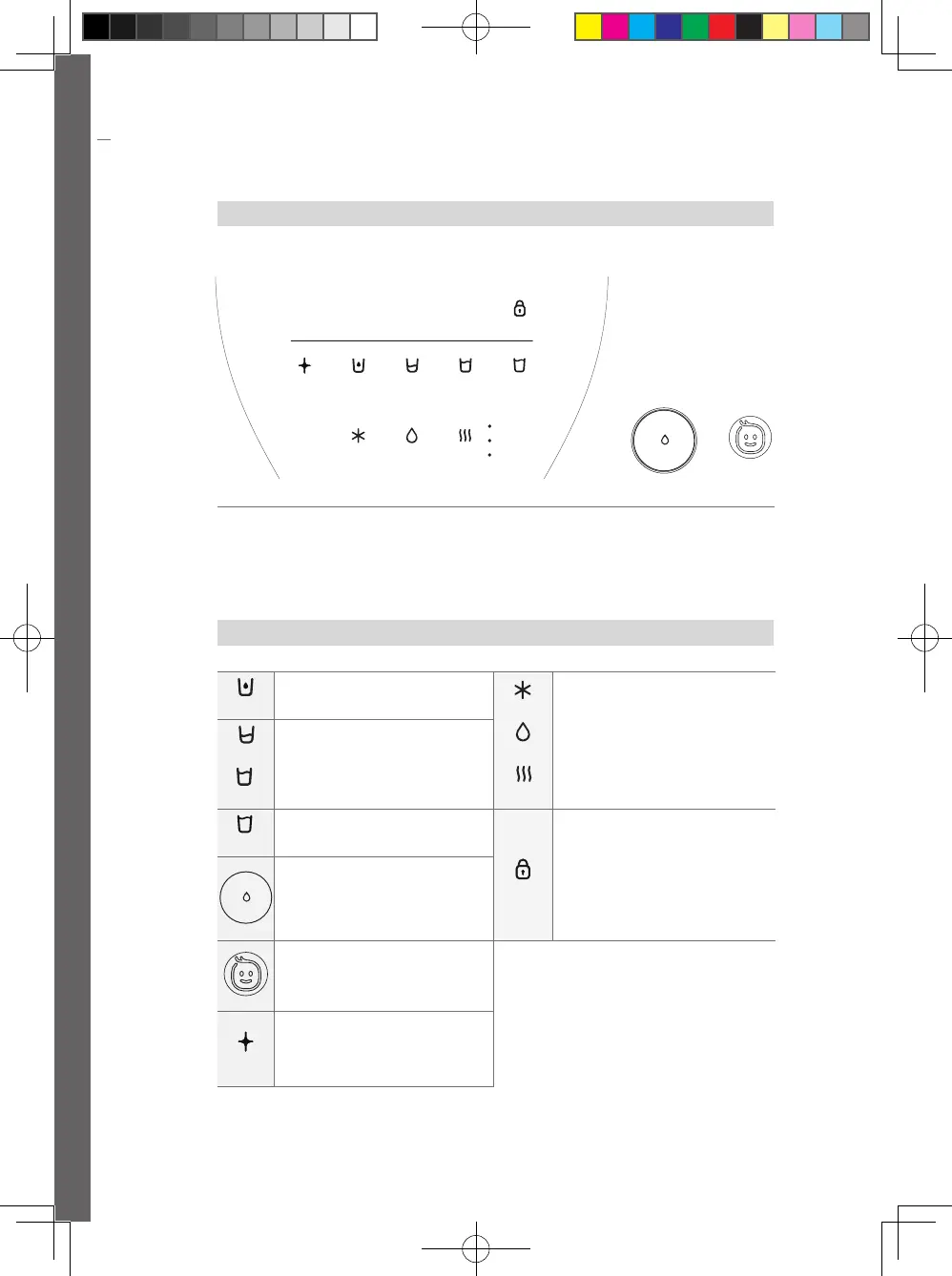
Display / Control panel
Button Descriptions
① Child Lock button
② UV button
③ 120ml button
④ 250ml button
⑤ 550ml button
⑥ 1000ml button
⑦ Cold water button
⑧ Puried water button
⑨ Hot water button
⑩ Water intake button
⑪ Children Water intake button
⑩
⑪
WiFi Child LockChild Lock
UV 120ml 250ml 550ml 1000ml
Cold Ambient Hot
Hot
Tea
Infant
①
② ③ ④
⑦
⑤
⑧
⑥
⑨
WiFi Child LockChild Lock
UV 120ml 250ml 550ml 1000ml
Cold Ambient Hot
Hot
Tea
Infant
• Water Amount : 120 mL
WiFi Child LockChild Lock
UV 120ml 250ml 550ml 1000ml
Cold
WiFi Child LockChild Lock
UV 120ml 250ml 550ml 1000ml
Cold A
mbien
WiFi Child LockChild Lock
UV 120ml 250ml 550ml 1000ml
Cold Ambient
Hot
• Select cold water, puried water and hot
water according to the amount of water
intake
- Cold Water: Blue LED
- Purified Water: Green LED
- Hot Water: Red LED
WiFi Child LockChild Lock
UV 120ml 250ml 550ml 1000ml
Cold Ambient Hot
Hot
Tea
Infant
WiFi Child LockChild Lock
UV 120ml 250ml 550ml 1000ml
Cold Ambient Hot
Hot
Tea
Infant
• Water Amount : 250 mL / 550 mL
• 550 mL : Water intake cock LED Brightness
Control (More than 5 seconds)
WiFi Child LockChild Lock
UV 120ml 250ml 550ml 1000ml
Cold Ambient Hot
Hot
Tea
Infant
• Water Amount : 1,000 mL
• Buzzing Sound ON/OFF
(More than 5 seconds)
WiFi Child LockChild Lock
UV 120ml 250ml 550ml 1000ml
Cold Ambient Hot
Hot
Tea
Infant
• Cold water OFF/ON (Cold water + Lock for
more than 5 seconds)
Children button lock / Unlock
- (Purified Water + Lock for more than 5 seconds)
• Hot Water Button Lock/
- (Hot Water + Lock for more than 5 seconds)
• Unlock both cold water ON and lock
- (Lock for more than 5 seconds)
• Quantity water intake when you press once
• The water intake stops when the button is
pressed once during water intake
• Only one cup can be taken with cold water
or puried water
WiFi Child LockChild Lock
UV 120ml 250ml 550ml 1000ml
Cold Ambient Hot
Hot
Tea
Infant
• Use for cork manual UV safety care
• During UV safety care notication LED ON/
OFF (More than 5 seconds)
• UV safety care ON /OFF (UV safety care +
Lock for more than 5 seconds)
※ ±15% deviation may occur on the water intake amount depending on the installed water pressure.
15
How to operate
How to Control
1
Water intake amount selection
Select a desired water intake amount.
• If the LED of corresponding button is ON, touch is
not required.
• The selection of the water intake is set to one cup
if there is no operation for a certain period of time.
WiFi Child LockChild Lock
UV 120ml 250ml 550ml 1000ml
Cold Ambient Hot
Hot
Tea
Infant
2
Select water intake
temperature
Select a desired water intake temperature.
• If the LED of corresponding button is ON, touch is
not required.
• The LED color of the water intake panel is set
according to the selected water intake temperature.
• Every time you press the hot water button, the
temperature changes to hot water, tea, lukewarm
water/ water.for infant.
WiFi Child LockChild Lock
UV 120ml 250ml 550ml 1000ml
3
Water intake
Press water intake button.
• The water intake stops automatically after taking
the selected water intake amount.
• The water intake light blinks during the water
intake, and if water intake Button is pressed, the
water intake stops.
4
Hot water initialization
• The initial one-time initialization function is
automatically executed only when the product is
installed.
The hot water initialization function is not
performed afterwards.
WPU-A700-180829-EN.indd 14 2018-09-20 오후 7:29:07



 To Next Page