22
Cleaning
How to clean
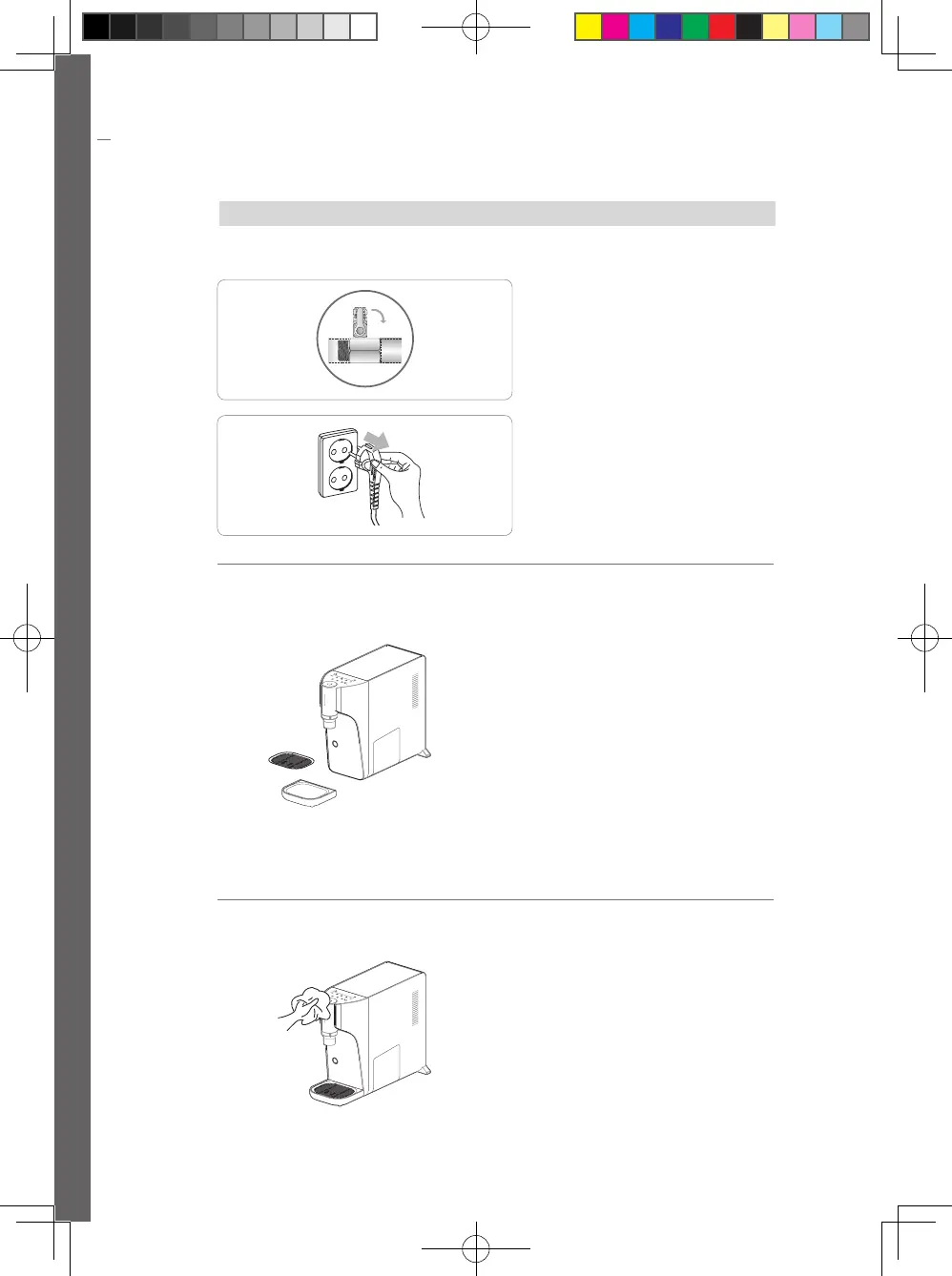
Before starting cleaning
How to clean water collector
How can I clean?
2
Remove the power cord.
1
Close Water Supply Valve.
2
After removing the water collector
cover and water collector, please
wash with running water or soft
brush
• If the water collector is cleaned with
a sharp object, the collector can be
damaged.
3
Please dry in a cool shade and use
assemble it again in the product.
※ If water is contained in the water
collector for a long time, the water can be
contamination.
Check the water collector container
frequently to make sure there is no water.
1
Please remove the water collector
xed by the magnet by hand.
• If any water is inside, the water may spill.
How to clean the exterior and water intake
panel
2
Wipe water intake panel with a wet
cloth and remove moistures with a
dried cloth.
1
When cleaning the exterior, wipe
it with a plastic cleaner and a wet
cloth. (Do not wipe it with thinner,
benzene or alcohol.)
Open
Close
Water supply
valve
23
Failures
Status Possible cause Measures
Cold water is not
cold
(If it is not a product
failure)
Low supply power
• Check if the supplied power is 220 V.
If the power is low, it should be adjusted to 220 V.
Taking a lot of water
• Continual water intake of large amounts increases the
cold water temperature.
Please try water intake later.
Cold water function
turned off
• Touch the cold water button and the lock button
simultaneously for 5 seconds to turn cold water on.
- Cold Water can be turned ON via App.
Not in normal operation
mode
• If Children Water intake button blinks, remove the power
cord and insert back after 1 minute. Then, try Cold Water
again after 1 hour.
Product installation or
unused for a long time
• Cold water generation time is required after product
installation or when not used for a long time. Please take
cold water after about 1 ~ 2 hours.
Cold water is not
cold
(If it is a product
failure)
Failure of cooling section
• While the power supply is normal, if the water is not cold
enough after 2 hours, contact the Customer Center.
Water is not taken
End of filter life
• After checking the filter replacement cycle, contact the
Customer Center.
• If the water reception fails after the filter replacement,
close Water Supply Valve, remove the power cord and,
then, contact the Customer Center.
Cut off tap water
• Close Water Supply Valve first and, then, remove the
power cord.
• When the tap water starts to run, open Water Supply
Valve and insert the power cord.
Connection hose is bent.
• Check if there is any bent on the connection hose.
Water continues to
ow, and cold water,
puried water, and
hot water LEDs ash
in sequence.
Not in normal operation
mode
• The product returns to the normal mode if One Cup
Button is touched or Water intake Button is pressed.
Failure, How can I do that in this case?
• If you suspect a malfunction while using the product, first check the following.
If the product is still in an abnormal condition, request authorized service center or customer service
center.
If it is not a product failure it may occur costs
WPU-A700-180829-EN.indd 22 2018-09-20 오후 7:29:15



 To Next Page