16
How to operate
To drink the desired water
1
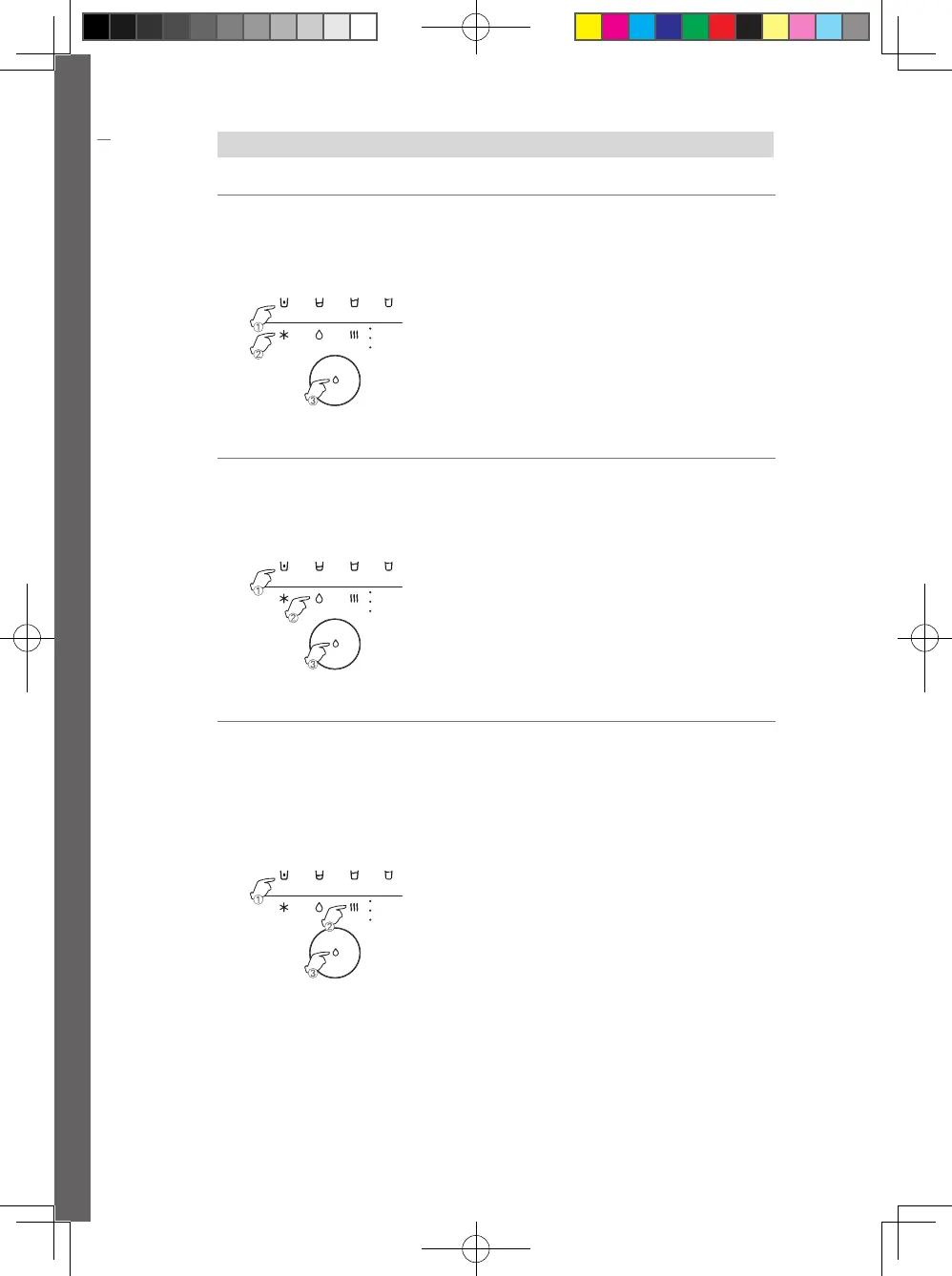
To drink cold water
1. Select a desired water intake amount.
(120ml/250ml/550ml/1,000ml)
2. Touch cold water button. (Cold Water: Blue LED)
3. Press water intake button.
• To stop the water intake, press Water intake Button again.
120ml 250ml 550ml
Cold Ambient Hot
Hot
Tea
Infant
1000ml
120ml 250ml 550ml
Cold Ambient Hot
Hot
Tea
Infant
1000ml
120ml 250ml 550ml
Cold Ambient Hot
Hot
Tea
Infant
1000ml
2
To drink puried water
1. Select a desired water intake amount.
(120ml/250ml/550ml/1,000ml)
2. Touch puried water button.
(Puried Water: Green LED)
3. Press water intake button.
• To stop the water intake, press water intake Button again.
120ml 250ml 550ml
Cold Ambient Hot
Hot
Tea
Infant
1000ml
120ml 250ml 550ml
Cold Ambient Hot
Hot
Tea
Infant
1000ml
120ml 250ml 550ml
Cold Ambient Hot
Hot
Tea
Infant
1000ml
3
To drink hot water
1. Select a desired water intake amount.
(120ml/250ml/550ml/1,000ml)
2. Touch the hot water button.
• Every time you press the hot water button, it changes to hot
water, tea, lukewarm water/ water for infant.
• Hot water: 80℃
• Tea: 70℃
• Lukewarm water/ water for infant.: 50℃
3. Press water intake button.
• To stop the water intake, press Water intake Button again.
• If there is no operation within 7 seconds after hot water
intake, it will be changed to the previous mode automatically
after using hot water.
120ml 250ml 550ml
Cold Ambient Hot
Hot
Tea
Infant
1000ml
120ml 250ml 550ml
Cold Ambient Hot
Hot
Tea
Infant
1000ml
120ml 250ml 550ml
Cold Ambient Hot
Hot
Tea
Infant
1000ml
17
How to operate
To use the function
1
To turn buzzing Sound
on or o
Touch the Continuous button for more than
5 seconds.
• With the buzzing sound, buzzing Sound is ON/OFF.
WiFi Child LockChild Lock
UV 120ml 250ml 550ml 1000ml
Cold Ambient Hot
Hot
Tea
Infant
2
To use Children Water
intake button
Press Children Water intake button located on the
front of the product.
• Only a cup of cold water or purified water is available.
• The water temperature can be selected as cold water or
constant only. If you choose (lukewarm water / water for
infant) or hot water, cold water and purified water are
automatically taken at the previously taken temperature.
3
To control the
brightness of Cock LED
1. Touch 550ml Button for more than 5 seconds.
• 550ml Button blinks and Green LED of the water intake panel
is ON.
2. Press water intake button to select a desired
brightness.
• Each button press changes the brightness.
(High, Medium, Off)
3. Touch 550ml Button.
• The setting is completed.
• If there is no other input for 5 seconds after brightness
adjustment, the setting is completed automatically.
WiFi Child LockChild Lock
UV 120ml 250ml 550ml 1000ml
Cold Ambient Hot
Hot
Tea
Infant
4
To turn UV safety care
notication LED ON or
OFF
1. Touch the UV safety care button for more than
5 seconds.
• UV safety care button blinks and UV safety notification LED on
water intake panel is ON.
2. Press water intake button.
• Each button press turns UV safety care notification LED ON/
OFF.
3. Touch the UV safety care button.
• The setting is completed.
• If there is no other input for 5 seconds after the selection, the
setting is completed automatically.
WiFi Child LockChild Lock
UV 120ml 250ml 550ml 1000ml
Cold Ambient Hot
Hot
Tea
Infant
WPU-A700-180829-EN.indd 16 2018-09-20 오후 7:29:07



 To Next Page