EasyManua.ls Logo

Skil HD182001 - User Manual

Skil HD182001
50 pages
Print Icon
To Next Page IconTo Next Page
Loading...
WARNING: To reduce the risk of injury, the user must read and understand the
Owner’s Manual before using this product. Save these instructions for future reference.
AVERTISSEMENT : Afin de réduire les risques de blessure, l’utilisateur doit lire et
comprendre le guide d’utilisation avant d’utiliser cet article. Conservez le présent guide
afin de pouvoir le consulter ultérieurement.
ADVERTENCIA : Para reducir el riesgo de lesiones, el usuario debe leer y comprender
el Manual del operador antes de utilizar este producto. Guarde estas instrucciones para
consultarlas en caso sea necesario.
Owner’s Manual
Guide d’utilisation
Manual del propietario
For Customer Service
Pour le service à la clientèle
Servicio al cliente
1-877-SKIL-999
OR
www.skil.com
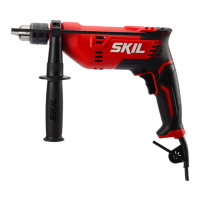
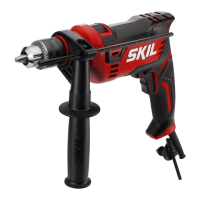
Hammer Drill
Perceuse À Percussion
Martillo Perforador
Model/ Modelo/ Modèle: HD182001

Questions and Answers

  • K
    Kyle MillerJul 28, 2025
    What to do if my Skil Drill will not start?
    • D
      Diana GreenJul 28, 2025
      If your Skil Drill won't start, there are several potential causes: 1. Ensure the power cord is properly plugged into a functioning power outlet. If it is not, plug the tool into a power source. 2. Check the power source's fuse or circuit breaker. If it has tripped, replace the fuse or reset the circuit breaker. If the issue persists, discontinue use and have the tool serviced by an authorized SKIL service center. 3. Inspect the power cord for any damage. If you find damage, have it replaced by an authorized SKIL service center. 4. A burned-out switch could also be the culprit. In this case, have the switch replaced by an authorized SKIL service center.
  • A
    Audrey ShafferAug 5, 2025
    Why does my Skil Drill not come up to speed?
    • W
      William MartinAug 5, 2025
      If your Skil Drill isn't reaching its full speed, it could be due to: 1. An inadequate extension cord. Replace it with one of the appropriate gauge and length. 2. Low house voltage. If this is the case, contact your electric company.
  • M
    Melissa TaylorAug 11, 2025
    How to reduce excessive vibration in Skil HD182001?
    • M
      Matthew GallagherAug 11, 2025
      Excessive vibration in your Skil Drill can be caused by: 1. A bent or damaged accessory. If so, discard the old accessory and replace it with a new one. 2. An improperly secured accessory in the chuck. Refer to the "Inserting Bit" section of the manual for instructions.
  • J
    johnsonjulieAug 19, 2025
    What to do if Skil HD182001 accessory binds or stalls?
    • L
      Lorraine JohnsonAug 19, 2025
      If the accessory binds, stalls the motor, or kicks back when drilling with your Skil Drill, consider these possibilities: 1. The accessory may be damaged. Discard it and replace with a new one. 2. The accessory might be incorrect for the drill speed. Use an accessory properly rated as indicated by the accessory manufacturer.

Summary

General Power Tool Safety Warnings

Work Area Safety

Keep work area clean, well lit, and free from distractions to prevent accidents.

Electrical Safety

Ensure proper plug usage, avoid earthed surfaces, and use GFCI in wet conditions to prevent shock.

Personal Safety

Maintain alertness, use PPE, prevent unintended starting, and remove tools before adjustments.

Power Tool Use and Care

Operate tools correctly, maintain them, keep bits sharp, and handle them with dry hands.

Safety Warnings for Hammer Drills

General Operations Safety

Wear ear protection, use auxiliary handles, and be cautious of hidden wiring when drilling.

Additional Safety Warnings

Long Drill Bit Safety

Operate at appropriate speeds, start slow, and apply direct pressure to prevent bit bending or breakage.

Workpiece Security and Hazard Avoidance

Secure workpieces, avoid drilling near wiring, wear PPE, and manage vibration exposure.

Trigger Lock and Cord Safety

Avoid trigger lock-on during binding situations and keep cords clear of rotating parts.

Handling Bit Binding and Chuck Installation

Release trigger immediately if bit binds, and ensure bits are securely inserted in the chuck.

Safe Bit Removal and Handling

Use protective gloves when removing bits, check for loose wrenches, and avoid carrying the drill at your side.

Electrical and Power Supply Precautions

Use GFCI, wear protective gear, and do not use AC tools with DC power supplies.

Symbols and Safety Alerts

Safety Symbols Explained

Defines hazard symbols (DANGER, WARNING, CAUTION) and the safety alert symbol for understanding risks.

Damage Prevention Information

Provides crucial information to prevent equipment or property damage, stressing eye protection.

Get to Know Your Hammer Drill

Hammer Drill Component Identification

Illustrates and labels the main parts of the hammer drill for user familiarity.

Tool Specifications

Lists technical details like model number, chuck size, and RPM for the tool.

Operating Instructions

Variable-Speed Trigger Control

Explains how to control speed by adjusting trigger pressure for ON/OFF and speed adjustments.

Lock-On Button Operation

Describes how to lock the trigger ON for continuous operation and how to release it.

Reversing Button Functionality

Details the function of the reversing button for forward and reverse rotation and necessary precautions.

Chuck Key and Storage Area

Explains the location and utility of the chuck key for easy access and to prevent loss.

Inserting and Tightening Drill Bits

Guides on inserting bits correctly and tightening the chuck using the key for a secure grip.

Auxiliary Handle and Depth Gauge Setup

Instructions for mounting, adjusting the auxiliary handle, and setting the depth gauge.

Drill;Hammer-Drill Mode Selection

Explains how to use the selector switch for drill-only or hammer-drill actions based on material.

General Operating Tips

Provides advice on holding the tool, pressure, and bit contact for efficient and neat work.

Drilling Techniques and Bit Selection

Variable Speed Drilling Control

Explains using variable speed for precise starting and avoiding bit wandering in hard materials.

Drill Bit Types and Usage

Details different drill bit types (twist, high-speed, carbide-tipped) and their applications.

Drilling Wood and Metal Guidance

Provides advice on drilling wood (clamping, backup block) and metal (pressure, speed, lubrication).

Masonry Drilling Recommendations

Advises on using carbide-tipped bits for masonry and adjusting pressure based on material hardness.

Maintenance and Storage

Tool Service and Professional Repair

Emphasizes professional servicing and warns against unauthorized repairs for safety.

Lubrication and Carbon Brush Care

Recommends gear lubrication at brush changes and periodic examination of carbon brushes.

Bearing Maintenance and Cleaning

Advises replacing noisy bearings and safe cleaning methods, avoiding damaging solvents.

Proper Tool Storage Practices

Instructions for storing the tool indoors, away from children and corrosive agents.

Extension Cords and Troubleshooting

Extension Cord Usage Guidelines

Specifies using adequate gauge, 3-wire cords for grounded tools, and notes smaller gauge means heavier cord.

Troubleshooting Common Tool Issues

Lists common problems like tool not starting or stalling, with causes and remedies.

Limited Warranty Information

Warranty Coverage and Terms

Details the one-year warranty, exclusions for accessories, and conditions for repair/replacement.

Warranty Limitations and Legal Rights

Explains limitations on incidental/consequential damages and consumer legal rights.

Skil HD182001 Specifications

General IconGeneral
BrandSkil
ModelHD182001
CategoryDrill
LanguageEnglish

Related product manuals