18
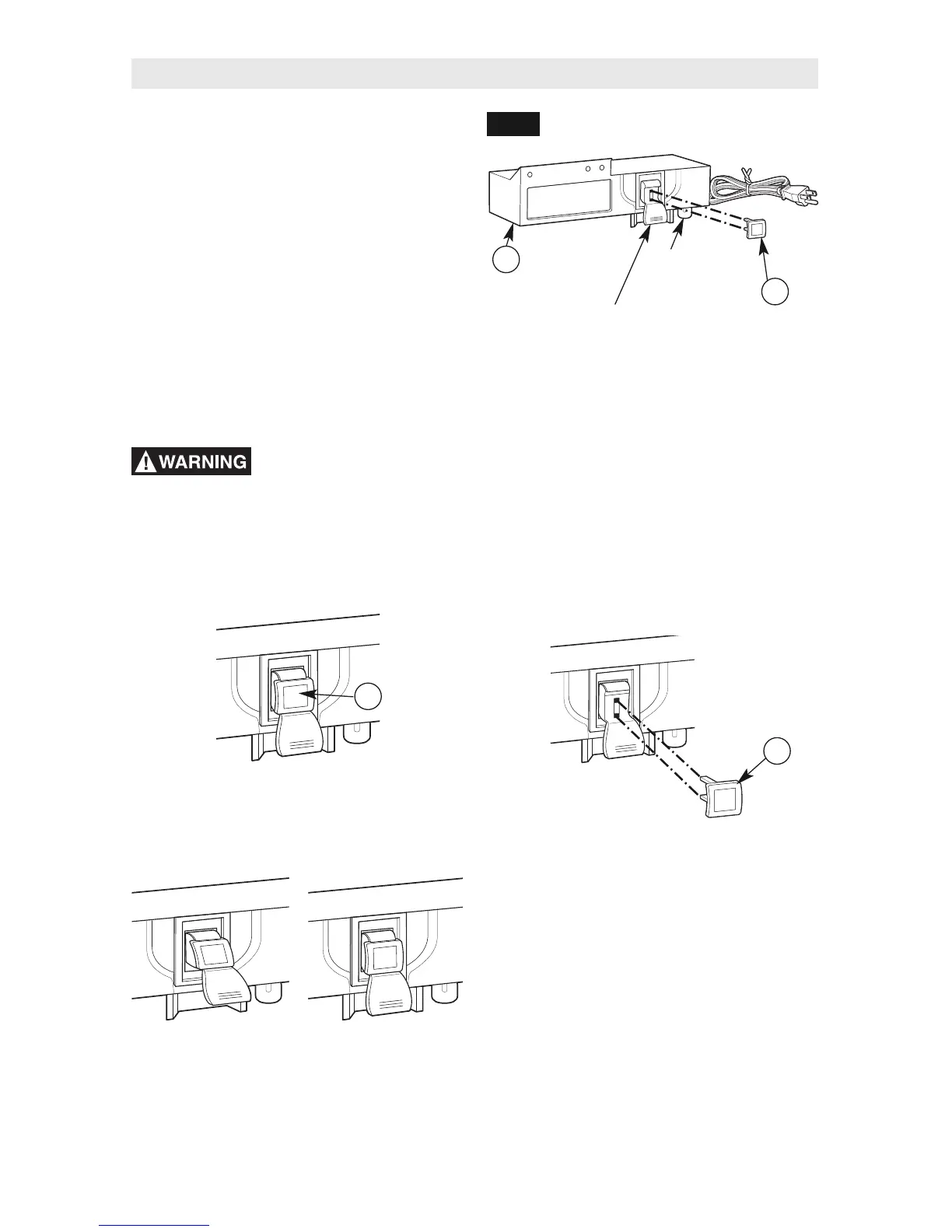
SWITCH OPERATION (Fig. 18)
This section explains the operation and features
of the switch box assembly (B) prior to plugging
the power cord into a power outlet. The intent is
to familiarize the user with the switch operation
without actually turning ON the router.
The switch box (12) (Fig. 18) incorporates a
lockout key (13) to help prevent unauthorized
use by others.
•
The lockout key (13) is the yellow part in
the top of the red plastic paddle. The yellow
lockout key must be completely inserted into
the top of the red plastic paddle and switch
box (12) before the paddle can be turned ON.
•
The circuit reset button for the switch box (12)
is on the bottom right side of the box.
Yellow
lockout key
Switch box
assembly
Red
plastic paddle
(ON/OFF switch)
FIG. 18
Make sure that the
extension cord is not
plugged into an electrical outlet before
proceeding any further.
Router Table Operation
4. To prevent unauthorized use, the switch
can be disabled by removing the yellow
lockout key (13) completely from the top of
the red plastic paddle.
1. Make sure the yellow lockout key (13) is
completely inserted in the top of the red
plastic paddle.
2. To turn the router ON, lift the red plastic
paddle up to the ON position.
3. To turn the router OFF, press the red plastic
paddle to the OFF position.
Circuit
reset button
12
13
13
13
OFF
(DOWN)
ON
(UP)


 To Next Page