17
ROUTER TABLE SETUP
Preparing the router table for use
WARNING
Lift router table only by the table edges. Lifting table by any other
surface could cause personal injury.
Helpful tools to have on hand
•
#1 and #2 Phillips screwdrivers (not included)
•
3/8” wrench or nut driver (not included)
Unfolding and locking legs
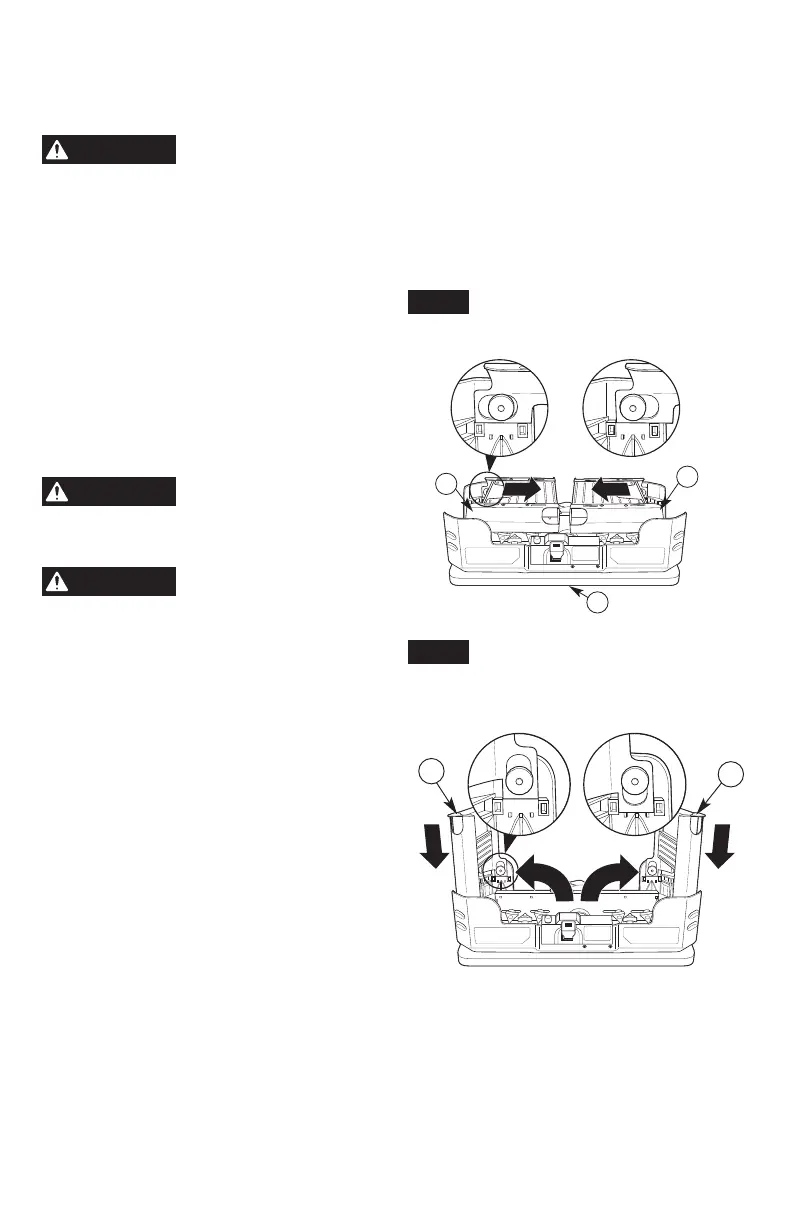
(Figs. 1 and 2)
1. Gently lift and place the router table
assembly upside down on the tabletop (1).
2. Gently pull both leg assemblies (8 and 10)
inward towards center of the table until the
leg assemblies are in the unlocked position
as shown in Fig. 1.
WARNING
Always rotate leg
assembly from end of leg
and keep ngers clear of joint. This avoids
a pinch point.
WARNING
Never rotate leg
assemblies until the
locking tabs have been completely
disengaged. This will prevent possible
damage to the locking tabs or table housings.
3. After the leg assemblies (8 and 10) are
unlocked, rotate both leg assemblies to the
fully upright and extended position (Fig. 2).
4. Gently press down on both leg assemblies
(8 and 10) to secure and lock the left and
right leg assemblies in the upright position
as shown in Fig. 2.
8
10
1
Fig. 1
Locked (Legs Slid
Towards Outside)
Unlocked (Legs Slid
Towards Center)
8
10
Fig. 2
Locked
(Legs Slid Down
Towards Table)
Unlocked
(Legs Slid Up Away
From Table)


 To Next Page