
 Need help?
Do you have a question about the Skoda Swing and is the answer not in the manual?
Covers manual scope, equipment variants, and illustration differences for user guidance.
Details safe usage practices for vehicle devices and display care instructions.
Explains radio's convenience coding, safety code storage, and procedure for code entry.
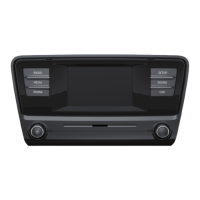
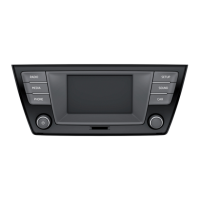
Illustrates and describes each button on the radio unit for user interaction and control.
Explains how to power the unit on/off and its behavior relative to the vehicle's ignition status.
Guides on adjusting bass, middle, treble, balance, fader, and special sound parameters.
Explains how to set special functions like AUX sensitivity, phone, beep, illumination, AF, and REG.
Guides on switching wavebands, activating FM/AM, and station searching/storage.
Explains SCAN for preview, RDS for text, and traffic reports impact on playback.
Instructions on inserting, removing, and controlling CD/MP3 playback, including safety warnings.
Covers SCAN, RPT, FOLDER, PLAYLIST, MIX, and MP3 data requirements.
Explains connecting and using external audio sources via AUX-IN and MDI inputs.
Outlines connection prerequisites, safety warnings, and proper handling of external devices.
Describes the location and activation of AUX-IN and MDI inputs for external audio sources.
This document provides a comprehensive guide to operating the ŠKODA Radio Swing, covering its general information, radio functions, CD player, and external source connectivity.
The manual is designed for ease of use, with a table of contents for quick navigation. Directional indicators like "left," "right," "front," and "rear" always refer to the vehicle's direction of travel. Important notes are highlighted with "WARNING" for serious risks of accident or injury, "CAUTION" for potential damage to the vehicle, and "Note" for general important information.
The manual describes all possible equipment variants, so not all features may be present in every vehicle. The scope of equipment for your specific vehicle is detailed in the sales documentation. Illustrations are for general information and may differ slightly from your vehicle.
The radio should only be operated when traffic conditions permit safe use, ensuring full concentration on driving. The driver is fully responsible for vehicle control. Volume should be adjusted to allow external acoustic signals, such as emergency vehicle sirens, to be heard. High volumes can cause hearing damage.
For display care, avoid solvents like benzine or turpentine, which can damage the surface. Treat the display gently, as finger pressure or sharp objects can cause dents and scratches. The display can be cleaned with a soft cloth and alcohol.
The radio is equipped with convenience coding. When first operated, the safety code is stored in both the radio and the vehicle. After disconnecting and reconnecting the battery, the ignition must be switched on before the radio. If the radio is installed in another vehicle, the safety code must be entered, which requires assistance from a specialist ŠKODA garage. This anti-theft feature significantly reduces the risk of unauthorized use after theft. The code is stored in the instrument cluster, enabling automatic decoding (convenience coding), so manual input is usually not necessary.
To enter the code, switch on the radio with the ignition on, use selection buttons 1-4 to input the safety code, and confirm by pressing selection button ⑥. If an incorrect code is confirmed, the procedure can be repeated. After two incorrect attempts, the unit will be blocked for approximately one hour. After this hour, if both the device and ignition remain on, the code can be re-entered. This cycle of two attempts followed by an hour block will continue.
The radio features an on/off knob (1) for switching the unit on/off and controlling volume. The settings knob (2) allows access to menu settings for radio or CD player parameters and activates the Scan function. The MEDIA button (3) activates audio source playback, while the RADIO button (4) activates radio mode. Buttons (5) enable fast station finding in radio mode and track selection/fast forward/backward search in CD mode. The INFO button (6) displays radio text information and additional MP3-CD information. Button (7) is for sound adjustment. The AS button (8) automatically stores radio stations, and the TP button (9) activates traffic report reception. The CD case (10) and CD-eject button (11) are for CD handling. Function buttons (12) select and store radio stations, select CDs, and enter codes.
To switch the unit on or off, briefly press the on/off knob (1). If the ignition key is removed while the unit is on, it will automatically turn off but can be switched on again by pressing the on/off knob (1). If the ignition is off, the unit automatically turns off after approximately one hour to protect the vehicle battery. If the radio was switched off by removing the ignition key, it will automatically switch back on when the ignition is turned on again.
Sound adjustment is performed by pressing the button and then selection button (12) to choose a parameter, then turning the settings knob (2) to set the desired value. Parameters include BASS, MIDDLE, TREBLE, BALANCE (left/right volume ratio), FADER (front/rear volume ratio), ON VOL (stores last volume, reduces if higher on restart), PDC VOL (reduces volume for parking aid), GALA (increases volume with speed), and LOUD (reinforces bass and treble at low volumes).
Special functions are set by pressing the settings knob (2) longer, then using function keys to select menu functions and the settings knob (2) or function buttons to set values. AUX settings control external audio source functions and input sensitivity (AUX LEV: LEV 1 for notebooks, LEV 2 for cassettes/CD players, LEV 3 for MP3 players). PHONE enables/disables mobile phone call playback through loudspeakers if a hands-free system is installed. BEEP switches on/off the tone signal for storing radio stations. ILLUM controls the illumination of control buttons (value 2 for on, value 1 for off). AF (alternative frequency) ensures the best receivable frequency for the selected station, muting briefly during search. REG (regional programs) allows access to regional broadcasts, with options for FIX (switches to regional "related" station if current reception is interrupted) and AUTO (unlimited access to regional "related" stations). BT-AUDIO enables wireless transfer of MP3 data from telephone preinstallation.
To switch between wavebands, press the RADIO button longer. The radio has FM and AM wavebands, each with 3 memory levels and 6 memory slots. To activate the FM waveband, press the RADIO button longer, then the FM selection button (12). Briefly pressing the RADIO button switches between FM1, FM2, and FM3. Similarly, for AM waveband, press the RADIO button longer, then the AM selection button (12), and briefly pressing switches between AM1, AM2, and AM3.
Manual search for stations involves turning the settings knob (2) to set the desired frequency. To store a station, select it, then press and hold selection button (12) until a brief mute and signal sound. Automatic station finding (AS) starts by pressing the AS button, storing the 6 strongest stations in FM3 and/or AM3 memory levels. After storage, any selection button (12) can recall the desired station. The stored stations in FM3 and/or AM3 can be updated by repeatedly pressing the AS button.
The SCAN function plays stations briefly (ten seconds) one after another. Pressing the settings knob (2) starts the scan. To recall the original station, press CANCEL (12). To terminate the scan, press OK (12); the current station remains selected. To choose other stations, press SKIP (12).
The RDS function displays additional text information (radio text) by pressing the INFO button. Note that radio text may not be available for all stations, and reception quality affects the time needed to read characters correctly.
The traffic information function is activated by pressing the TP button, displaying "TP". If the current station doesn't transmit traffic reports, the radio searches for one that does. Incoming traffic reports automatically interrupt CD playback and resume original playback afterward. To turn off the function, press the TP button again; the "TP" symbol will disappear.
The internal drive plays Audio-CDs (CD-A) and MP3-CDs. To insert a CD, place it printed side up into the CD slot (10) until it is automatically drawn in; playback starts automatically. To remove a CD, press the button; the CD will eject. If not removed within 10 seconds, it will retract for safety.
During CD playback, briefly pressing the or buttons or turning the settings knob (2) selects the previous or next track. For quick playback, press and hold the or buttons. Playback continues after release. To scroll through folders or playlists (for MP3 files), use selection button (12).
To change between audio sources, press the MEDIA button to select CD (internal drive), CDC (external CD changer), AUX/MDI (external input), and BT-AUDIO (wireless transfer of MP3 data from telephone preinstallation).
The CD Player is a Class 1 laser product, safe under normal operation. Never remove the housing. Do not insert CDs with the " " designation or "Eco Discs." After pressing the eject button, there's a delay before the CD fully ejects; wait to avoid damaging the drive. Dirty, damaged, unreadable, or incorrectly inserted CDs can cause playback problems. Check the CD and reinsert it properly. If problems persist, try another CD or visit a ŠKODA specialist garage. If the internal temperature is too high, no CDs will be accepted, and the unit will switch to the last active operating mode. Never use liquids like gasoline, paint thinner, or record cleaner to clean CDs. Do not expose CDs to direct sunlight, write on them with inappropriate tools, or affix anything to them.
Uneven road surfaces and strong vibrations can cause CDs to skip. Moisture (condensate) in cold or rainy weather can impair playback; wait for it to dissipate. Clean dirty CDs from the inside out with a soft, lint-free cloth. For heavy stains, use a commercial CD cleaner and allow it to dry. Copyright-protected and home-made CD-R/CD-RW discs may not play back or may only play under certain circumstances.
Note additional information for MP3 mode and observe national copyright laws. The CD Player does not contain user-serviceable parts; for defects, visit a ŠKODA specialist garage. If an ejected CD is not removed, it will retract. If the radio is in TP mode before switching to CD mode, CD playback will be interrupted during traffic reports, and the unit will switch back to radio mode. After reports end, the unit switches back to CD mode.
Consecutive playback of each title for 10 seconds. Briefly press the settings knob (2) to start scrolling. To recall the original title, press CANCEL (12). To stop the scan, press OK (12); the replayed title remains selected. To select another track, press SKIP (12).
During CD playback, the display shows RPT (repeat mode selection): OFF (continuous play), TRACK (repeat selected title), FOLDER (repeat titles from the active folder for MP3 CDs). FLD DOWN (PREV PL) scrolls downwards in folders, and FLD UP (NEXT PL) scrolls upwards.
PLAYLIST plays selected titles from individual folders stored on the CD. BROWSE scrolls through the entire folder structure, active only for external audio sources connected via MDI input. BROWSE functions include CANCEL (ends BROWSE), TOP (returns to root folder), UP (returns to a higher level), PLAY ALL (replays all titles from selected folder), OPEN (opens sub-folders), and PLAY (starts playback of selected title). MIX plays titles in random order. Confirm OPEN and PLAY using the selection button or by pressing the settings knob (2).
Requirements for MP3 data and data carrier: CD-ROM, CD-R, CD-RW with 650/700 MB capacity. CDs must conform to ISO 9660 Level 2 standard and Joliet data system (single/multi-session). Data names must be no longer than 64 characters. List structure is restricted to 8 levels deep. Artist, album, and title (ID3 tag) can be displayed; if no ID3 tag, list and data name are shown. Playlists are not supported. WMA data (Windows Media Audio) can be played even if copyright-protected by DRM, but such WMA data is not supported by the unit.
Press the INFO button to display additional information about the current track. Use selection buttons (11) - (12) to select additional MP3 file information. The system supports MP3 data with bit rates of 32 to 320 KB/s and variable bit rates. Indicated playing time data with variable bit rates is not reliable.
External audio sources can be played through the vehicle's radio loudspeakers. A different audio source can be selected at any time, and the external source remains active in the background if not switched off. Refer to the specific manufacturer's owner's manual for operating the external audio source. If an external audio source is connected via the multimedia input, the display in the Audio menu will show AUX instead of MDI. An audio source connected via AUX-IN can only be played if no data storage unit is connected to the multimedia input.
For AUX-IN, a 3.5 mm standard jack plug is needed; an adapter is required if the external source doesn't have this plug. Only USB 2.0 devices are supported. The connected device's file allocation table (FAT) must be FAT16 (<2 GB) or FAT32 (>2 GB). Playing from a hard disk with a large data volume or a complicated folder structure may cause a time delay when reading music data. The folder structure must not exceed 8 levels deep, and one folder must not contain more than 1,000 files. A USB extension cable or USB distributor (HUB) must not be used. A special adapter is required for MDI input, available from an authorized ŠKODA Service Partner for USB devices, Mini USB output devices, or iPods.
The play function volume of external audio sources can be adjusted via the radio's volume control. Depending on the connected source, its output volume can also be changed. Input sensitivity can be adjusted to match other audio sources or avoid distortions.
Never place external sources on the dashboard or near airbags, as they could be thrown into the passenger compartment during sudden maneuvers or airbag deployment, causing injury. Never hold external sources in hand or on knees while driving. Always route connection cables to avoid restricting driving. The AUX-IN input is only for audio sources.
Refer to the specific manufacturer's owner's manual for operating the external source. An external audio source connected via AUX-IN can only be used if no other unit is connected via MDI. If an external audio source with an adapter for external power supply is connected via AUX-IN, audio signal interruptions may occur depending on the adapter's quality.
The AUX-IN input is located under the front armrest. Activate it by pressing the MEDIA button and then the AUX selection button. Playback starts automatically after connecting the source. External audio sources connected to AUX-IN cannot be operated from the radio.
The MDI input is located under the front armrest, in the storage compartment of the front passenger side, or in the center console (depending on vehicle model). A special adapter is needed for MDI input. Activate MDI input by pressing the MEDIA button and then the MDI selection button. Audio files in MP3, WMA, OGG Vorbis, and AAC formats from external data storage devices connected to MDI input can be played via the radio. External audio sources connected to MDI input can be operated from the radio.
 General
| Type | Car Receiver |
|---|---|
| Touchscreen | Yes |
| Supported formats | MP3, WMA |
| Connectivity | Bluetooth, USB, AUX, SD card reader |
| Bluetooth | Yes |
| USB | Yes |
| AUX | Yes |
| SD card reader | Yes |
| Radio | AM/FM |
| MP3 Playback | Yes |
| CD Player | No |
| Steering Wheel Controls | Yes |
| Display | Color |











 To Next Page