If an incorrectly entered code is confirmed, the procedure can be repeated once
again.
If the code number is entered incorrectly for the second time, the unit will be
blocked for approx. one hour. It is possible to enter the safety code again after
one hour has expired if both the device and the ignition have stayed turned on
during that time.
The cycle - two attempts, blocked for an hour - will continue to apply.
Device specification and operation
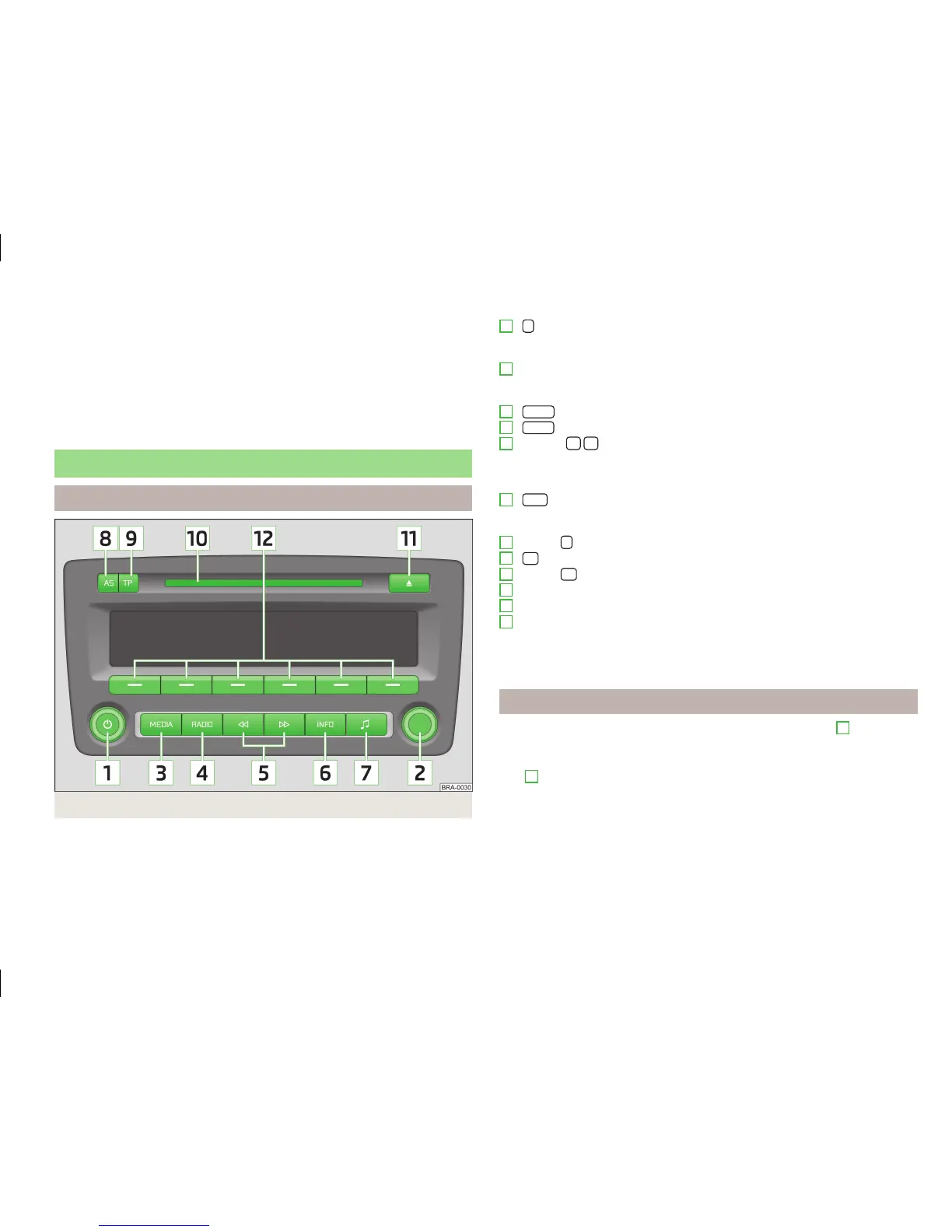
Device specification
Fig. 1
Equipment overview
- On/off knob
›
to switch the radio on and off (push)
›
for volume control (turn)
Settings knob
›
to call up the menu settings for the radio or CD player parameters
›
to activate the Scan function
MEDIA
button to activate the play function of audio sources
RADIO
button to activate the radio mode
Buttons
›
fast station finding in radio mode
›
Select the track in the CD mode, fast forward/backward search in the CD
mode
INFO
button
›
Display of radio text information
›
Display of additional information of MP3-CDs
Button
for sound adjustment
AS
button to store radio stations automatically
Button
TP
to activate the reception of traffic reports
CD case
CD-eject button
Function buttons
›
Select and store radio stations
›
Select CD
›
Enter code
Switching the unit on and off
›
The unit is switched on or off by briefly pressing the on/off knob
1
.
If the key is removed from the ignition while the unit is still switched on, it will
turn off automatically. The unit can be switched on again by pressing the on/off
knob
1
. If the ignition is switched off, the unit protects the vehicle battery by
switching itself off automatically after approx. one hour.
If you have switched the radio off by removing the ignition key, the radio switches
itself back on when the ignition is turned on again.
1
2
3
4
5
6
7
8
9
10
11
12
3
General information












 To Next Page