
 Need help?
Do you have a question about the Skoda SYMPHONY and is the answer not in the manual?
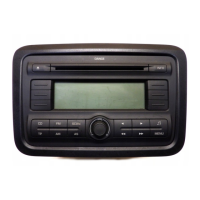
Details each numbered control and button on the car radio's front panel.
Describes the primary control knob for power, volume, tone, and balance adjustments.
Explains the function of the AUD button for tone control (bass/treble) adjustments.
Explains the function of the GEO button for tone balance (fader/balance) adjustments.
Details the use of the Dolby button for noise reduction system activation.
Covers the automatic reversal of tape direction and the process for ejecting a cassette.
Describes the A/F button for switching between FM/AM wavebands and memory levels.
Explains the TP button for traffic programme functions and accessing the setup menu.
Details the AIM button for storing and playing back traffic announcements.
Explains the C/D button for source selection between cassette, CD, and radio modes.
Describes the rocker button for searching radio stations and scrolling through memory lists.
Explains the AS button for automatic storage of radio stations.
Explains the function of the security diode indicating theft protection status.
Describes the SCN button for scanning stations or playing titles in cassette/CD mode.
Emphasizes the need for full attention to the road and safe operation of the radio system.
Mentions the convenience of controlling the Skoda CD changer or CD player.
Explains how to use the main control knob for power, volume, and tone adjustments.
Describes the A/F button for switching between FM and AM wavebands and memory levels.
Explains how to automatically store the strongest radio stations using the AS button.
Details the SCN button for scanning through stations in the selected waveband.
Explains how to store and recall RDS stations using the intelligent search function.
Details how to adjust bass and treble settings using the AUD button and control knob.
Explains how to adjust the fader and balance settings using the GEO button and control knob.
Provides details on storing RDS stations and the benefits of the Best Station Function.
Explains the RDS system, including PI, PS, AF, and TP codes.
Details how to use the TP button for traffic announcements and automatic station search.
Explains the AIM function for storing traffic announcements with a digital voice memory.
Describes how to store and recall up to 24 stations using the station buttons and memory levels.
Details playback options for stored traffic announcements in chronological or random order.
Explains how to repeat the current traffic announcement.
Explains how to manually tune radio stations and perform station searches.
Details the process of manually storing radio stations onto the station buttons.
Explains cassette insertion, tape run indication, and the Dolby noise reduction feature.
Describes how to use the rocker to fast forward or rewind the cassette tape.
Explains how to change tape direction and eject the cassette.
Details the MSS function for automatically searching for the beginning of music pieces.
Explains how traffic announcements interrupt cassette playback and how to manage them.
Explains how to select and repeat individual tracks on a CD.
Details how to activate and deactivate the random play function for CDs.
Describes how to quickly preview tracks on a CD at reduced volume.
Explains the SCAN function to play each CD track for approximately 8 seconds.
Details how traffic announcements affect CD playback and how to manage them.
Explains how to stop CD playback by changing the programme source.
Explains how to access and navigate the setup menu for various functions.
Details how to manually set the time and use RDS synchronization.
Explains how to synchronize the clock with RDS information or disable it.
Details how to adjust the minimum volume for traffic announcements.
Explains how to enable or disable automatic station search sensitivity.
Explains how to select alternative frequencies, prioritizing regional stations in emergencies.
Details how to adjust the sensitivity of the station search function.
Explains how to select between mono and stereo sound output.
Details how to set a maximum volume limit for when the radio is switched on.
Explains the Loudness function for improving sound at low volumes.
Details how to control radio power using the ignition switch or the IO button.
Explains the RM function for switching to the last selected radio program.
Details how the radio handles telephone calls, muting or routing audio.
Explains how to set the minimum volume level for telephone calls.
Details the GALA function which automatically adjusts volume based on vehicle speed.
Explains how to check if the coding (theft protection) is activated or not.
Explains the convenience radio coding system and when a security code is not needed.
Details the convenience coding system and how to obtain a security code if necessary.
Provides step-by-step instructions to deactivate the security system after power loss.
Explains the consequences of entering incorrect codes and waiting times for retries.
Details the procedure to activate the theft protection system using the radio card code.
Explains the flashing behavior of the security diode when the radio is off.
Provides recommendations for optimal cassette playback quality and maintenance.
Outlines the guarantee conditions applicable to the car radio systems.
Lists the various external connections supported by the car radio.
Details the types of information displayed by the car radio.
Specifies the maximum audio output power of the car radio.
Describes the anti-glare illumination and its adjustability.
Explains how wavebands are selected using touch buttons.
Details the technical aspects of the cassette player, like sound head and MSS.
Explains the electronic security system for preventing unauthorized use.
Lists the supported radio reception ranges (FM, AM).
Describes the features that suppress radio interference.
Details automatic station memory, manual tuning, and PLL tuning.
Summarizes the automatic station search and traffic announcement features.
Lists the audio features like tone control, balance, and speed-dependent volume.
The device is a car radio system, specifically the ŠkodaAuto Symphony model, designed to provide a comprehensive audio experience within a vehicle. It integrates radio, cassette, and CD changer functionalities, ensuring a wide range of entertainment options for the user.
The core function of the device is to provide audio entertainment through various sources. It features a radio mode with both FM and AM (MW) reception ranges. The radio supports automatic station search, traffic announcements, and manual tuning for RDS stations. It also includes an automatic station memory function, allowing users to quickly access their favorite stations. The system can store up to six stations for each of the AM1/AM2 and FM1/FM2 wavebands. Traffic programme functions are a key feature, enabling automatic traffic announcements and the ability to interrupt ongoing announcements. The device can store up to 24 traffic announcements in chronological order, with a storage standby of 2 hours. If the memory is full, the oldest announcement is overwritten.
The cassette player is equipped with a wear-resisting high-performance sound head and automatic tape type recognition. It supports fast forward and rewind, electro-motoric cassette ejection, and automatic stop at tape end. A notable feature is the automatic change of cassette side at tape end (autoreverse) and a music search system (MSS). The MSS allows users to search for the beginning of the next or previous music piece on a cassette. The device also incorporates Dolby® noise reduction system for improved sound quality during cassette playback.
For CD playback, the system connects to an original Škoda CD changer or CD player. It allows for selecting and repeating tracks, as well as playing tracks in random order. Source selection between FM/AM, tape, or CD is managed through a dedicated button.
Audio functions include stereo sound for radio, cassette, and CD. It features active tone control, sound balance control (Fader and Balance), and a speed-dependent volume control (GALA). The GALA function automatically adjusts the volume based on vehicle speed, compensating for increased noise levels.
A crucial security feature is the electronic security system, which locks the radio if the power supply is disconnected. The radio can only be reactivated by entering a correct code number, which is typically found on a radio card. A security diode flashes when the radio is switched off and the ignition key is removed, indicating the active theft protection.
The device also integrates telephone functions, allowing the user to select whether a telephone call is heard via the loudspeakers when a mobile phone is connected. It can automatically mute the car radio on reception of a call and allows adjustment of the minimum telephone sound volume.
The device is operated through a combination of control knobs, push buttons, and rocker switches. The control knob/push button serves multiple purposes: switching the radio on/off, adjusting volume, and controlling tone settings (bass, treble, fader, balance). Pressing the knob switches between these settings, which are indicated on the display.
Station selection is intuitive, with six station buttons for each waveband. The "AS" button enables autostore functionality, automatically storing the strongest stations in a convenient order. The "SCN" button allows scanning through all stations in a selected waveband. Manual tuning is also possible using the rocker switch.
For cassette playback, inserting a cassette automatically switches the device to cassette mode. The Dolby® button activates or deactivates the noise reduction system. The rocker switch is used for fast forward and rewind, and the music search system. Ejecting a cassette is done by pressing a dedicated button.
In CD changer mode, the rocker switch is used to select tracks and for fast forward/rewind. The "SCN" button plays every track for about 8 seconds, while the "SHFL" function plays tracks in random order.
The "TP" button is central to traffic programme functions. It activates and deactivates traffic announcements, and pressing it during an announcement can interrupt it. The "AIM" button (Automatic Information Mode) allows storing traffic announcements for later playback.
The "SETUP" menu, accessed via the "TP" button, allows users to customize various settings such as TM (Traffic Message), SYNC (synchronization), TAVOL (Traffic Announcement Volume), LRN (Learn), REG (Regional), LOC (Local), MONO (Mono), ONVOL (On Volume), LOUD (Loudness), IGN (Ignition), PHONE (Phone settings), GALA (Speed-dependent volume control), CODE/SAFE (security coding), and BEEP (sound signal). These settings are adjusted using the control knob/push button and the rocker switch.
To ensure optimal performance and longevity, the manual provides several maintenance tips, particularly for the cassette player. Users are advised to use "chromium dioxide" or "metal" cassettes from renowned manufacturers for best playback quality. To prevent distortions, cassettes with a playing time of max. 90 minutes (C-90) are recommended, with C-60 cassettes being particularly appropriate.
It is crucial not to stick adhesive labels or additional labels on cassettes, as they can detach during playback and cause malfunctions. Cassettes should not be exposed to extreme temperatures (below -10°C or above +50°C) inside the vehicle. Direct sunlight should also be avoided, and cassettes should ideally be stored in their original boxes or in a cassette tray with a reel lock.
If high frequencies are lost after long operation (approximately 100 hours), it may indicate a soiled sound head. In this case, cleaning the sound head with a wet cleaning cassette from a renowned manufacturer is recommended, following the manufacturer's instructions.
For security, if the radio's electronic security system locks (e.g., after battery disconnection or a blown fuse), the correct code number must be entered to reactivate it. If the radio card with the code number is lost, users are advised to contact a Škoda service point. The device also includes an incorrect code number lockout mechanism, with increasing waiting times after multiple failed attempts.
The device is designed with automatic interference suppression circuits to minimize disturbances from the vehicle's electrical system, such as the motor, ventilator, and windscreen wiper. This helps maintain clear audio quality. The manual also states that the paper used for the manual is chlorine-free and bleached pulp, indicating an environmental consideration.
 General
| Type | Car Receiver |
|---|---|
| Brand | Skoda |
| Model | SYMPHONY |
| Supported Media | CD, Radio |
| RDS | Yes |
| CD-changer control | Yes |
| Display | LCD |
| Power Output | 4 x 20W |
| Supported formats | MP3 |
| Connectivity | AUX |












 To Next Page
