9
GB
Treble control (TRE)
• "TRE" and the current setting +6 to –6
appear in the display.
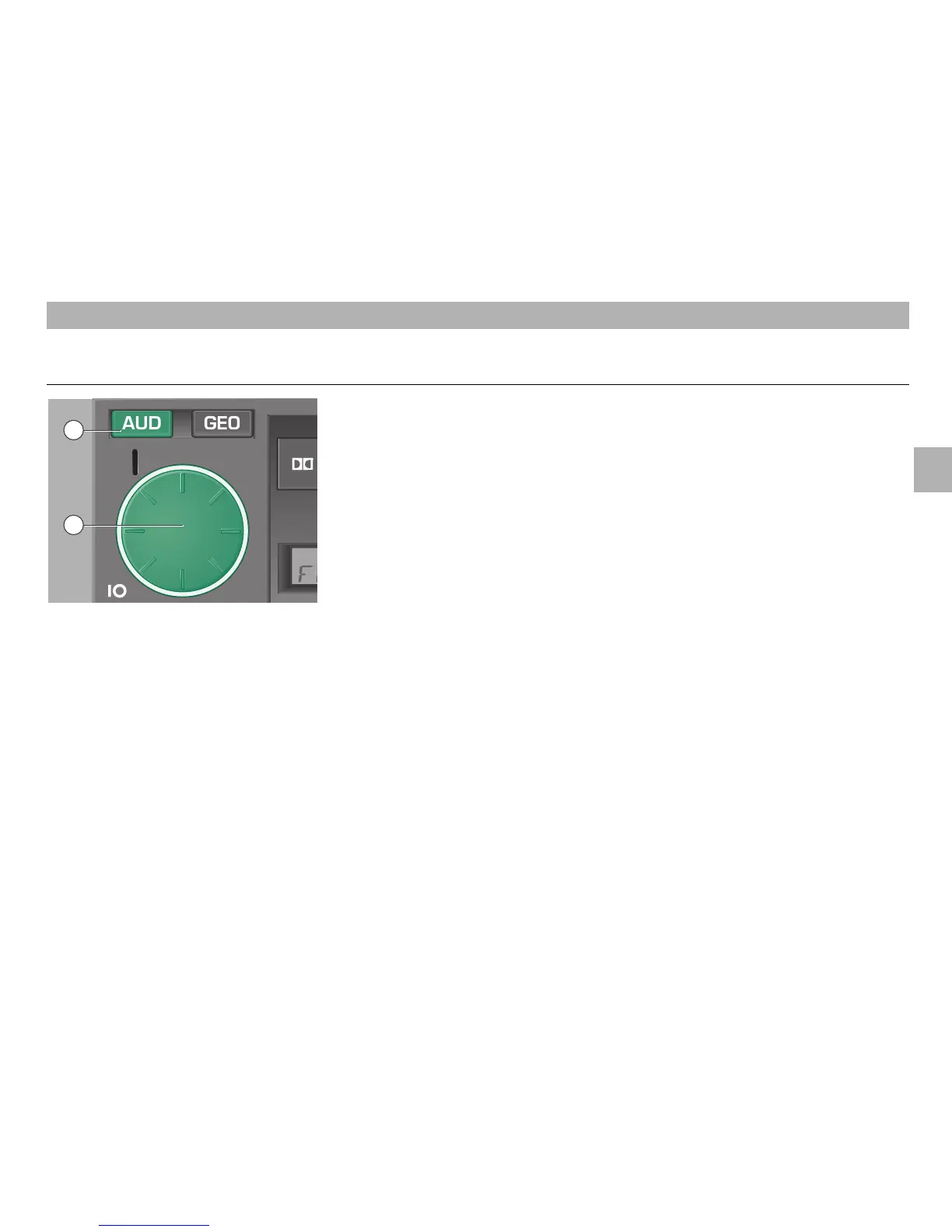
• Turn the control knob/push button
1
to
the left or the right to adjust the desired
setting.
• If you wish to adjust the treble control
immediately to its normal setting, press
the AUD button
2
until "TRE 00"
appears in the display.
• When this is done, press the AUD
button
2
again to store the setting.
• To go directly to the treble control mode,
press the AUD button
2
briefly twice.
RADIO MODE
2
– Tone control button
After pressing the AUD button
2
, the fol-
lowing indications appear in the display:
• 1 pressure: bass control "BASS",
• 2 pressures: treble control "TRE".
You may change the tone control setting
by turning the control knob/push button
1
.
Tone control
Bass control (BASS)
• Press the AUD button
2
. "BASS" and
the current setting +6 to –6 appear in the
display.
• Turn the control knob/push button
1
to
the left or the right to adjust the desired
setting.
• If you wish to adjust the bass control
immediately to its normal setting, press
the AUD button
2
until "BASS 00"
appears in the display.
• When this is done, press the AUD
button
2
again to store the setting.
This will select at the same time the
treble control mode.
2
1













 To Next Page