This document describes the ŠkodaAuto CAR RADIO DANCE, a car radio designed for Škoda Fabia and Roomster models. It provides an overview of its functions, important information, anti-theft protection, basic settings, special functions, radio mode, and CD changer operation.
Function Description
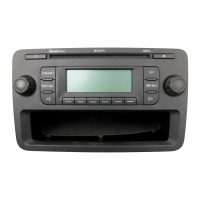
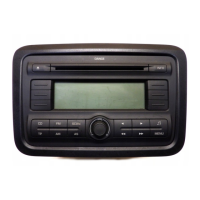
The ŠkodaAuto CAR RADIO DANCE is an integrated audio system for vehicles, offering radio reception (FM and AM wavebands) and CD playback (CD-DA/CD-R/CD-RW/MP3, multisession). It features a display screen, rotary/push knob for volume and menu navigation, and various buttons for specific functions.
Radio Mode:
- Waveband Switch-over: The radio supports FM and AM wavebands, each divided into 3 memory levels (FM1, FM2, FM-AS for FM; AM1, AM2, AM-AS for AM), providing 6 memory spaces per level.
- Manual Search: Allows users to set the desired radio station frequency using dedicated buttons.
- Automatic Station Finding (SEEK): Searches for the next available radio station in the selected waveband.
- Store Station: Users can store up to six stations with the strongest reception in each waveband by holding down a station key.
- Automatic Station Finding with Storing: Automatically finds and stores the 6 strongest stations in the current waveband.
- Radio Text (INFO): Displays additional text information transmitted by certain radio stations (e.g., song titles, artist names).
- Traffic Reports (TP): Activates traffic information mode, automatically interrupting other audio sources to broadcast traffic reports. The system can search for stations transmitting traffic reports if the current station does not.
- Function SCAN: Briefly plays each station in a waveband for ten seconds, allowing users to preview and select stations.
- Program Types (PTY): Enables searching for radio stations based on desired program types (e.g., News, Sport, Music genres like Pop, Rock, Classical).
CD Changer Mode:
- CD Playback: Supports CD-DA, CD-R, CD-RW, and MP3 multisession CDs.
- Track Selection: Allows users to select previous or next tracks, and perform fast forward or reverse searches.
- Function SCAN: Plays the first 10 seconds of each title on the CD, displaying the title number.
- MP3 Data Play Function: Displays information such as current title number, folder number, playing time, and active repeat/mix modes.
- Selective Functions (MIX/REPEAT):
- MIX: Plays titles in random order (continuous, within a folder, or from randomly selected folders for MP3 CDs).
- REPEAT: Repeats the selected title or all titles within an active folder (for MP3 CDs).
External Sources (AUX):
- The radio is equipped with a connection for external audio units, such as portable players.
- Input Sensitivity Setting: Allows adjustment of input sensitivity (AUX LEV 1, AUX LEV 2, AUX LEV 3) depending on the external source's output level.
Important Technical Specifications
- Power Output: 4x20 W at 14.4 V, 25°C, 10% THD (Total Harmonic Distortion); 4x35 W peak power.
- Audio Processing: Digital audio processor with Equalizer according to vehicle model.
- Display: Positive FSTN (Film Super Twisted Nematic) with Graphic 200x47 active points.
- Wavebands: FM and AM, each with multiple memory levels.
- CD Compatibility: CD-DA, CD-R, CD-RW, MP3 (multisession).
Usage Features
- Rotary/Push Knob (1): Used for switching the unit on/off (press), volume control (rotate), and adjusting other function settings in various menus.
- Station Keys (12): Used for storing and selecting RDS stations, CD selection, and selecting parameters for user settings.
- CD Eject Button (13): Ejects the CD from the integrated player.
- Display Screen (15): Shows current radio station, frequency, track information, menu settings, and other relevant data.
- Audio Settings (MENU): Allows adjustment of sound parameters like TREBLE, MIDTONE, BASS, LOUD, MONO, BALANCE, FADER, GALA (speed-dependent volume), PDC VOL (parking aid volume reduction), PH VOL (handsfree system volume), and TA VOL (minimum volume for traffic reports).
- Special Functions (MENU): Accesses settings for LEARN (automatic frequency updating for clear reception), REGIONAL (handling of regional program variations), SEEK (local or all available stations), and AUX (external source connection).
- Anti-theft Protection: The radio features convenience coding, where the safety code is stored in the instrument cluster and automatically decoded. Manual code entry is required if the radio is installed in a different vehicle or after certain battery disconnections.
Maintenance Features
- Display Care: The display should be handled carefully to avoid dents and scratches. It can be cleaned with a soft cloth and pure alcohol to remove finger marks. Solvents like turpentine or petrol should not be used as they can corrode the display surface.
- CD Care: CDs should be cleaned with a soft, fluffy cloth from inside to outside, not in a circular motion. For severe dirt, a commercially available CD cleaner can be used. CDs should not be exposed to direct sunlight, written on, or affixed with anything. Always store CDs in a protective case to prevent scratches and reading errors.
- Condensation: If moisture deposits in the CD drive due to cold or rain, it may affect CD playback. The system should be allowed to dissipate the moisture before use.
- Warranty: The equipment comes with the same warranty terms as new vehicles. After warranty expiration, reconditioned original units can be used for replacement, provided there is no housing damage or unauthorized repair attempts.

 Need help?
 General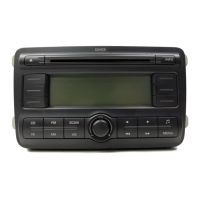







 To Next Page