This document describes the Škoda Auto Beat car radio, providing details on its functions, technical specifications, and usage.
General Functions
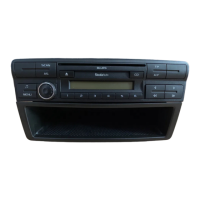
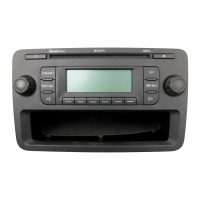
The car radio features a left-hand press/turn knob (1) for ON/OFF switching and volume control, and a right-hand press/turn knob (2) for frequency/title scan and manual tuning. Six station buttons (3) (numbered 1-6) are available for radio station selection and CD selection. A dedicated CD button (4) is used to call up CD playback. Navigation buttons (5) and (6) allow browsing forwards and backwards. The AM/FM button (7) switches between AM and FM bands and changes memory areas. The TP button (8) activates or deactivates traffic announcements. The AS button (9) initiates automatic station storing. A Note button (10) allows access to sound settings (Treble, Bass, Balance, Fader).
The display shows various information including TP (Traffic Programme set) (11), FM1/FM2 UKW pre-sets (1-6 or 7-12), AM1/AM2 LW/MW pre-sets (1-6 or 7-12) (12), station number (13), and programme name/frequency (14).
Important Advice
For safety, it is crucial to prioritize concentrating on traffic while driving. Any extensive adjustments, such as those in the Setup menu, should only be made when the vehicle is stationary. The volume should be set to allow awareness of external acoustic signals.
Comfort Radio Coding
The car radio is equipped with a device-specific security code. This code only needs to be entered once during the initial setup in the vehicle. After the first entry, the radio "acquaints itself" with the vehicle, eliminating the need for re-entry if the on-board voltage is interrupted. The radio automatically checks vehicle data upon ignition. The code is only requested again if the radio detects it is in a different vehicle. If a security code was not provided, the vehicle is fitted with a comfort coding system that does not require one. In such cases, after battery disconnection and reconnection, the ignition must be switched on before the radio. If a code is desired, contact a Škoda service partner or importer. The code number should be kept in a safe place at home, not in the vehicle, to deter theft.
Switching On and Off / Setting the Volume
The radio is switched on and off by pressing the left-hand knob (1). Upon switching on, the radio adopts the last set parameters for Treble, Bass, and Balance. The volume is reduced, if necessary, to the maximum initial level set in the "ONVOL" Setup menu. Volume can be adjusted by turning the left-hand knob (1) between Volume 0 and Volume 45.
Setting the Sound (Geometry)
Sound settings (treble, bass, balance, fader) can be adjusted.
- Bass: Press the Note button (10) once. "BASS" appears on the display. Use the right-hand knob (2) to adjust bass from -9 to +9.
- Treble: Press the Note button (10) again. "TRE" appears on the display. Use the right-hand knob (2) to adjust treble from -9 to +9.
- Balance: Press the Note button (10) again. "BAL" appears on the display. Use the right-hand knob (2) to adjust balance from LEFT 9 through CENTER to RIGHT 9.
- Fader: Press the Note button (10) again. "FAD" appears on the display. Use the right-hand knob (2) to adjust fader from REAR 9 through CENTER to FRONT 9.
If the Note button (10) is pressed again or 5 seconds elapse after the last adjustment, the radio returns to normal operation and stores the values.
Radio Mode
The car radio has an FM and AM receiver with 6 pre-sets for each band (FM1, FM2, AM1, AM2). The selected range is shown on the display at position (12).
- Change-over AM - FM: A long press on the AM/FM button (7) switches between AM and FM bands, setting the radio to the last station listened to in the respective band.
- Change-over FM1 - FM2 (Message displayed (12) = FM): A short press on the AM/FM button (7) switches between FM1 (pre-sets 1-6) and FM2 (pre-sets 7-12).
- Change-over AM1 - AM2 (Message displayed (12) = AM): A short press on the AM/FM button (7) switches between AM1 and AM2 ranges.
- Switching Traffic Announcements On/Off (Message displayed (11) = TP): A short press on the TP button (8) activates the TP (Traffic Programme) band, preparing the radio to receive traffic announcements, potentially with higher speaker volume. A TP symbol (11) appears on the display. Traffic announcements interrupt CD playback. If the programme cannot receive traffic announcements, "NO TP" is displayed. To switch off TP, press the TP button (8).
Selecting a Programme
- Via Station Buttons: A short press on a station button (3) sets a stored programme, indicated on the display (13).
- Browsing: A short press on the (5) or (6) button initiates searching in the selected direction for the next receivable programme.
- Manual Tuning: Turn the right-hand knob (2) clockwise for higher frequency or counterclockwise for lower frequency.
- Scan: A short press on the right-hand knob (2) briefly plays all receivable programmes in the set range.
Storing Programmes
- Storing Manually: A long press on the desired station button (3) stores the current programme on the appropriate memory pre-set (AM1, AM2, FM1, or FM2). If "BEEP" is activated in the Setup menu, an audible beep confirms the setting.
- Storing Automatically (AM2 and FM2 only): A long press on the AS button (9) initiates automatic storage. The radio stores the six strongest programmes in the selected range, indicated by "STORE" on the display.
RDS Functions
RDS (Radio Data System) displays programme names (14). While driving, RDS automatically searches for alternative frequencies for the set programme to ensure optimal reception.
- Storing RDS Programmes: Press the station button only when the programme name is shown on the display, ensuring all RDS data is evaluated and stored. Avoid storing "scrolling text."
- General Advice: In unfavorable conditions (e.g., mountainous areas), the radio frequently checks alternative frequencies, which may cause momentary sound interruptions.
- How RDS Works: RDS transmits an inaudible digital data stream alongside the radio signal, containing:
- Programme Identification (PI code): Identifies the received programme.
- Programme Service Name (PS code): Provides the name to be shown on the display (14).
- Alternative Frequencies (AF list): Contains relevant frequencies for receiving the programme from different transmitters.
- Traffic Programme Identification (TP; message (11) on display): Identifies programmes with traffic information.
- Traffic Announcement Identification (TA): Identifies traffic messages. If necessary, the radio's volume is raised, and CD mode is interrupted.
- EON (Enhanced Information Concerning Other Networks): Programmes using EON pick up traffic messages from other programmes, displaying the other programme's name during the message.
CD Mode
- Play CD Selection: Pressing the CD button (4) switches to CD mode. "CD" appears on the display, and the last selected CD plays.
- CD Selection: Use buttons (3) (1-6) to select the desired CD from the magazine. The CD loads and plays once its contents are read.
- Title Selection: Turn the right-hand button (2) clockwise for the next title, or counterclockwise for the previous title.
- Browsing Forwards/Backwards: Pressing the (5) (backwards) or (6) (forwards) button during CD playback rapidly moves through the current title.
- Title Scan: Briefly pressing the right-hand knob (2) starts Title Scan, playing each title for a few seconds.
- Shuffle Mode: All titles on a CD play in random order. Shuffle mode can be activated from the Setup menu (page 11, CD section).
- Return to Radio Mode: Pressing the AM/FM button (7) switches back to Radio mode.
A long press on the right-hand knob (2) accesses the Setup menu for special settings. Changes should only be made when the vehicle is stationary.
- Selecting Options: Individual menu options are selected by briefly pressing the right-hand knob (2). An audible signal confirms selection if "BEEP" is not switched off.
- Changing Options: Changes are made by turning the right-hand knob (2) and are stored when moving to the next menu option.
- Exiting Setup: A longer press on the right-hand button (2) exits the Setup menu without storing changes to the last option.
Available Functions:
- GALA (speed-dependent volume adjustment): Increases radio volume with driving speed. Selectable from 1 to 7, or NO to switch off.
- ONVOL (maximum volume on switching on): Sets the maximum volume level when the radio is switched on (1 to 45). If the last volume level was higher, it is reduced to this set level.
- PHONE (telephone function ON/OFF switch): Routes telephone conversations through vehicle speakers. Select NO (OFF) or ON (ON).
- AUX (external audio source ON/OFF switch): Activates an additional external audio source. Select OFF or LEV1 – LEV 3 (ON).
- BEEP (beep tone ON/OFF): Controls audible signals in the Setup menu and for storing programmes. Select ON or OFF.
- CD (selection of the CD playing sequence): Determines if CDs play titles in sequence (PLAY) or random order (SHFFL).
- LOUD (loudness ON/OFF): Compensates for the human ear's poorer perception of high and low frequencies at quieter volumes. Select ON or OFF.
Security Code
The anti-theft system activates when the radio is switched off and the key is removed, preventing unauthorized operation in another vehicle.
- Entering the Code:
- Switch on the radio; "SAFE" appears, then "1000" after 3 seconds.
- Use station button (3) 1 to enter the first digit.
- Repeat for subsequent digits using station button (3) 2, etc., until the complete code is entered.
- Confirm with a long press on station button (3) 6. The radio is ready.
- Wrong Code: If an incorrect code is confirmed, "SAFE" flashes, then "1000" reappears. After two incorrect confirmations, the radio locks for approximately an hour. If the code is unknown, contact a Škoda service partner or importer.
Operation with the Multi-Function Steering Wheel (MFL)
If the vehicle has an MFL, some radio functions can be operated from its buttons.
- VOL+, VOL- button: Sets volume between 0 and 45. In Radio mode, calls up the next higher or lower station. In CD mode, moves to the next or preceding title.
- ►► button: Briefly pressing initiates browsing in Radio mode, seeking the next receivable programme (FM, AM, or TP). In CD mode, briefly selects the next CD. Holding down the button starts a forwards search.
- MUTE button: Switches muting on or off in Radio and CD mode. Turning the left-hand knob (1) also cancels muting.
Technical Specifications
- General:
- Connections: Active antenna, mobile telephone, AUX.
- Indications: Wave band, transmitter name, frequency, station button, traffic programme (TP), CD mode, telephone mode, AUX.
- Lighting: Glare-free internal lighting (Night design) of controls and display when vehicle lights are on. Brightness adjustable with instrument lighting.
- Anti-theft system: Electronic equipment lock requiring a code if installed in another vehicle.
- Screening: Interference suppressors minimize engine and electrical system interference.
- Radio:
- Reception ranges: FM (UKW), AM (MW and LW).
- Station buttons: Six for each segment (AM1, AM2, FM1, FM2).
- Tuning: Manual tuning (forwards/backwards), PLL Tuning.
- Source selection: Last source (radio or CD) is set again when radio is switched on. Last programme set before radio was switched off is automatically reset (Last Station Memory).
- Traffic channel system: Automatic transmitter search, automatic announcements.
- CD mode:
- Automatic stop and switchover to radio when traffic announcements are received.
- Audio:
- Maximum output: 4 x 20 Watts.
- Reproduction: Stereo (radio and CD), active tone control, loudness, electronic fade-in/fade-out control.
Guarantee
Standard warranty conditions apply. Damage from inappropriate use or inexpert repair attempts, or external damage, is not covered.

 Need help?
 General





 To Next Page