4
General functions
Switching on and off
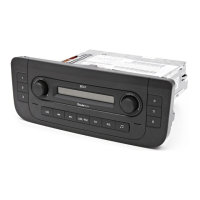
You switch the radio on and off by pressing
the left-hand knob . When it is switched
on, the radio adopts the last parameters set
for Treble, Bass and Balance, etc. Only the
volume is reduced, if necessary, to the maxi-
mum initial level set in the “ONVOL” Setup
menu when the radio is switched on.
Setting the volume
Set the desired volume by turning the left-
hand knob to the right and/or the left to a
level between Volume 0 and Volume 45.
Setting the sound
You can set the sound (treble and bass)
and the tone (balance and fader) to suit
your wishes. The ratios for the left and
right speakers are set with the Balance
function and the front and rear speakers
with the Fader function.
Setting the bass:
• Press the Note button . The message
"BASS" appears on the display with the
current setting.
• Use the right-hand knob to adjust the
bass to the desired value from -9 to +9.
Setting the treble:
• By pressing the Note button once again
you reach the treble setting. The message
"TRE" appears on the display with the cur-
rent setting.
• Use the right-hand knob to adjust the
treble to the desired value from -9 to +9.
Balance:
• By pressing the Note button once
again you reach the balance setting. The
message "BAL" appears on the display
with the current setting.
• Use the right-hand knob to adjust the
balance to the desired value from LEFT 9
through CENTER to RIGHT 9.
Fader:
• By pressing the Note button once again
you reach the fader setting. The message
"FAD" appears on the display with the cur-
rent setting.
• Use the right-hand knob to adjust the
fader to the desired value from REAR 9
through CENTER to FRONT 9.
If you press the Note button again or 5
seconds after the last adjustment is made,
the car radio switches back to normal opera-
tion and stores the values set.
Switching on and off Setting the sound Geometry
Setting the volume
1
1
10
10
10
10
10
2
2
2
2
bed_anl_Skoda-Beat_A05 rz.QXP 02.03.2006 16:27 Uhr Seite 4












 To Next Page