This document is the owner's manual for the "CAR RADIO BLUES" system, specifically designed for Škoda vehicles, including Octavia and Yeti models. The manual provides a comprehensive overview of the radio and CD player functions, important information, and basic settings.
Function Description
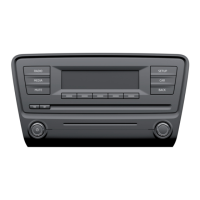
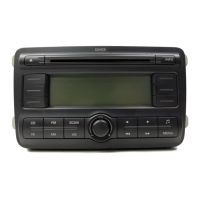
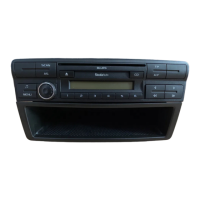
The CAR RADIO BLUES system integrates both radio and CD player functionalities, offering a range of audio entertainment options.
Radio Functions:
- Rotary/Push Knob (1): This central knob serves multiple purposes:
- Switching On/Off: Pressing the knob toggles the unit's power.
- Volume Control: Rotating the knob adjusts the audio volume.
- Menu Navigation: In various menus, it's used for other function settings.
- Rocker Switch MENU (2): Used to access menu settings for both radio and CD player parameters.
- Rocker Switch (3): Adjusts sound settings.
- Rocker Switch AS (4): Automatically stores radio stations.
- Rocker Switch SCAN (5):
- Activates AM radio mode.
- Initiates a fast search within the current waveband.
- Allows scrolling through the contents of a CD.
- Rocker Switch TP (9): Activates or deactivates the reception of traffic reports. When active, "TP" appears on the display. If a set station doesn't transmit traffic reports, the radio searches for one, displaying "TP SEEK." If no such station is found, "NO TP" is shown. Incoming traffic reports interrupt CD playback or non-traffic radio stations, displaying "INFO" and the station name, then returning to the original function after the report.
- Rocker Switch A/F (10): Switches between AM/FM wavebands. A long press changes wavebands, while a brief press switches between memory levels (FM1/AM1 and FM2/AM2), each having 6 memory spaces.
- Rocker Switches ◄ / ► (11):
- Used for manual station finding or fast station finding.
- In CD mode, these select tracks or perform fast forward/backward searches.
- Used for selecting menu points.
- Display (12): Shows current settings, station information, track details, and menu options.
- Station Keys 1-6 (13):
- Store and select RDS (Radio Data System) stations.
- Used for CD selection.
- Enter the anti-theft code.
Radio Mode Features:
- REG AUTO / REG OFF: Manages regional program changes. "REG AUTO" prioritizes alternative frequencies to maintain quality, while "REG OFF" allows unlimited access to "related" regional stations.
- GALA: Automatically increases volume with vehicle speed.
- LOUD: Reinforces bass and treble at low volumes.
- BEEP: Toggles the tone signal when storing stations.
- ON VOL: Stores the last volume setting before switching off. If the new ON VOL value is higher, the volume is reduced to this value upon restart.
- PHONE*: Integrates with hands-free systems, routing mobile phone calls through vehicle loudspeakers.
- PDC AT*: (Parking Aid) Automatically decreases volume when parking aid is active. Options include:
- PDC ATO: No volume restriction.
- PDC AT1: Restricts volume to a middle level.
- PDC AT2: Restricts volume to a low level.
- PDC AT3: Mutes the tone completely.
- AUX*: Adjusts input sensitivity for external audio sources (AUX LEV 1 for notebooks, AUX LEV 2 for cassettes/CD players, AUX LEV 3 for MP3 players).
- Manual Search: Set desired frequency using rocker switches (11).
- Automatic Station Finding SEEK: Searches for the next station in the selected waveband using rocker switches (11).
- Function SCAN: Plays each station in the current waveband for 10 seconds. Pressing SCAN again ends the function and replays the current station.
- Store Station: Hold a station key (13) until a brief mute and signal confirm storage.
- Automatic Station Finding with Storing: Press AS (4) to automatically find and store the 6 strongest stations in FM2/AM2 memory levels. "STORE" is displayed during this process.
- Radio Text: Displays additional text information transmitted by certain radio stations.
CD Player Functions:
- CD - Eject Button (6): Ejects the CD.
- CD Case (7): The slot where CDs are inserted.
- Button CD (8): Activates CD mode.
- Inserting CD: Carefully insert a CD into the CD case (7) until it's automatically drawn in; playback begins automatically.
- Audio CD: Select Track: Use rocker switches (11) to select previous/next tracks or for fast forward/backward search.
- MP3 Data: Select Track: Similar to audio CD, use rocker switches (11) for track selection, fast forward/backward search, or to scroll through folders/playlists.
- Function SCAN: Press SCAN (5) to play the first 10 seconds of each title on the CD. Press SCAN again to return to normal mode.
- End Play Function: Press A/F (10) to switch to radio mode; the CD remains in the unit.
- Display of Additional Information (MP3 data): Use station keys 1-6 (13) to display:
- 1: Folder and track number.
- 2: Track name.
- 3: Performer name.
- 4: Album name.
- 5: Data name.
- 6: Folder name.
- Replay Tracks in Random Order (MIX): Access via MENU (2). Options include:
- MIX OFF: Function off.
- MIX CD: Plays tracks on a CD in random order.
- MIX FLD: Plays titles in a specific folder in random order.
- MIX PLS: Plays tracks from a playlist (only displayed if a playlist is created on the CD).
External Audio Source (AUX-IN*):
- Location: Below the armrest of the front seats, marked with the AUX logo.
- Activation: Press CD (8) twice to select the external input; playback starts automatically upon connection.
- End Play Function: Press A/F (10) to switch to the last selected radio station, or press CD (8) to select the CD source.
- Volume Adjustment: Volume can be controlled via the radio's volume knob (1). Input sensitivity can be adjusted via AUX settings (page 3).
- Connection: Uses a standard 3.5 mm jack plug; an adapter may be needed for other plug types.
Important Technical Specifications
- Power Output: 4x20 W.
- MP3 Data Requirements:
- Data Carriers: 650 MB and 700 MB CD-ROM, CD-R, CD-RW.
- Standards: ISO 9660 Level 2, Joliet data system (single and multi-session).
- Data Names: Max 64 characters.
- List Structure: Max 8 list levels deep.
- ID3 Tag Support: Displays artist, album, and title if available.
- Playlists: Not supported.
- Bit Rate: Supports MP3 data with bit rates from 32 to 320 KB/s, including variable bit rates. Note that indicated playing time for variable bit rates may not be reliable.
- Overheating Protection: CD playback ends if the unit temperature exceeds 85°C.
- Loudspeaker Matching: Loudspeakers are matched to a power output of 30W.
Usage Features
- Anti-theft Protection: The radio features convenience coding. When first operated, the safety code is stored in both the radio and the vehicle. After battery disconnection, switch on ignition, then the radio. If installed in another vehicle, the safety code must be manually entered. The code is stored in the instrument cluster for automatic decoding.
- Entering Code: If "SAFE" is displayed, then "1000," enter the 4-digit code using station keys 1-4, then confirm with key 6. Incorrect entries block the unit for an hour.
- Basic Setting (Audio Settings): Press rocker switch (3) repeatedly to select parameters like TRE (Treble), BASS, BAL (Balance), and FAD (Fader). Adjust values with the rotary/push knob (1).
- Special Functions: Press MENU (2) to activate the Set-up menu. Select functions using MENU or rocker switches (11), and adjust values with the rotary/push knob (1).
- MP3 Data Playing Sequence: The unit plays MP3 data in a specific sequence, typically traversing folders and sub-folders (e.g., F1, F1.1, F1.1.1, F1.2, F2).
- Safety during Driving: The manual emphasizes that the radio should only be used when traffic conditions permit, and volume settings must allow external audible signals (e.g., emergency vehicle sirens) to be heard. Drivers are responsible for road safety and must maintain full control of the vehicle. External audio sources should not be placed on the dash panel or near airbags, and connection cables must not obstruct driving.
Maintenance Features
- Display Cleaning: Clean the display with a soft cloth and pure alcohol. Do not use solvents like turpentine or petrol, as they will corrode the surface.
- CD Care:
- Clean CDs from inside to outside with a soft lint-free cloth. For severe dirt, use a commercial CD cleaner, also cleaning from inside to outside and allowing to dry.
- Avoid using liquids like gasoline, paint thinner, or disk cleaner, as they can damage the CD surface.
- Do not expose CDs to direct sunlight.
- Do not write on or affix anything to CDs.
- Always store CDs in a protective case.
- Condensation: In cold or rainy conditions, moisture may form in the CD drive, potentially affecting playback. Wait for the moisture to dissipate.
- Ejected CD Safety: If an ejected CD is not removed, it will be drawn back in for safety reasons.
The manual is issued by ŠKODA AUTO a.s. and reserves all rights, including copyright and the right to make changes to the document.

 Need help?
 General




 To Next Page