Slingbox SOLO • Page 6
Connecting the audio and video cables
Now that you’ve seen the back of your Slingbox, let’s connect it!
Step 1: Audio connections
It’s best to first connect the audio cables.
Step 2: Video connections
Next, choose the kind of video you have. Choose one of the methods below—the one
that provides the optimal video in your situation. After choosing, connect the cables.
Audio info Use these ports and cables Do this
These connections
provide stereo
sound.
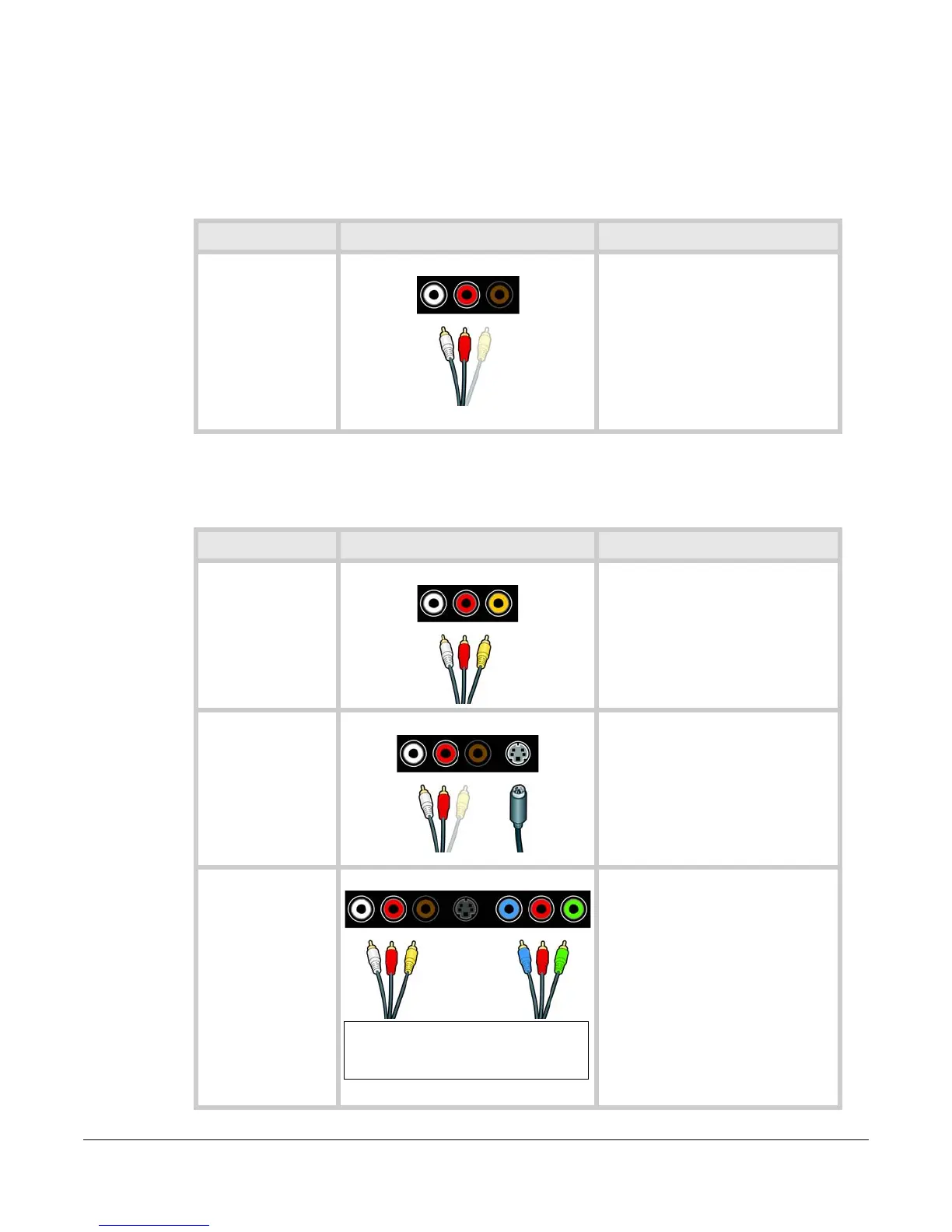
Any cable with jacks
shaped like these are
also called RCA
cables.
Audio Connection
Connect one end of the audio cables
to your video device and the other
to the IN ports on your Slingbox.
Connect another set of audio cables
to the OUT ports and then to your
TV.
--White is for left audio.
--Red is for right audio.
Don’t connect the yellow cable yet.
Video info Use these ports and cables Do this
Very good quality.
A connection that
uses the red and
white audio cables
along with the yellow
video cable is called a
composite
connection.
Composite Connection
If you have an available yellow video
port on your video device, connect
one end of the yellow video cable to
your video device and the other end
to the IN ports on your Slingbox.
Connect another yellow video cable
to the OUT port and then to your TV.
This is an S-video
connection.
S-video cables carry
no sound, so they
must be used with
the red and white
audio cables.
S-video Connection
If you have an available S-video port
on your video device, connect one
end of the S-video cable to your
video device and the other end to
the IN port on your Slingbox.
Connect another S-video cable to
the OUT port and then to your TV.
Don’t connect the yellow cable.
A connection that
uses the set of
green, blue, and red
cables is called a
component
connection.
Component video
cables carry no
sound, so they must
be used with audio
cables.
Component Connection A device with component video splits
the video signal into its three parts:
green, blue, and red.
If you have available component
video ports on your video device,
connect one end of the component
video cables to your video device
and the other ends to the IN ports
on your Slingbox.
Connect another set of component
cables to the OUT ports and then to
your TV.
Don’t connect the yellow cable.
Note that the component ports on some
Slingboxes are in a different order. Match
the colors, regardless of the order.


 To Next Page