STEP 1: CONNECT VIDEO/AUDIO SOURCE
HD COMPONENT and AUDIO CONNECTIONS
The Slingbox SOLO can connect to one High Definition (HD) device or one Standard Definition
(SD) device such as a DVR, Cable Box, Satellite Receiver or DVD Player.
Visit http://support.slingmedia.com for a list of compatible devices.
*To watch your Slingbox on your mobile device you must purchase SlingPlayer™ Mobile software separately. There
are versions of SlingPlayer Mobile specific to many PDAs, mobile phones and smart phones. A free 30-day trial is
available at http://www.slingmedia.com. SlingPlayer Mobile is not compatible with all PDAs, mobile phones, smart
phones or providers.
It may not work or be used in all countries. Note that some providers charge additional usage fees for video stream-
ing. Go to http://www.support.slingmedia.com for a list of supported mobile devices.
AUDIO
HD COMPONENT
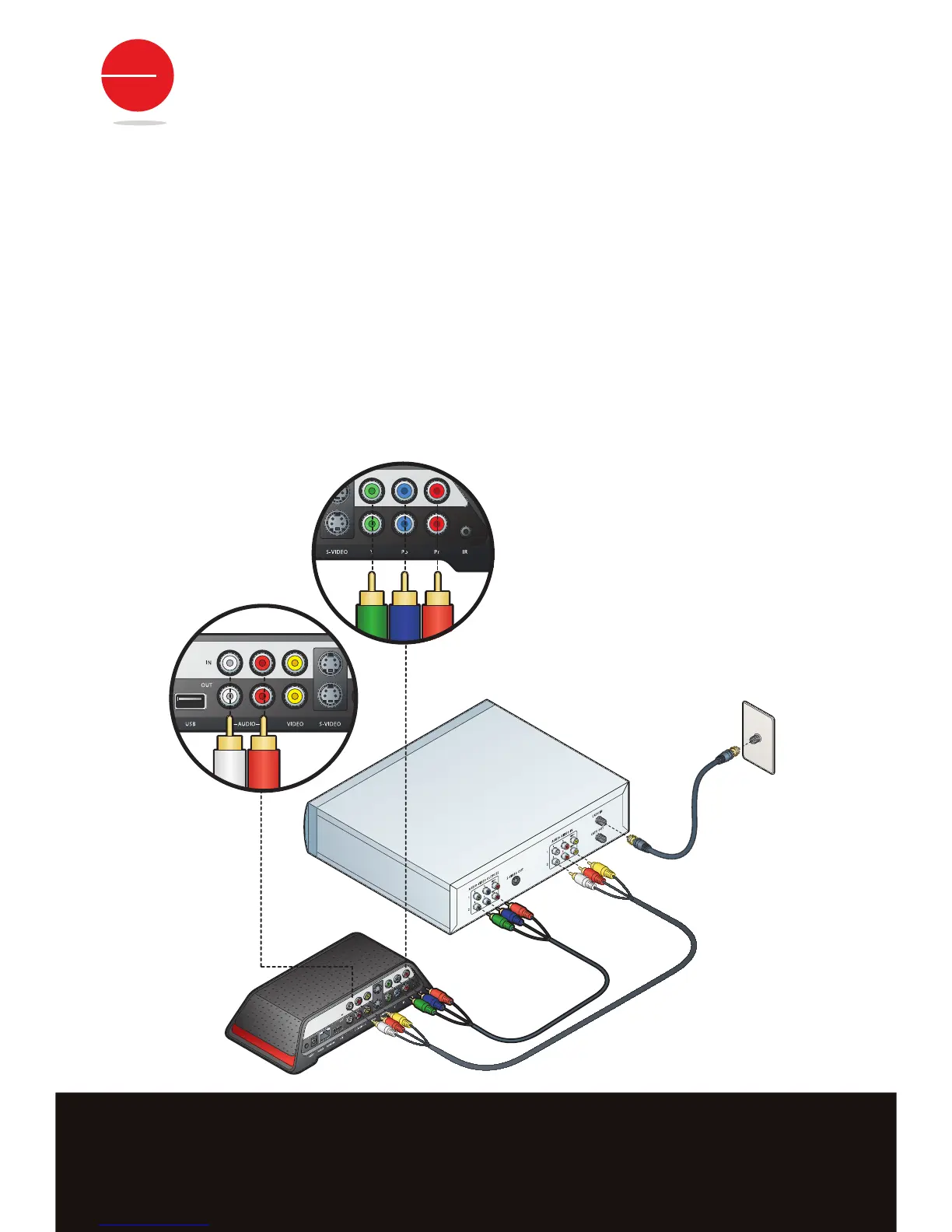
If your A/V source has component output, use a component cable (sold separately).
t$POOFDUUIFDPNQPOFOUDBCMFHSFFOCMVFSFEGSPNUIF"7TPVSDFPVUQVUUPUIF4MJOHCPY
Component IN. This supplies the video signal only.
t5PDPOOFDUBVEJPSFNPWFUIFDPNQPTJUF"7DBCMFGSPNZPVSBDDFTTPSJFTQBDL
t$POOFDUUIFSFEBOEXIJUFDPNQPTJUFDPOOFDUPSTGSPNUIF"7TPVSDFPVUQVUUPUIF4MJOHCPY
Audio IN.


 To Next Page