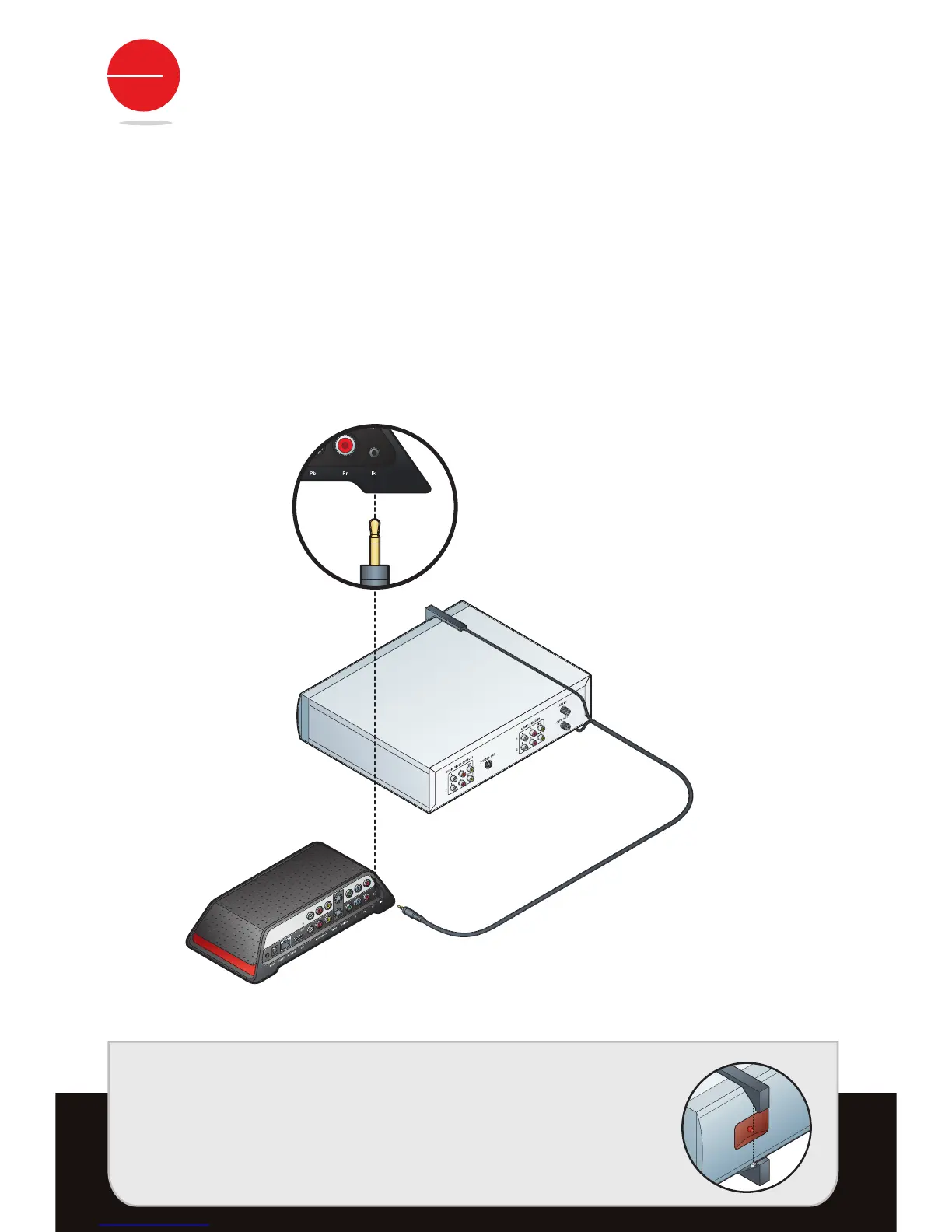
STEP 2: CONNECT REMOTE CONTROL IR CABLE
t3FNPWFUIFSFNPUFDPOUSPM*3DBCMFGSPNUIFBDDFTTPSJFTQBDL
t$POOFDUUIFSFNPUFDPOUSPM*3DBCMFUPUIF*3DPOOFDUJPOPOUIF4MJOHCPY
t1MBDFUIFSFNPUFDPOUSPM*3DBCMFIFBETPOUIFUPQPSCPUUPNPGZPVS%73BOEPS
Cable/Satellite Box so they point at its IR sensor.
TIP: The IR sensor is on the front of your Cable/Satellite box or
DVR, usually behind a dark, sometimes reddish plastic
window. If you don’t see the sensor, shine a flashlight through
the window and look for a small bulb similar to the one on the
end of the remote control IR cable.
Make sure they extend out far enough over the front of the
device to send a signal to your DVR or Cable/Satellite Box. You
may want to affix the remote control IR cables using the
adhesive pads after installation is complete.


 To Next Page