13
en
Assembly instructions.
Before mounting or replacing cutting tools or accessories, pull the power plug.
This preventive safety measure rules out the danger of injuries through acci-
dental starting of the power tool.
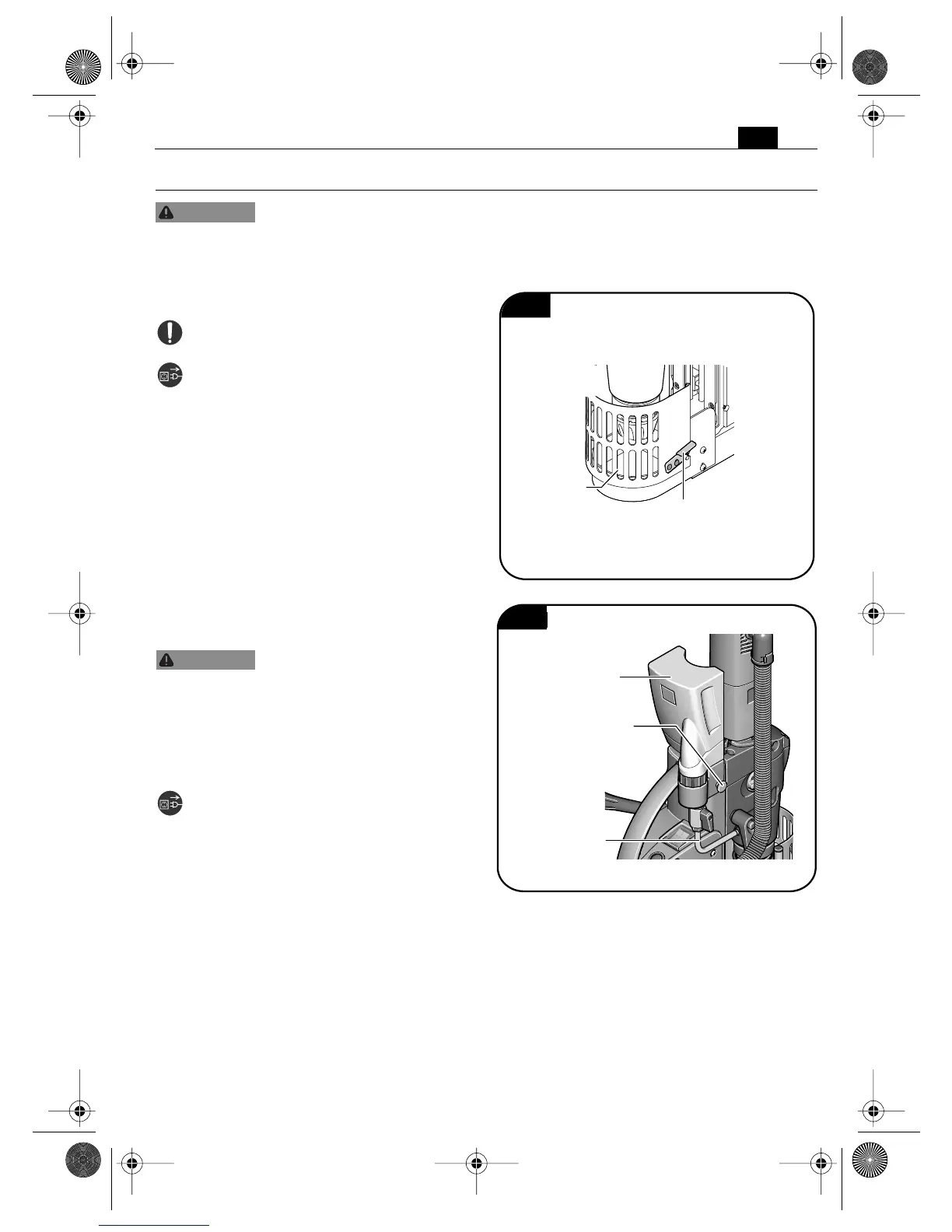
Mounting the guard protecting against
chip and accidental contact (Figure 3).
The chip guard must be mounted at all
times.
➤ Mount the guard protecting against
chip and accidental contact.
➤ To remove any accumulated chips,
open the guard protecting against chips
and accidental contact.
➤ Before commencing operation, fasten
the chip guard with the hook.
Mounting the coolant container
(Figure 4).
Prevent the flow of liquid
along the cord into the socket
or into the core drill, as this can lead to elec-
tric shock. Tie a bow in the cord near the
plug, so that any liquid can drip off.
Only use cooling lubricant that is capable of
being pumped like Slugger Cutting Fluid.
➤ Place the filled coolant container into
the holder provided on the motor hou-
sing.
➤ Fasten the coolant container using the
fixation screw.
➤ Connect the coolant tube.
WARNING
Fig. 3
Chip guard
Hook for
locking
WARNING
Fig. 4
Coolant
container
Fixation screw
Coolant tube
3 41 01 166 21 0.book Seite 13 Mittwoch, 7. September 2011 2:23 14


 To Next Page