‘Child Lock’ Mode
Cleaning & Maintaining Your SA600
The SA600 should be cleaned at least once every month using a dry
and clean cloth. Depending on the environmental conditions, more
frequent cleaning may be required.
'Do Not Disturb' Mode
To save energy and reduce the impact of the SA600's lights on your
environment, the SA600 includes a built-in, automatic 'Do Not Disturb'
mode.
If the SA600's buttons are not touched for 3 minutes, all control lights
will turn off. The next time you touch any button on the SA600, the
lights will turn back on, showing you the previous purifier state. This
mode will not work when your filter needs replacing.
The ‘Child Lock’ mode locks the current purifier state and prevents any
purifier settings from being changed.
To enter ‘Child Lock’ mode, simply hold the ‘Child Lock’ button for 3
seconds. The ‘Child Lock’ light will then illuminate. In this mode,
pressing any button will not alter the purifier’s state. Pressing a button
will cause the ‘Child Lock’ light to flash continuously.
To exit ‘Child Lock’ mode, hold the button for 3 seconds and the light
will stop flashing.
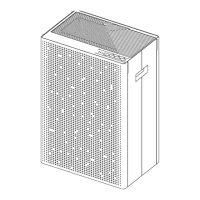
Product No.: SA600
Dimensions: 350mm x 232mm x 510 mm
Recommended Coverage Area: ≤55㎡
Power: 60W
Voltage: 100-240V~ / 50-60Hz
Noise (high): 53dB
Material: ABS Plastic
Net Weight: 6.9kg
MADE IN CHINA
Product Information
SA600 + H13 HEPA + Carbon
CADR: 470m³/hr
Airflow: 480m³/hr
SA600 + H13 HEPA
CADR: 500m³/hr
Airflow: 505m³/hr


 To Next Page