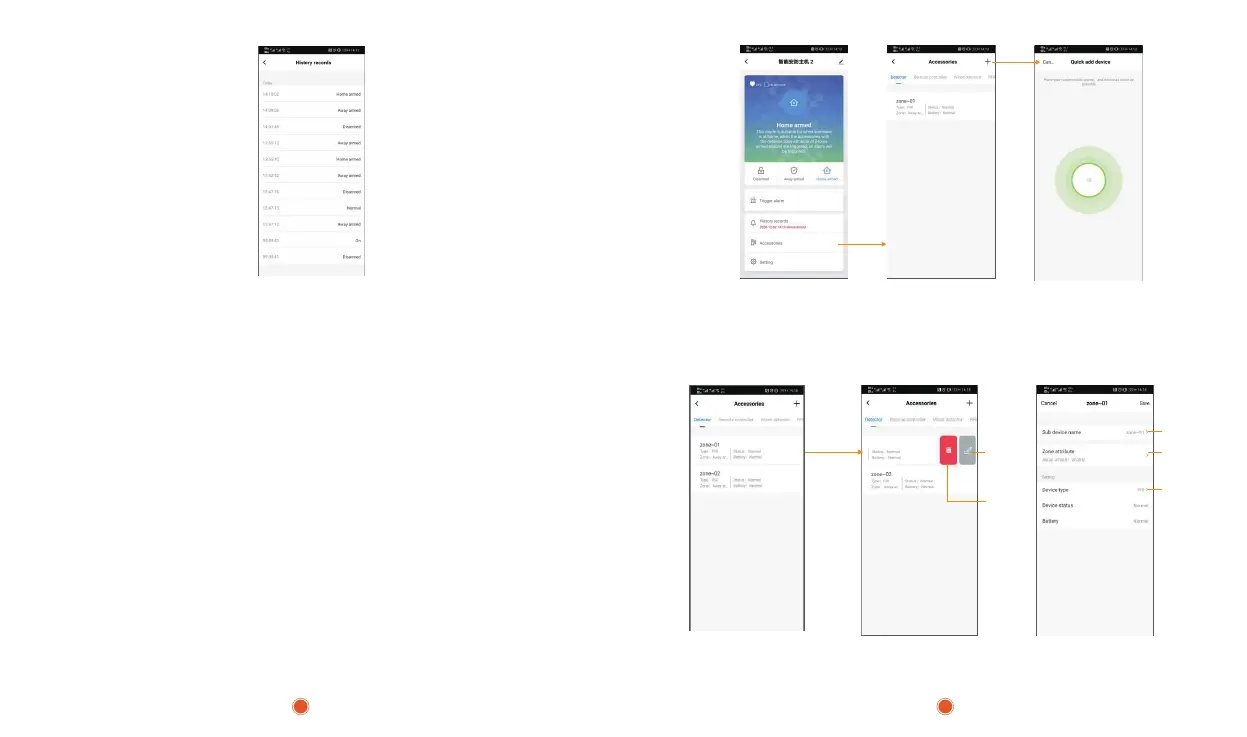
5.3. Add Accessories
For the products purchased in a kit, accessories have been added, no need for this
step. When you need to add accessories, please choose any of the following ways to
add:
Method 1 (APP):
Open the APP, enter the host page, select [Accessories]->[+] below, the host enters
the code pairing state (the indicator light flashes red quickly), at this time trigger the
device to be added, such as Window/door sensor,PIR Detector and Remote Controller;
only one accessory can be added at a time.After the addition is successful, the APP
page will pop up a window to remind,and the host will exit the code pairing state.
Note: APP can add wireless devices, RFID, and the NC / NO attributes of wired
devices need to be modified on the host.
Click
Slide left
Rename
Rename
Zone Attribute
Switch
Device Type
Switch
Delete
Method 2 (see page 14: 6.3 Defense zone ): support to add up to 100 wireless detectors.
5.4 Accessory Attribute Editing
Click
11 12


 To Next Page