4 | P a g e
SMT-400 Draft Manual
User Manual
Introduction
Congratulations for your purchase of the Smart Temp SMT-400 thermostat. Please take time to read and understand
these simple instructions so that you may gain maximum benefit from this intuitive and powerful air conditioning control
thermostat.
A simple to use touch screen interface is provided that will offer you clear feedback of the comfort of your home or office
and the status of your heating and air conditioning system.
The SMT-400 can be used a simple manual thermostat however when connected to your Wi-Fi network numerous extra
functions are available. Please see the section “The app Explained on page 7 of this manual.
Please Note:
The SMT-400 thermostat can be configured by your installer to a large variety of configurations, each with specific
functions so that your SMT-400 thermostat is perfect for you and your individual needs. As such, this manual may
describe a function or feature not active on your thermostat.
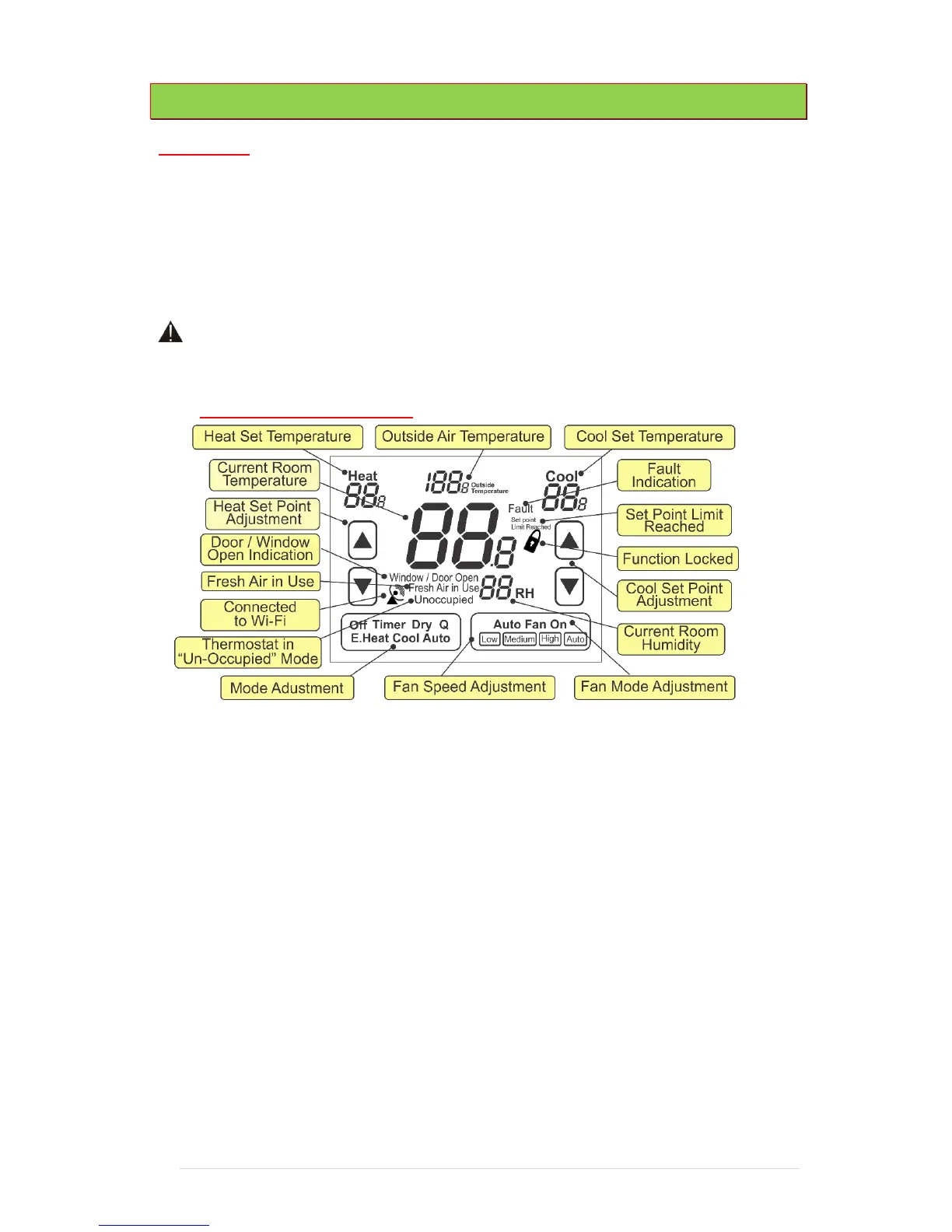
The Touch Screen - Explained
Buttons
A number of "buttons" or touch arears are available on the SMT-400 touchscreen, these buttons are used to adjust the
heat and cool set temperature, select the Heating or Cooling Mode or to adjust the Fan Speed and function.
Current Room Temperature
This is the temperature your SMT-400 is measuring either with the sensor fitted directly to the SMT-400 or any remote
temperature sensors wired into the SMT-400 remote temperature sensor terminals. This is the temperature your SMT-
400 will use as room temperature.
Room Humidity
This indicates the current level or relative humidity within the room. The SMT-400 can simply display this value or, if set
be the installer, take some action to increase or decrease room humidity.
Heat (or Cool) Set Temperature
This part of the display shows the Heat (or cool) setpoint. If the word heat and the heat (or Cool) set temperature is
shown your SMT-400 "Enterprise" is ready to heat (or cool) should the room temperature require it. If the word Heat
(or Cool) in this part of the LCD is blinking, then there is a safety delay preventing the heating (or Cooling) from running.
This delay is up to a maximum of 4 minutes.
Heat (or Cool) Set Point Adjustment
Use the up or down buttons to adjust your Heat (or Cool) set point.



 To Next Page
 Loading...






