7.1
7.1
7.1
7.1 Power
Power
Power
Power on/
on/
on/
on/ Power
Power
Power
Power off
off
off
off
Power
Power
Power
Power on:
on:
on:
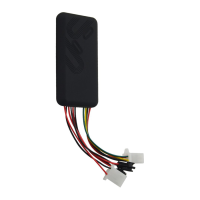
on: Once insert a valid SIM card and connect all the wires, turn on the
device, then Power LED will flash first, During signal searching process, GSM
and GPS LED will flash. Once GPS LED keeps solid light, it means the device
has been located and it starts to work.
Power
Power
Power
Power off:
off:
off:
off: Just turn off the power switch .
The device will begin to upload positioning data to server once inserting a valid
SIM card and power on. During the working time, it can upload data to server
every 10 seconds.
7.2
7.2
7.2
7.2 Check
Check
Check
Check location
location
location
location
7.2.1
7.2.1
7.2.1
7.2.1 V
V
V
V ia
ia
ia
ia SMS
SMS
SMS
SMS
7.2.1.1
7.2.1.1
7.2.1.1
7.2.1.1 SMS “ POSITION
POSITION
POSITION
POSITION ” ,to the SIM number of GT06. If the device succeed to
get the address, it will reply a location Google Map link.
<Date Time : 10-11-23 23:42:51 > http://maps.google.com/maps?q=N22.571490,E113.877103
7.2.1.2
7.2.1.2
7.2.1.2
7.2.1.2 SMS “ WHERE
WHERE
WHERE
WHERE #
#
#
# ” , to the SIM number of GT06. The terminal will send a
location message automatically.
You
can get the address. If the device does
not search any information of location, it will send “ No data ” to the cell phone.
Example:
Lat:N22.571285,Lon:E113.877115,Course:42.20,Speed:0.0740,DateTime:10-
11-23 22:28:51
7.2.1.3
7.2.1.3
7.2.1.3
7.2.1.3 SMS “ URL#
URL#
URL#
URL# ” , to the SIM number of GT06. The device will send a
location Google Map link. If the device does not search any information of
location, it will send “ No data ” to the cell phone.
Example:
<Date Time : 10-11-23 23:42:51 > http://maps.google.com/maps?q=N22.571490,E113.877103
7.2.
7.2.
7.2.
7.2. 3
3
3
3 Via
Via
Via
Via platform
platform
platform
platform
Go to the platform website offered by dealers to check your vehicle location.
7.3
7.3
7.3
7.3 SOS
SOS
SOS
SOS alarm
alarm
alarm
alarm
In emergent case, press SOS for 3s to activate SOS alarm. Then the device
will send SOS SMS to preset specific numbers and then dial the numbers in
circles until the call is through. At the meantime, the device will upload SOS
alarm data to the server. And it will send:
SOS Alarm! < DateTime:11-06-17 14 : 53 : 06 > ,
http://maps.google.com/maps?q=N22576713,E113.916585


 To Next Page
 Loading...