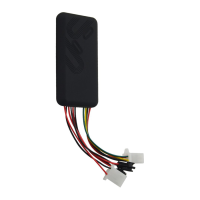
connect it to other ground wire.
5.1.2 ACC line (orange) is connected to the ACC switch of the vehicle. Please
make sure to connect the ACC line. The tracker will decide whether to enter
ignition detection according to ACC status. If do not connect to ACC line, the
device will enter ignition detection status. If the vehicle vibrates when moving,
it will activate the vibration alarm. If there is no need for the theftproof function,
connect the ACC line to the positive in parallel and keep high level.
5.1.3 Tele-cutoff (petrol/ electricity) control line (yellow) is connected to pin 86
of the Tele-cutoff (petrol/ electricity) relay (equal to the yellow line of the relay
socket).
5.2
5.2
5.2
5.2 USB
USB
USB
USB cable
cable
cable
cable (3
(3
(3
(3 pin)
pin)
pin)
pin)
Firmware updating interface/expanded function to reserve space.
5.3
5.3
5.3
5.3 MIC
MIC
MIC
MIC line
line
line
line (2
(2
(2
(2 pin)
pin)
pin)
pin)
Externally connect to microphone for voice monitor function
5.4
5.4
5.4
5.4 SOS
SOS
SOS
SOS line
line
line
line (2
(2
(2
(2 pin)
pin)
pin)
pin)
Externally connect to SOS switch for SOS function.
6.
6.
6.
6. Parameter
Parameter
Parameter
Parameter setting
setting
setting
setting
The SMS command format is no case sensitive and it is divided by comma.
There is a reply SMS after sending the command. If set successfully, there is a
“ ok ” reply SMS; or else please set again.
The device will reply the corresponding information after sending the SMS
command.
Any phone numbers can send SMS command to the device as default.
6.1
6.1
6.1
6.1 APN
APN
APN
APN setting
setting
setting
setting
After setting the APN of the sim card, device can be connected to the platform.
APN command format: APN,APN
APN,APN
APN,APN
APN,APN
’
’
’
’
s
s
s
s Name#
Name#
Name#
Name#
If your APN has user name and password, please use the following command:
APN,APN
’
s Name,user name,password#
It will reply “ OK ” after set successfully.
6.2
6.2
6.2
6.2 DNS
DNS
DNS
DNS setting
setting
setting
setting


 To Next Page