12
【
Charging
】
【
Auto Power-o
】
(Only the Leading Edition has this function.)
【
Brake Light
】
(Only the Leading Edition has this function.)
【
Lighting Always on Mode
】
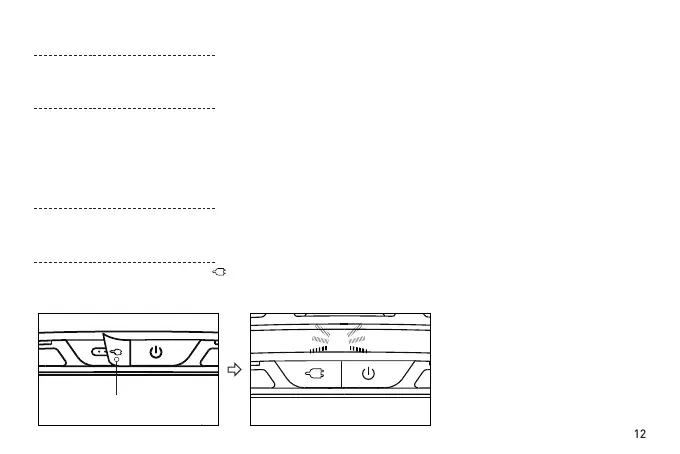
When the soft rubber lid with “ ” image is opened, the Magnetic charging port will be seen. Insert a USB
cable into the USB Charging cable interface of the helmet. Charging starts when the central LED blinks. During
charging, when the central LED stops blinking and turns o, charging is completed.
When the helmet keeps stationary for 20 minutes, it will automatically power o.
When the helmet detects a clear deceleration, the whole taillight will light up for 1-2 seconds to warn the
vehicles behind. (Only the upgraded version has this function.)
Comment: When the helmet shakes too heavy, the built-in sensor detects obvious deceleration to trigger the warning light
always on, which is normal.
In daytime or in a bright environment, the whole taillight will keep ashing.
Open the soft rubber


 To Next Page