Installing Brainfingers Access Software
The Brainngers software will enable you to congure and set up the
Brainngers headband for use. Before continuing, install the software from the
memory stick or the latest version can be downloaded from:
www.brainngers.com/ba70.htm
Once the software is installed, depending on your computer set up you may
need to set it to run as Administrator. This can be done by right clicking on
the software icon – Properties – Compatibility – Change Settings for all
Users – tick the box for ‘Run this program as an Administrator.’
2
Licencing
The software will run on a machine for a 30 day demo. You can licence it
after purchase from within the software. In the software click the button for
Licence (top right) it will tell you how many days are left and gives you the
option to Activate.
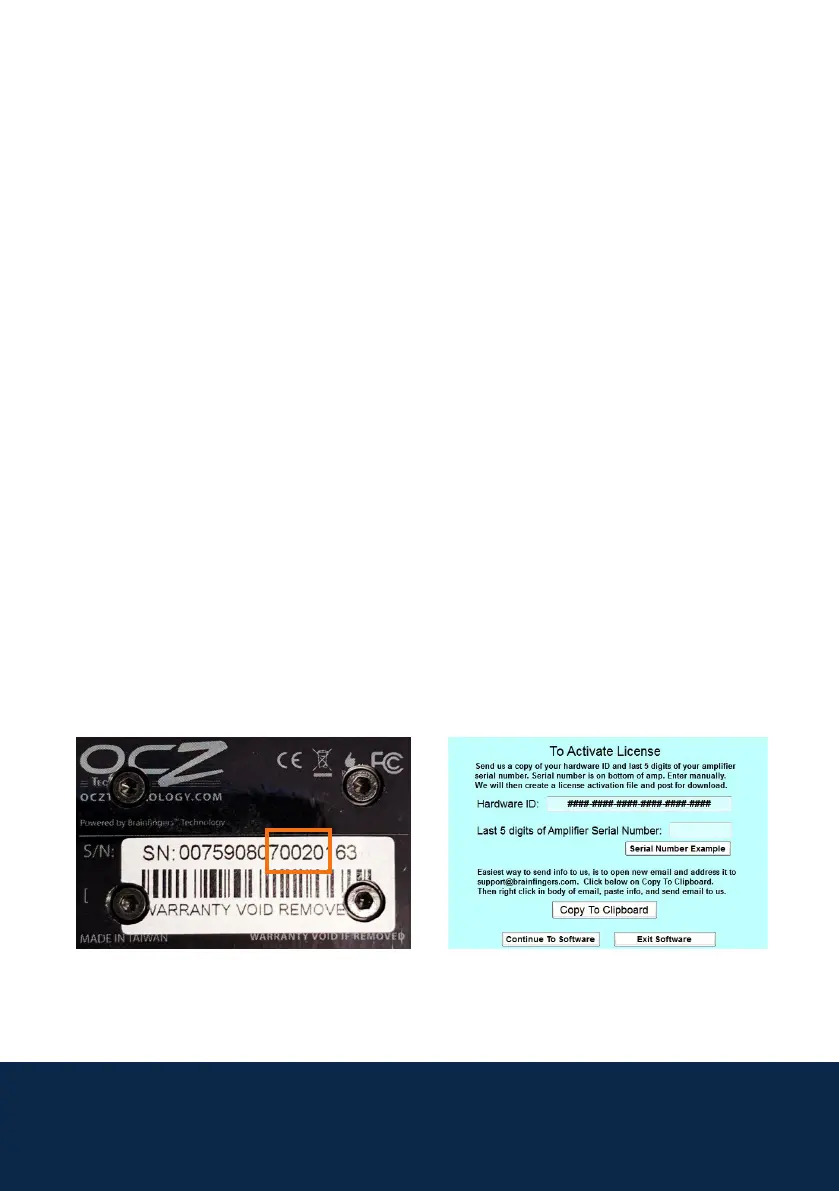
For Activation, you need the last 5 digits of the Amplier Serial Number and
the Hardware ID. The serial number is found on the bottom on the Amplier,
an example is below:
Send the last 5 digits and the Hardware Serial Number, found from the
Licence screen, to support@thinksmartbox.com we will then nd out the
licence and send it to you.



 To Next Page