CMM366A-4G Cloud Monitoring Communication Module User Manual
CMM366-4G Cloud Monitoring Communication Module 2017-12-25 Version 1.0 Page 6 of 16
4 PANEL AND TERMINAL DESCRIPTION
4.1 PANEL INDICATOR AND BUTTONS
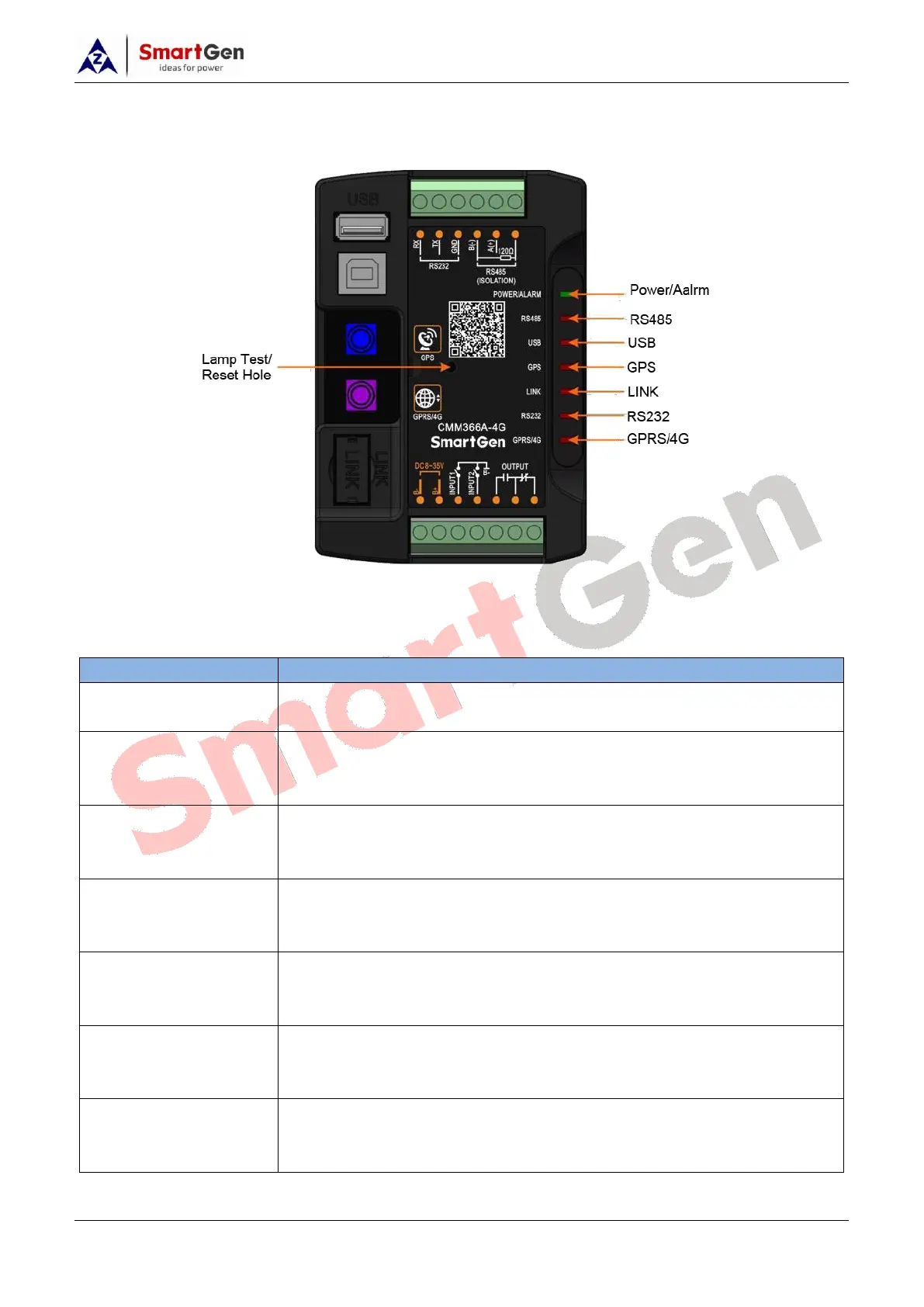
Fig.1 – CMM366A-4G Front Panel Diagram
Table 3 – Indicators Description
GreenLED Light: Power supply normal indicator;
RedLED Light: Common alarm indicator.
Normally Extinguish: RS485 disabled;
Normally Light: Communication fail;
Blink: Communication normal.
Normally Extinguish: USB(Host) disabled;
Normally Light: Communication fail;
Blink: Communication normal.
Normally Extinguish: GPS disabled;
Normally Light: GPS not gained satellite signal;
Blink: GPS gained satellite signal.
Normally Extinguish: Disabled;
Normally Light: Communication fail;
Blink: Communication normal.
Normally Extinguish: RS232 disabled;
Normally Light: Communication fail;
Blink: Communication normal.
Extinguish: CMM366A-4G login with server unsuccessfully;
Light: Login with server successfully;
Blink: Real-time communication normal.
Lamp test/Reset:


 To Next Page