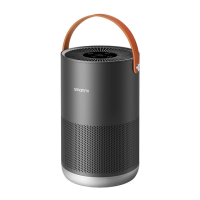
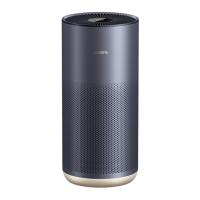
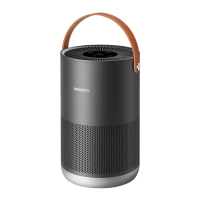
The Smartmi Air Purifier is a device designed to improve indoor air quality by filtering out particulate matter and harmful gases. It features an OLED display screen that provides real-time information on air quality, temperature, and humidity. The purifier can be controlled via a power button/operation mode selection button, a screen wakeup button, and gesture controls. It also integrates with the Mi Home/Xiaomi Home app for remote control and additional features.
Function Description:
The primary function of the Smartmi Air Purifier is to clean the air by removing various pollutants. It utilizes a filter system to capture dust, hair, and other particles, as well as activated carbon to absorb harmful gases. The device offers multiple operation modes, including Auto, Sleep, and Favorite, to cater to different user needs and environmental conditions. The Auto mode automatically adjusts the purification rate based on the indoor air quality (IAQ), while the Sleep mode operates at an ultra-low noise level for a quiet sleeping environment. The Favorite mode allows users to configure and store custom purification areas and rates via the mobile app.
Important Technical Specifications:
- Model: KQJHQ01ZM
- Rated Voltage: 120 V~
- Rated Frequency: 60 Hz
- Rated Power: 40 W
- Clean Air Delivery Rate (CADR Particles): 400 m³/h
- Formaldehyde Clean Air Delivery Rate (CADR Formaldehyde): 60 m³/h
- Particle Purification Efficiency: High
- Formaldehyde Purification Efficiency: High
- Item Dimensions: Φ260 × 535 mm
- Net Weight: Approx. 4.9 kg
- Noise Level: 64 dB(A)
- Recommended Surface Area: 28-48 m² (tested for particulate matter by third-party lab according to GB/T 18801-2015)
- Wireless Connectivity: Wi-Fi IEEE 802.11 b/g/n 2.4GHz
- Sensors: Temperature and humidity sensor, TVOC sensor, Laser particulate matter sensor.
Usage Features:
- OLED Display Screen: Provides real-time information on PM2.5 level, TVOC status, temperature, humidity, and operation mode. The PM2.5 level is indicated by a color (green for 0-35 µg/m³, orange for 36-55 µg/m³, red for 56 µg/m³ and above).
- Power Button / Operation Mode Selection Button: A gentle touch powers on the device and cycles through operation modes. A long press (2 seconds) powers off the device.
- Screen Wakeup Button: Located at the rear of the main unit, this button adjusts display brightness or enables/disables the display.
- Gesture Control Operations:
- Powering Off: Hold your hand above the screen for 6 seconds to power off the device.
- Operation Mode Selection: Air swipe left or right on the home page to select the operation mode. The home page reappears if no instruction is detected within 3 seconds.
- QR Code for App Installation: Air swipe up on the home page to display the QR code for installing the "Mi Home/Xiaomi Home" app. Air swipe down to return to the home page. The home page reappears if no instruction is detected within 10 seconds.
- Displaying Remaining Filter Life: Air swipe down on the home page to view the remaining filter life (%), and up to return to the home page. The home page reappears if no instruction is detected within 10 seconds.
- Note: Gesture control function needs to be turned on in the app first.
- Wi-Fi Connectivity: Allows connection to the Mi Home/Xiaomi Home app for remote control and smart features.
- Wi-Fi Reset: If the phone cannot connect to the purifier, simultaneously press and hold the power operation mode selection and screen wakeup buttons for 5 seconds until an alert tone indicates successful Wi-Fi reset.
- Placement: Maintain a distance of at least 20 cm between the air inlets and walls or other objects for optimal performance. The purifier should be placed on a firm and flat floor.
- Power Connection: Connect the power cord to the port at the bottom of the main unit and then to a power socket.
- Optimal Purification: Keep doors and windows closed during use for best air purification results.
Maintenance Features:
- Cleaning the Filter Housing: To maintain optimal ventilation and purification efficiency, regularly remove dust from the ventilation holes and housing walls using a vacuum cleaner or a soft cloth. Avoid spraying liquid onto the casing or wiping it with a wet cloth to prevent water leakage.
- Cleaning Laser Particulate Matter Sensor:
- Locate the catch of the PM sensor cover flap on the rear cover, just above the filter housing.
- Press the catch upwards and open the sensor flap.
- Clean the filter screen and sensor using an air blow gun or a hair dryer. Do NOT use hot air.
- Filter Status Reminder:
- Filter Installation Reminder: The screen displays "Please install a genuine filter" if no filter is detected or if an installed filter is not genuine.
- Filter Life Reminder: When the remaining filter life is more than 10%, the screen displays the percentage.
- Filter Replacement Reminder: Filters should be replaced every 6-12 months. When the remaining filter life is 10% or less, the screen will display a QR code and the percentage each time the purifier is powered on. Instructions for filter replacement are on the rear side of the filter cover.
- Note: Timely replacement of the filter is advised once the recommended filter life is over. Leaving a used filter in a well-ventilated area with adequate light may partially restore the activated carbon's absorption capability.
- Safety Precautions:
- Always turn off and unplug the purifier before moving it or performing maintenance.
- Do not use the purifier if the fan grille or filter compartment cover is not installed properly.
- Avoid placing fingers or foreign objects into protective parts, movable parts, air inlets, or air outlets.
- Keep hair or fabrics away from air inlets/outlets to prevent blockage.
- Do not sit on, lean on, or tilt the purifier.
- Ensure proper ventilation when used with gas-fueled appliances to prevent carbon monoxide poisoning.
- Do not pour liquids or throw powders/small substances into the air outlet.
- Avoid using near open flames, high-temperature appliances, or in unstable/extremely hot/humid/damp environments.
- Do not use with any solid-state speed control device to reduce the risk of fire or electric shock.
- The power cord must be genuine, plugged into a suitable electrical outlet, and not excessively pulled, twisted, or bent.

 Need help?
 General

 To Next Page