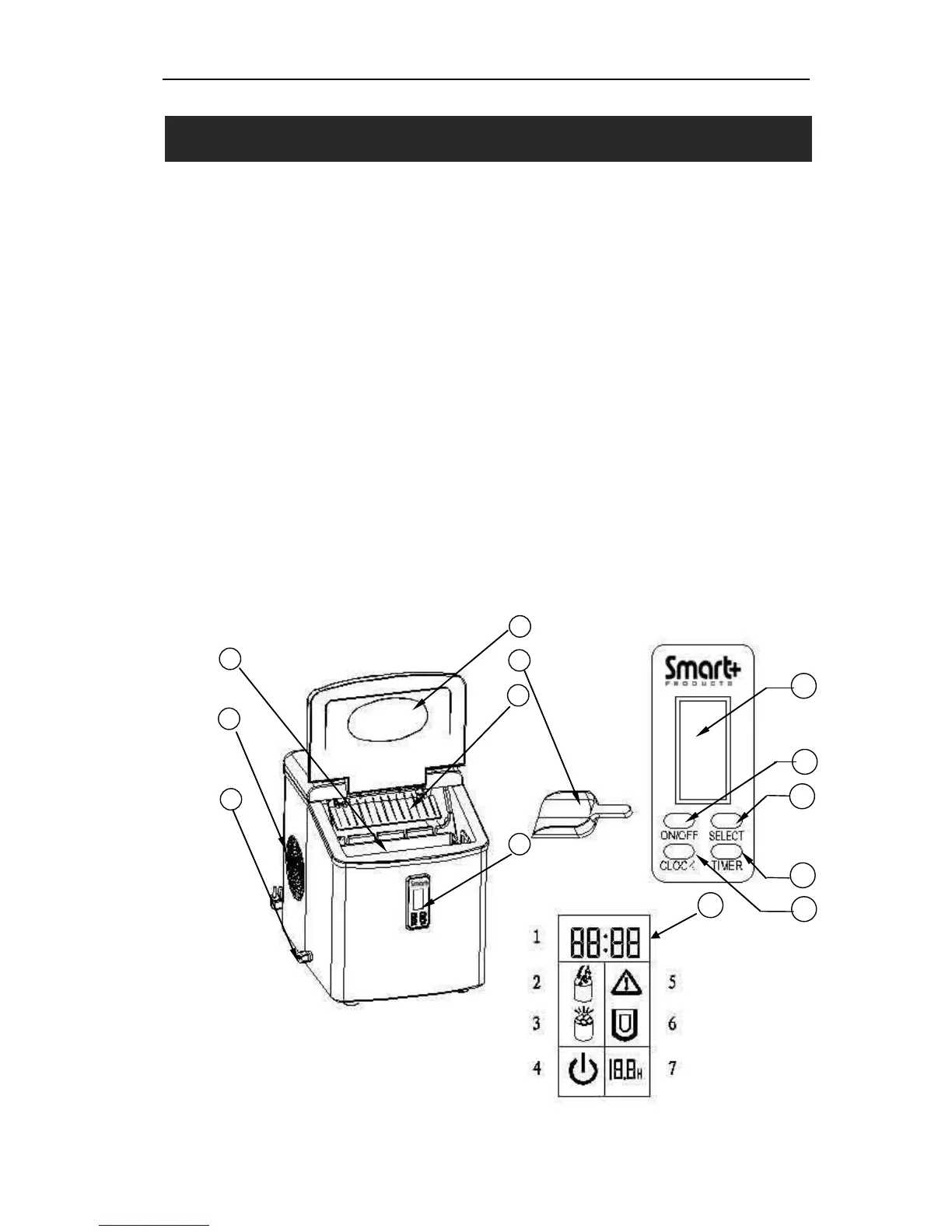
1. Cover: Transparent window allows interior visibility
2. Ice Scoop
3. Ice Shovel
4. Control Panel: Easy to use LCD display setting
A. LCD display window.
1: Clock
2: No water display: When flashing there is no water in the unit
3. Ice full display: When displayed the ice basket is full
4. ON/OFF display: If the unit has been turned off this symbol will flash. If the unit is
turned on the symbol will always be displayed.
5. Clean symbol: When flashing the unit needs to be cleaned
6. Ice cube size display: Small, Medium, and Large
7. Timer delay time display
B. ON/OFF button: To start or stop the unit.
C. SELECT button: To select your desired size of the ice cube:
Small, Medium or Large sized ice cubes can be selected
To change the clock or timer settings
D. CLOCK button: To set the correct time
E. TIMER button: To set or cancel the timer program and set the unit to start or stop at
your desired time.
5. Water drain cap: For draining water from water reservoir
6. Air Outlet
7. Ice basket


 To Next Page