5
DO NOT RUN THE CLEANER OUT OF THE WATER.
OPERATING THE CLEANER OUT OF THE WATER WILL DAMAGE THE MOTORS AND VOID THE WARRANTY
IMPORTANT NOTE: During normal operation, the cleaner will appear to shut off for a few seconds. This is normal and part of the pool cleaning program. The unit has multiple
ways of cleaning the walls. It may climb to the top, scrub, then make a turn and drive back down the wall to the bottom of the pool. It may also climb to the top, shut down for a
few seconds, remove itself from the wall, turn its pump motor on again, pushing itself down to the bottom of the pool away from the wall. It could also climb the wall, scrub the
waterline, turn its pump motor off, and float away from the wall down to the bottom. All of these variations have been programmed into the cleaner and are designed to most
quickly and efficiently clean your entire pool. This unit has been designed to clean all areas of your pool. It will climb the walls, and occasionally break the surface. In the process of
climbing the wall it may stay on the surface and continue to operate from several seconds to a few minutes. This is normal operation procedure and the cleaner will eventually make its
way to the bottom to continue its cleaning. Since most of the dirt is concentrated on the floor of the pool, the cleaner will spend the majority of its time on the floor.
REMOTE CONTROL OPERATION:
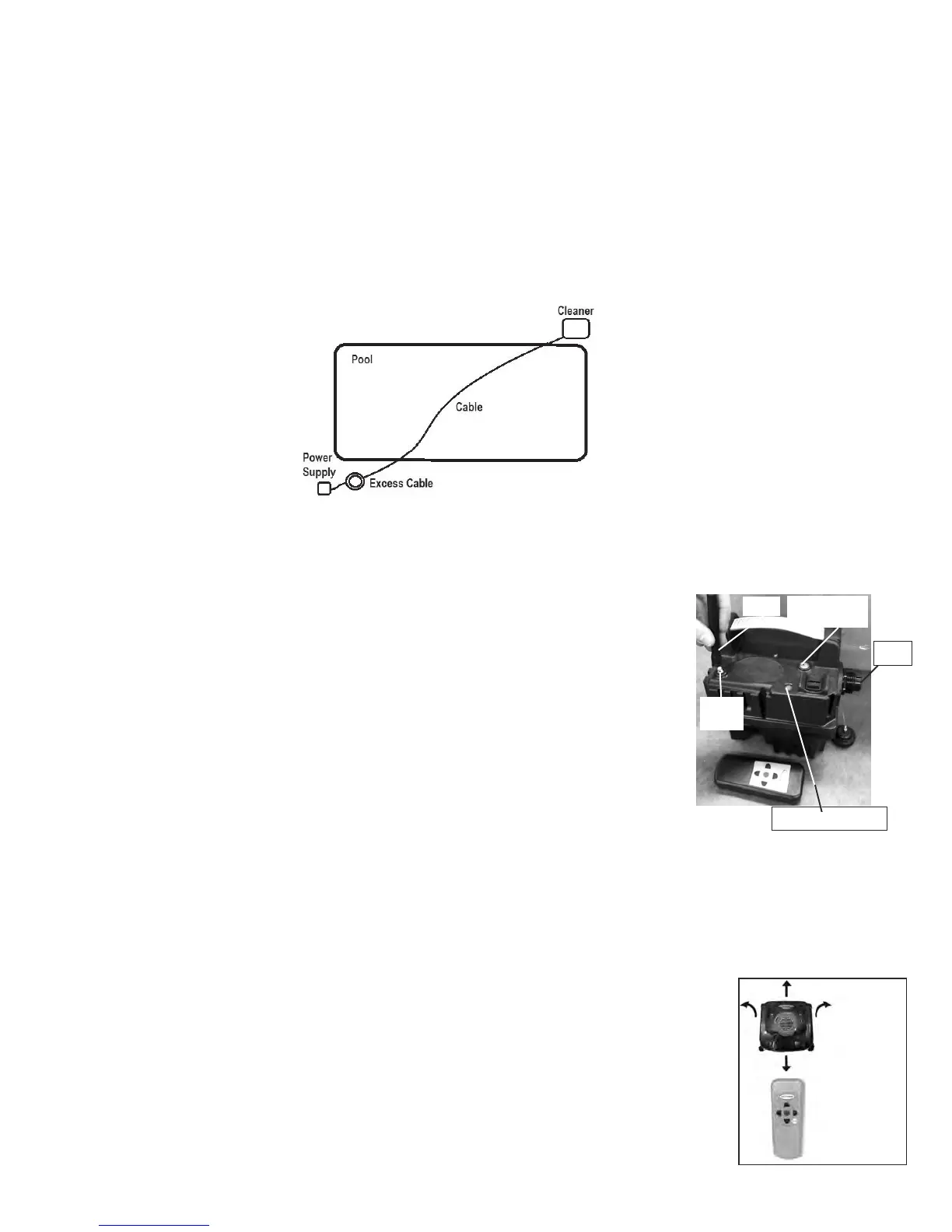
To use the remote control feature, place the vacuum unit into the swimming pool. Push the 3-hour switch on the power supply to the on position. Wait 10 seconds. Press and release any
switch on the remote control to activate the remote control feature. DO NOT HOLD THE BUTTON DOWN, AS THE VACUUM WILL TRAVEL IN THE DESIRED DIRECTION
UNTIL THE RED STOP BUTTON IS PUSHED. There will be an audible beep from the remote control, indicating that the command has been sent to the vacuum. The unit will stop
moving, but the pump motor will continue to run and filter water. If the cleaner needs to travel to the right, press and release the right arrow button. When the vacuum has turned to
the desired area, press and release the RED stop button. Press and release either the forward or back button to make the vacuum travel in that direction. By using these simple inputs
you can easily guide the unit to any area of your pool. To exit the remote control feature, press and release the button marked AUTO. The unit will resume its cleaning program and
automatically shut off when it reaches the end of its cleaning cycle.
NOTE: If, while in remote mode, the cleaner begins floating on the water’s surface, press the the STOP button on the remote until the robot floats to the
bottom of the pool.
Press and
release the
arrow button
on the remote
control to
move the
cleaner in the
desired
direction.
Socket
Cleaning Indicator (red) LED
Fig. PS1
Remote Signal
Indicator (green LED)
Antenna
Antenna
Connector
• Place the cleaner into the pool and if needed rock the cleaner side to side to release any trapped air. The cleaner will sink to
the bottom of the pool.
• Turn the power supply to the ON position.
• The cleaner will begin its cleaning program.
• The cleaner will automatically shut itself down after three hours.
• If a second cleaning is required or the unit is accidentally shut off, you should wait one minute before switching the unit
on again.
FIGURE. C1
INSTALLATION
• Walk the cleaner to the furthest point of the pool.
• Add 6’/2m of cord to the pool for additional coverage.
• Coil up the remaining cable and secure it so that excess cable will not be pulled into the pool (the Velcro strap originally attached to the cable can be used).
• Attach the antenna to the power supply by aligning the base of the antenna with the gold connector on the power supply. Twist the antenna onto the onnector in a clockwise direction until snug. DO NOT
OVERTIGHTEN.
• Be sure to only plug the power supply into a GFCI (ground fault current interrupter) or ELI (earth leak interrupter) protected electrical outlet.
• Look at the power supply and check that the power supply switch is in the off position.
• Plug the power supply into the GFCI or ELI protected outlet.
• Plug in the connector from the cleaner into the socket. The connector is keyed so that it will only plug into the socket one way. Make sure that the plug is pushed all the way onto the socket. Slide the
connector lock (strain relief) onto the connector and turn the connector lock clockwise until it is snug.


 To Next Page
 Loading...