9
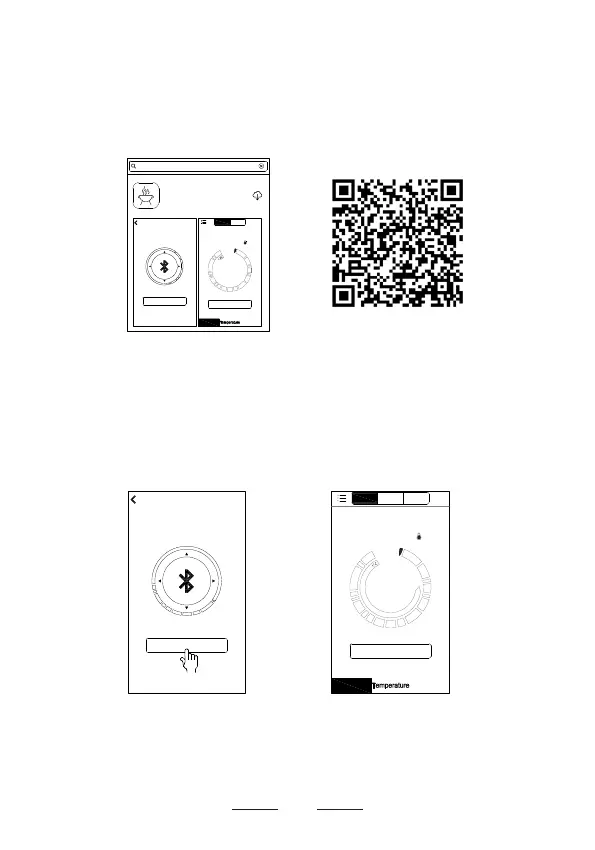
● Go to the Apple App Store to search the keyword
"SmartThermo2"
as shown on screen (e), or scan the
following QR Code on screen (f) with your phone to
download the app.
● Open the app, the Bluetooth screen (g) will appear.
Keep your phone close to the thermometer. Tap
Search
on screen (g). When Bluetooth connection succeeds,
you will hear the thermometer beep and the
Pair
will stop
ashing. Now you are back to screen (h).
NOTE:
If Bluetooth search interface doesn’t show up, click on
Pair
at the top right of screen (h) to enter the Bluetooth
search interface (g).
(g)
(e)
(h)
(f)
Pair
Search
Start
Channel2
Time: 01m 20s
Timer
Profile
Beef
Well Done
174°F
131 °F
Profile
Channel3
Pair
Channel1
Pair
Search
Start
Channel2
Time: 00m 00s
Timer
Profile
Beef
Well Done
77°C
_ _ _ °C
2
SmartThermo2
Fuzhou Emax Electronic Co.,Ltd
smartthermo2
Channel1
Profile


 To Next Page