Start
Channel2
Time: 01m 41s
Timer
0°F
136 °F
Profile
Channel3
Pair
Channel1
2
History
136°F
20:40 20:41 20:42 20:43 20:44
90°F
81°F
98°F
107°F
115°F
124°F
132°F
141°F
1
0 0 0
1 1 1
-
°F
●
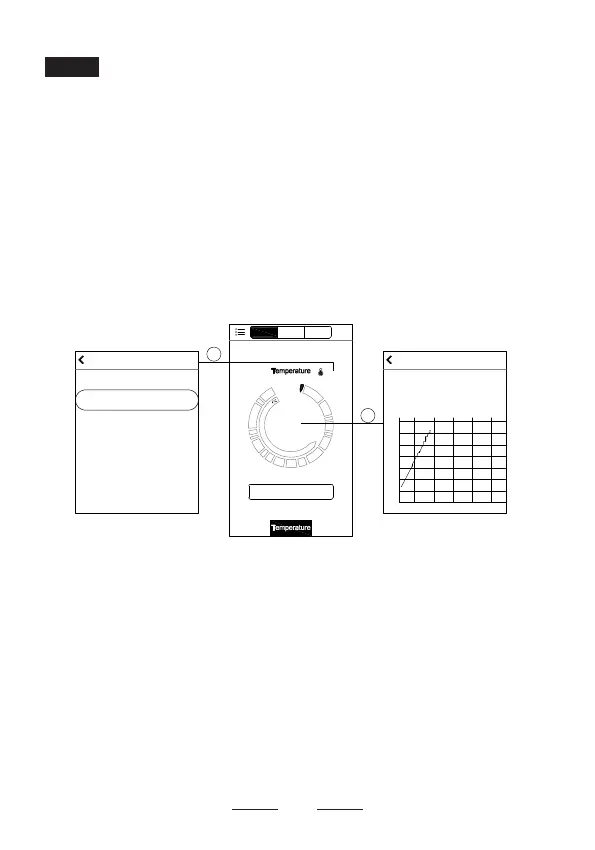
Cook By Custom Temperature:
Tap on
Temperature
at bottom of the screen (h), and then click
0°F
. This will
take you to the customized doneness temperature on
screen (i). Scroll to select the alert temperature. Tap the
arrow at top-left of the screen (i) to return to screen (h).
Click
Start
button, the app starts to time, and then click
Current Cook Temperature
on screen (h), you will see
the history of time-temperature on the screen (j).
(i)
(h)
(j)
●
Cook By Timer / Temperature:
Tap on
Timer
at the
bottom of the screen (k), and then click
0m 00s
. This will
take you to the customized cooking time on screen (l).
Scroll to select the custom time. Tap the arrow at top-left
of screen (l) and return to screen (k). Click
Start
button,
the app starts to countdown, and then click
Current
Cook Temperature
on screen (k), you will see the
history of time-temperature under countdown condition
on screen (m).
Knowing More about Your App
17


 To Next Page